
Has anyone setup Single Sign on with Catalina OS? I heard about it in during their last event. I am up to date with the Catalina Beta but cannot find anything to set it up. https://developer.apple.com/videos/play/wwdc2019/303/ towards the end of this video is where it is mentioned. We want to have the Mac users login to their computers the same way our PC (All PCs are joined to Azure) users do by using their email address and password. Any recommendations?
- Home
- Community
- Get Support
- General Discussions
- Catalina Single Sign On
Question
Catalina Single Sign On
- September 23, 2019
- 123 replies
- 682 views
123 replies


 +14
+14- Honored Contributor
- March 4, 2020
Thank you, this makes much more sense, I had considered them as two separate items entirely. What concerns me is the requirement for developer tools as this is a no-go for most user laptops. I'll check with Apple since I have a case open and report back when I find out more details.
@jwojda , could you share your findings on the krb5.conf file?

 +12
+12- Valued Contributor
- March 9, 2020
So i realised my issue, the link I received for the documentation sent me back to a December 2019 version of the Kerberos User Guide doc, and the January 2020 version has the script and then below it has the launchd plist to use that script.
My problem that I have is that I really don't want to distribute the command line utilities to all my devices as it will now double our total enrollment package (we have a very light core apps load and everything else is done per user preference via self service). I'm racking my brain around how to use these notifications without having to deploy a swift script and using the CLT if at all possible.
+12- Valued Contributor
- March 10, 2020
I'm also still not able to get my password change script to fire even with using the sample scripts, launchd and steps for setup. Anyone having success with their password change scripts that can share with the class how they hacked around this new tool that in no way has feature parody to the tool it is supposed to replace?
 +9
+9- Valued Contributor
- March 13, 2020
anyone use Enterprise Connect or Apple SSO extension with multiple realms? (35147)

 +12
+12- Contributor
- March 13, 2020
@sheltond3 I'm working on the finishing touches for my how to guide on the Apple Kerberos SSO extension. The SSO extension does NOT run scripts on it's own because its sandboxed. To get scripts to run, you need something that monitors Distributed Notifications which are sent out when things happen via the SSO extension. My guide is going to include a custom app that will monitor the Distributed Notifications as well as sample scripts that will run based on connection complete, password change, and auditing. I'm hoping to release the guide to the public by end of next week. All of our guides are located here: https://hcsonline.com/support/white-papers
- Honored Contributor
- April 2, 2020
@kmitnick I too am having problem running their sample script but you app is working but i did get constant pop ups about malicious software and had to run xattr -r -d com.apple.quarantine against it. Do you have your source code available for the sso app you made? Would like to sign, notarize and build it with xcode.
Thanks
+12- Contributor
- April 2, 2020
@tkimpton I did not create the app, but I can ask the person who created it if they mind me sending you the source code. You are correct with the xattr step. xattr -c -r /path/to/download will avoid the malicious software popups. Stay Tuned.
+12- Contributor
- April 2, 2020
@tkimpton Here's the source code. I only ask if you can share your finished Xcode project with everyone here when you're done so we can continue working on things to make it better. Thanks.
import Foundation
import AppKit
class NotifyHandler { var notification: String var action: String init(notification: String, action: String) { self.notification = notification self.action = action }
func observe() { DistributedNotificationCenter.default.addObserver( forName: Notification.Name(notification), object: nil, queue: nil, using: self.gotNotification(notification:) ) }
func gotNotification(notification: Notification) { print("Running action") let task = Process() task.launchPath = "/bin/zsh" task.arguments = ["-c", self.action] task.launch() }
}
class AppDelegate: NSObject, NSApplicationDelegate {
func applicationDidFinishLaunching(_ notification: Notification) {
let scriptPath: String = CommandLine.arguments.first!
guard let notificationName = UserDefaults.standard.string(forKey: "notification") else {
print("(scriptPath): No notification passed, exiting...")
exit(1)
}
guard let actionPath = UserDefaults.standard.string(forKey: "action") else {
print("(scriptPath): No action passed, exiting...")
exit(1)
}
let nh = NotifyHandler.init(notification: notificationName, action: actionPath)
nh.observe()
}
}
let app = NSApplication.shared
let appDelegate = AppDelegate()
app.delegate = appDelegate
_ = NSApplicationMain(CommandLine.argc, CommandLine.unsafeArgv)
 +6
+6- Contributor
- April 3, 2020
Hi there,
In my testing, the keys that perform the Active Directory and local passwords sync in .ExtensionData work great in both ways. Now, I would be very interesting to know which method you guys use to monitor it and what remediation do you use when the sync fails to update Keychain? Thanks all.
- Honored Contributor
- April 6, 2020
@kmitnick unfortunately I could not get that to work. I have reached out to Apple as their instructions do not work. If it is the case an application is need then Apple need to provide this in the OS so all we have to is create a launch agent instead of faffing about.
It’s great your application works but I don’t like to down load and run things other made for security reasons.
+6- Contributor
- April 7, 2020
If anyone would have and could share a working LaunchAgent plist file that would trigger a changePW shell non-Swift scripts, that'd be awesome. I am also struggling with this part of the SSO extension setup and deploying CLT isn't planed for now. Thanks.
+12- Valued Contributor
- April 14, 2020
I agree. I do not want to have to deploy and update the CLT to every device in our enterprise, especially when we had a perfectly good working tool (EC) that did all the functionality that this tool is "supposed" to have that didn't require them before.
+6- Contributor
- May 12, 2020
Hi everybody,
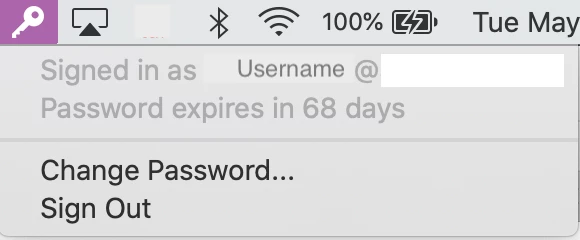
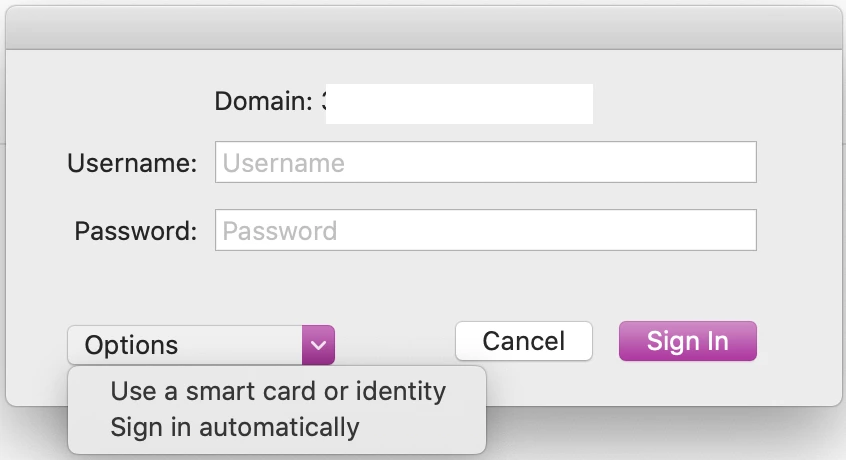
By any chance, do you know how to:
- Remove or replace the @domain in SSO menu in toolbar
- Remove the "Options" field when user wants to authenticate
Thanks :)
+12- Valued Contributor
- May 13, 2020
Those are a couple things I've asked our rep on as well. They've been put in as feature requests. I'm actually meeting with APS next week to go over some things with the Kerberos Extension SSO, hopefully will get closer to being able to replicate EC and make it an easier transition for all.
+12- Valued Contributor
- May 13, 2020
Those are a couple things I've asked our rep on as well. They've been put in as feature requests. I'm actually meeting with APS next week to go over some things with the Kerberos Extension SSO, hopefully will get closer to being able to replicate EC and make it an easier transition for all.
+15- Valued Contributor
- May 26, 2020
This might be the correct discussion to ask this, but, I've been trying to figure out SSO for our web browsers and our Intranet site. All browsers prompt for AD creds (Safari, Chrome, Firefox). I not that familiar with the SSO process and what is needed. I suspect I have a setting incorrect somewhere or not even set. I'm onprem, are using AD credentials with mobile accounts, and, we have Enterprise Connect.
From previous posts it sounds like EC should be able to do this. My Intranet SharePoint guy said they are not using Kerberos for authentication in the site. He said they use NTLM on our windows devices and it works for IE, Chrome, and, Firefox without any issues. Anyone have any suggestions?
 +4
+4- Contributor
- May 27, 2020
@bcbackes As best I could tell MacOS doesn't support SSO on NTLM in the browser. We got this working in our environment by configuring our servers for kerberos authentication. We are using AD bound Macs with Nomad.
+12- Valued Contributor
- June 2, 2020
So there are different types of notifications, and because I was using the default one that was in the template scripts (which also looked to be the correct duplicate that we used in EC), that may be what was causing my issues. Apple has asked that I change some permissions around, but also change the launchd to use the "com.apple.KerberosExtension.passwordChangedWithPasswordSync notification" instead. For clarification, our users have to use a separate internal website to change their account password so all the different types of user account will sync, as well as to support some legacy systems and PCI compliances.
+14- Honored Contributor
- June 2, 2020
@sheltond3 we also use a separate internal website. Would you mind letting me know what script you're using for password changes and if you installed the command line developer tools on your endpoint? To my knowledge, Kerberos SSO can't trigger a bash script which is where we're stuck right now.
Thanks!
+6- Contributor
- June 3, 2020
@jtrant You can use Kerberos notifications to trigger bash scripts, it works. HCSOnline has a nice tutorial about that.
Also, once SSO configuration profile is installed, is anyone would know if there is a key or anything else I could use to avoid SSO extension window to automatically pops up when it first detect local network over VPN?

 +36
+36- Hall of Fame
- July 13, 2020
Curious if the days to expiration is still configurable so it shows when rolling over the icon, as it did when we used Enterprise Connect? Users can click on the icon and see how many days they have now, so not a big issue, just curious.
Thankfully changing your password through the SSO syncs back to your FileVault 2 password (like Enterprise Connect did).
--https://donmontalvo.com
+12- Valued Contributor
- July 13, 2020
@jtrant I use a cleaned up version of the passwordChangeSample.sh script that came with the Enterprise Connect installers. This is triggered by the launch agent and the specific kerberos notification trigger that works in your case. For me, with having the separate internal site and the password being synced manually, I use the "com.apple.KerberosPlugin.LocalPasswordSynced" trigger now (after bouncing around a bunch of different notifications, this one turned out to be correct with some config modifications). I've posted a cleaned up version of the password change script I run on github.
I also do have to install the command line tools to run the swift script thats in the documentation from Apple. For the trigger, i'm using the sample swift script, and the sample daemon as a launchagent that has the corrected script path and the notification trigger i mentioned above edited into it.
@Karl941 I actually asked the Apple engineers this exact question as well as if its possible to set up the "Automatically sign in" button to just default answer yes instead of requesting to users, and the ability to hide the additional options dropdown menu in the main window, but so far those aren't available. I was hoping to get more from the updates from wwdc.
@donmontalvo I've never had EC do that, where it just shows when rolling over the icon before, i've always had users have to click it in order to see the days remaining. That would be an interesting feature to add, but seeing how there are still a lot of features missing to provide better parody between the two tools, I doubt that something like that would be high on the list.
+5- Contributor
- July 13, 2020
Following on from a few posts above regarding SSO Extension AND use of NoMAD, we are using NoMAD already, and take advantage of the auto mapping of network drives and the issuing of kerberos tickets from on-prem AD via the NoMAd tool. Having only recently begun upgrading to Catalina across the fleet, I've come across and contemplating use of the SSO Extension (way back then and again now its readily available), but wondering what SSO Extension will provide over and above NoMAD? Can the two work together, or is it a case of one OR the other?
Am i missing something here, as there appears a lot of cross over ?
Anyone had any experience using JAMF Connect/NoMAD and the SSO Extension ? Benefits, if any at all ??
Enter your E-mail address. We'll send you an e-mail with instructions to reset your password.
Scanning file for viruses.
Sorry, we're still checking this file's contents to make sure it's safe to download. Please try again in a few minutes.
OKThis file cannot be downloaded
Sorry, our virus scanner detected that this file isn't safe to download.
OK