
Question

Change Account Name with dscl

  • December 29, 2017
  • 4 replies
  • 121 views

Forum|alt.badge.img+4

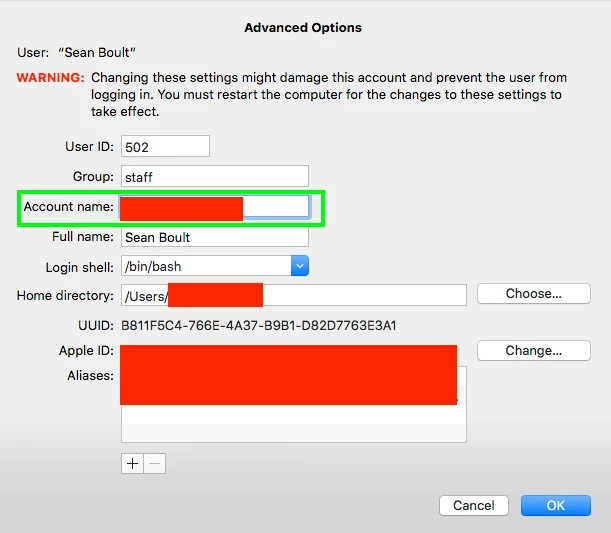
I'm trying to change the short name of an account via the CLI. Right now I'm unsure of how to target the "Account name" property. However, I've been able to change the Full Name with the following command.

sudo dscl . change /Users/<myShortName> RealName "Sean Boult" "seanboult"

Am I able to change the "Account name" property from the command line?
4 replies

Forum|alt.badge.img+13
  • Honored Contributor
  • December 29, 2017

Nm you already tried what I was going to suggest. You try anything with sysadmctl?


Forum|alt.badge.img+4
  • Author
  • New Contributor
  • December 29, 2017

@Nix4Life I have not tried to mess with sysadminctl. After taking a look at the man page it appears it does not have the ability to change the account name. I could be wrong though.


mm2270
Forum|alt.badge.img+24
  • Legendary Contributor
  • December 29, 2017

I believe the property is known as "RecordName" So if you do something like the following:

dscl . read /Users/<myShortName> RecordName

it should print back the short username, as in RecordName: <myShortName>
I haven't tried it myself, but I think if you do something like:

dscl . change /Users/<myShortName> RecordName <myShortName> <myNewShortName>

it may change that in the record. You will of course have to change the home folder name and make sure the permissions on the home folder reflect the new name, yada yada yada. It's almost a given that something might get missed in the transition and cause some issues, so I would do extensive testing on a non-logged in account and see what happens when you log back into it.


Forum|alt.badge.img+4
  • Contributor
  • April 22, 2020

Just saw this - would there be a way to combine (Full Name, Account Name, and Home Folder) into a script like: https://community.spiceworks.com/scripts/show/4409-mac-account-rename-script-username-home-directory-display-name

but to prompt the user instead to enter their new information themselves, sort of like this post you were active in @mm2270 https://www.jamf.com/jamf-nation/discussions/11440/rename-user-account
