Question

Cisco Anyconnect 3.1.04072, 10.9, and Admin Credentials

  • March 19, 2014
  • 68 replies
  • 266 views

Show first post

68 replies

Forum|alt.badge.img+14
  • Honored Contributor
  • October 11, 2016

@jhbush1973

The real issue is that AnyConnect looks for Identity Certs, which is what the JSS enrollment cert is, so it wants to access it to see if it can be used...hence the keychain prompt.

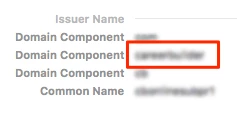
What I did was open the Mac's AD certificate in Keychain, and under Details -> Issuer Name there are entries for Domain Component, and chose one of them to use in the AnyConnect profile.

So the outlined entry in red on the screenshot matches what I put in "pattern" key in our profile. Based on these keys being in the profile, AnyConnect will ignore any Cert that doesn't match the domain component specified.


Forum|alt.badge.img+6
  • Contributor
  • October 21, 2016

ooshnoo,
Can you pre-populate the profile that the ASA pushes to have the relevant setting, or does it have to come from the appliance at the first connection? Is that profile the ~/.anyconnect file, or something else (or, doesn't actually get created on the client anywhere)?


Forum|alt.badge.img+14
  • Honored Contributor
  • October 21, 2016

@KSchroeder

That profile can be configured on the VPN appliance and then pushed down to client when AnyConnect connects to the VPN.

The profile is located here: /opt/cisco/anyconnect/profile/profilename.xml


Forum|alt.badge.img+7
  • Valued Contributor
  • February 15, 2017
Well this thread did me to enter the correct search terms in Google: https://live.paloaltonetworks.com/docs/DOC-5059 So, I'll try & see about scripting a solution. Once done I'll post here & maybe it'll work for you guys? I'll need the path of the anyconnect client & someone to test though.

Hi @bentoms ,

Just wondering if you got it working for PAN, can you share please?

Under Config Profile - AD Certificate - Allow access to all Applications is ticked but when the profile is deployed, the setting is not applied.

Thanks


bentoms
Forum|alt.badge.img+35
  • Hall of Fame
  • February 15, 2017

@khey I didn't. We ended up dumping the vpn client & used macOS's built in VPN over IPSEC with X-Auth enabled on the Palo's


Forum|alt.badge.img+9
  • Contributor
  • March 21, 2017

@ooshnoo are those keys stored in ~/.anyconnect , if so where? Are they within </AnyConnectPreferences> ?


Forum|alt.badge.img+4
  • Contributor
  • March 6, 2018

Did you all get this fixed by using Certificate Matching in the profile?
I have tried all sorts of combinations for matching criteria, but it always prompt for admin credentials to access the System Keychain...

Is there anything obvious I am missing?

@jhbush1973 @ooshnoo

Thanks in advance.


KyleEricson
Forum|alt.badge.img+17
  • Valued Contributor
  • April 18, 2018

I tried to change the XML but it didn't work. Is there any way to script Trusted Applications on the private key.
I saw this but don't know how to use it.
We are using machine-based certs in the system keychain.
Apple Link


bradtchapman
Forum|alt.badge.img+20
  • Valued Contributor
  • April 20, 2018

@Jesper - your local XML may be overwritten by the gateway every time you connect. The new setting requires AnyConnect 4.5 package loaded on the gateway in order to access a setting that limits the search to the login keychain only.


Forum|alt.badge.img+4
  • Contributor
  • April 20, 2018

@bradtchapman Thanks for the response.
The changes were all done on the ASA together with my colleague who is our network admin, and I could see the changes made being in the XML coming down from the gateway to the Mac.
I currently run AnyConnect 4.6 deployed from the gateway. Do you know if you can limit the search to the System keychain? Thats where our Device certificate is stored...


Forum|alt.badge.img+14
  • Honored Contributor
  • April 20, 2018

@Jesper Limiting the search to just the System Keychain shouldn't be necessary, as AnyConnect will only attempt to use certs that adhere to the certificate matching policies. Our Certs are stored in System Keychain, and it works w/out issue and prompts.


Forum|alt.badge.img+4
  • Contributor
  • April 20, 2018

Comforting to know that it can work :-)
I simply just cannot grasp why it doesnt pick the correct cert. on first try. I have tried more or less every matching criteria there is, so the problem must be elsewhere in the config....


Forum|alt.badge.img+4
  • Contributor
  • May 9, 2018

@ooshnoo What is your settings under Access Control on the private key of your certificate in the System Keychain?
Do you use "Allow all applications to access this item" ?
If I set it to that, I dont get the prompt, but dont know if that is a major vulnerability to do that...

Thanks again.


Forum|alt.badge.img+7
  • Contributor
  • June 14, 2018

Found an issue where Anyconnect version 4.6.xxx will ignore the .anyconnect use config file. Works still in version 4.3.02039.

I am running a script that gets the user vpn cert SHA-1 and writes it to the .anyconnect file due to the same Anyconnect issue above wanting to access the System keychain for the JSS cert.

And of course I can not get Cisco to help (not even using the online option) since our company did not pay for TAC support for the past 2 years.


Forum|alt.badge.img+6
  • Contributor
  • June 18, 2018

Our VPN guy is working on a config for the ASA that will tell AC to only look in the user keychain; need to test it out, but fixing this from the backend seems like a better option (though I do like the script to build the ~/.anyconnect file, and we're working on the same). There are some other tips out there that the VPN admin can use to tell AC to only look for certs issued from your Issuing CA also, which may help.

Can you post either a link or a cleaned-up script that you're using?


Forum|alt.badge.img+1
  • New Contributor
  • January 18, 2019

Early testing of a new MDM workaround with a custom SSL VPN profile shows this seems to solve the issue for us.

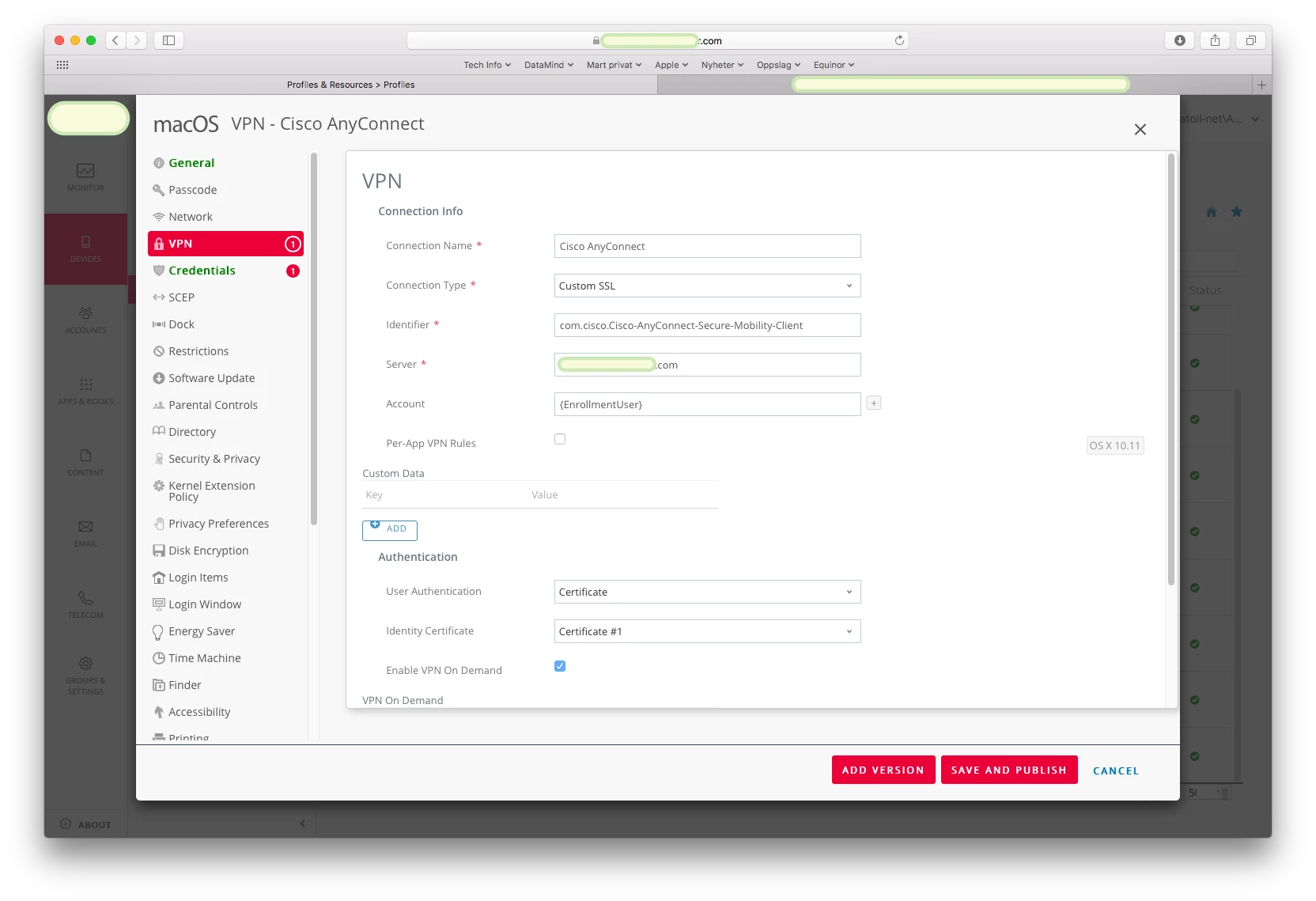
We're using VMware Workspace ONE (Airwatch) PKI integration to get a computer certificate. In the VPN section, the choices for VPN type are not literally the same as the ones mentioned in the Apple developer documentation for Configuration profile reference in https://developer.apple.com/business/documentation/Configuration-Profile-Reference.pdf

It appears the one called Custom SSL matches closest to the one called VPN in the Apple docs.
I experimented with Identifier field in WorkSpace ONE (which appears to correspond toVPNSubType) set to
com.cisco.anyconnect.applevpn.plugin
And then found the new network interface on the client, and clicking on Connect button results in a message saying to use the Cisco AnyConnect client instead.

After finding the bundle identifier for the macOS AnyConnect application in the app itself, I tested with Identifier set to
com.cisco.Cisco-AnyConnect-Secure-Mobility-Client

This appears to work correctly. After installing both the configuration profile, and the AnyConnect client package, the AnyConnect client is indeed listed as allowed application in the keychain for the certificate private key. I also created a whitelisting configuration profile for the AnyConnect kernel extension. When I installed a XML settings file for AnyConnect which has filtering for the selection of the certificate, I got the app to connect without further issues.

Before arriving at this workaround, we found Cisco lists this issue as a known bug number CSCul51157. They suggests three workarounds for this.
1. The AC client application can be manually added to the private-key's "Access Control" allow-list under the "Get Info" settings of the key in Keychain Access.
2. The machine certificate & accompanying private-key can be moved to the User/Login Keychain store.
3. use a local PEM store for the computer certificate and private key separate from the macOS keychain.

It seems to me the workarounds 2 and 3 would be less secure as private key would need to be stores outside the system keychain an thus would be less secure as they are not protected by the keychain API and admin permission restriction anymore. I did some research on several forums and Slack channels, but found general consensus is the first workaround can't be scripted after deployment. I tried the second one briefly and didn't succeed in the GUI beacause of an error exporting the private key.

I tested the MDM custom SSL profile workaround only on macOS 10.13.6 and 10.14.2 on a test Mac so far. Apple Enterprise support confirmed this is a good workaround, we're setting up a custom SSL connection type using the AnyConnect bundle identifier.

I just want to thank all the persons who helped me understand this issue in this forum, and wanted to share what seems an OK MDM workaround so far.


Forum|alt.badge.img+10
  • Valued Contributor
  • January 27, 2019

@Martinus

Thank you for posting this. I do not have certificate matching working in the profile yet, however I altered my VPN payload to use Custom SSL instead of the Cisco AnyConnect option. I put in the bundleID you mentioned and the certificate installs and shows anyconnect in the keychain as an approved app.

Now, when I launch AnyConnect, it asks for keychain access twice. I hit deny both times and the VPN connects. However, after that first use, it never asks for keychain on subsequent relaunching of the AnyConnect app. This is a much more elegant solution than we used to have implemented, the keychain ACL manual process usually resulted in every VPN user not in IT needing to call the help desk for assistance on the keychain prompts. I'm wondering if there is a way to have it work without any keychain prompts, and I wonder if having the CertificateMatch properly configured in the vpn appliance profile would resolve this. That will require work on something I do not have access to, so I will use what I have so far as a victory


Forum|alt.badge.img+13
  • Valued Contributor
  • November 7, 2019

Im also seeing this after enrolling my systems into JAMF, it was not happening prior to that. I'm trying to think of the best way to handle this other then having them click deny a few times. Also in my case I have the added issue that its looking for a user cert to verify before allowing a login. Which at the moment im having to manually install in login keychain for them. If they reset their keychain or need to create a new one the user cert is gone thus throwing up a certificate validation error also. We don't have a Cisco Expert on staff so im kind of doing the best I can but its difficult at the moment