
Question

Cisco WebEx / Microsoft Outlook 16.13

  • May 20, 2018
  • 6 replies
  • 32 views

Forum|alt.badge.img+4

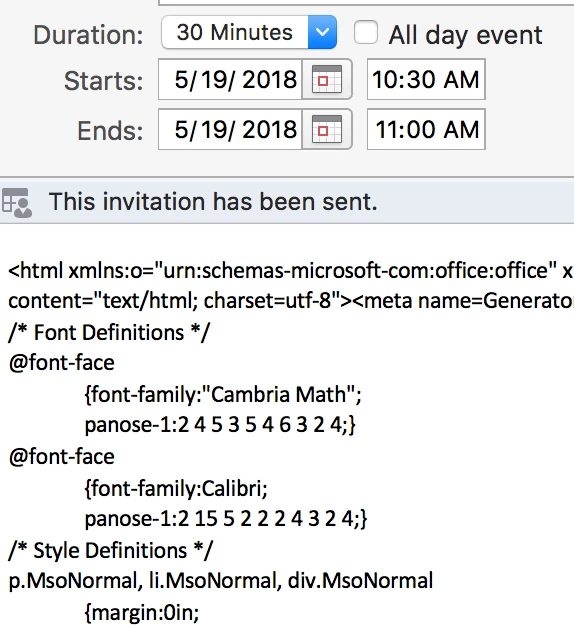
I began noticing this after Microsoft released Outlook 16.13 a few days ago. If you send a WebEx invite using Productivity Tools and Outlook 16.13 without adding a message, it presents the invite to the recipient as raw html.
The workaround is to add text above the ‘do not delete or change’ message.

This is Cisco’s full response:

Microsoft has released a new Outlook update for MacOS, Version 16.13 build 180513, which is causing Productivity Tools HTML email template source to appear as plain-text (Raw HTML) instead of the formatted template. Meeting scheduled from Outlook for MacOS version 16.12 (or higher) is affected.

Our engineering has already engaged Microsoft development team to further investigate the issue. Microsoft is aware of this issue and they are currently working on the fix, there is no action pending from Cisco’s end for this reported issue.

For tracking purpose our engineering has created a bug: CSCvj50501. We do have a workaround for now as below:

Workaround:
Typing anything above the "-- Do not delete or change any of the following text. --" line prior to sending the initial invite will cause Outlook to correctly render and format the HTML code inserted by Webex Productivity Tools
6 replies

Forum|alt.badge.img+12
  • Contributor
  • May 21, 2018

thanks for this Xian, What I dont understand this was a known issue in last month. how come 2 big companies as these dont test on applications which they know most of the companies use.


Forum|alt.badge.img+4
  • Author
  • New Contributor
  • May 29, 2018

According to Cisco, a patch to Productivity Tools will be released on June 2nd.


Forum|alt.badge.img+12
  • Contributor
  • May 30, 2018

The new patch from Cisco is out and the solution works


Forum|alt.badge.img+8
  • Valued Contributor
  • May 30, 2018

Just out of interest, how are you guys packaging he WebEx tools and managing automatic updates? My users are now admins and the constant updates require elevated access.


Forum|alt.badge.img+4
  • New Contributor
  • May 30, 2018

@jaz

I've been using a script to download and install the latest version of the tools.

#!/bin/bash

url="https://<companyurl>.webex.com/upgradeserver/client/ptool/2.8.0/mac/intel/cwptools.dmg"
dmgName="webex.dmg"
volName="WebEx Productivity Tools.pkg"
curl -s -o /tmp/$dmgName $url

hdiutil attach /tmp/$dmgName -nobrowse -quiet

cp "/Volumes/$volName/WebEx Productivity Tools.pkg" "/tmp/webex_prod_tools.pkg"

installer -pkg "/tmp/webex_prod_tools.pkg" -target /

drive=$(/bin/df | /usr/bin/grep "$volName" | awk '{print $1}') 
hdiutil detach "$drive" -quiet

version=$(/usr/libexec/PlistBuddy -c "print InternalVersion" "/Applications/WebEx/Productivity Tools/WebEx Productivity Tools.app/Contents/Info.plist")
echo "WebEx Prod Tools Version: $version"

exit 0

Forum|alt.badge.img
  • New Contributor
  • November 28, 2018

I know this is a bit old but we are getting the html code on all our Macs who use Sierra, High Sierra or Mojave that have Outlook version 16.18 or 16.19 and the WebEx Desktop App. Everything is up to date and even the WebEx update that was released on 11/09 didn't fix it.

Any news on a fix?