Solved

Composer 10.28 - Couldn't communicate with a helper application

  • April 12, 2021
  • 36 replies
  • 625 views

snowfox
Forum|alt.badge.img+9

Hi All,
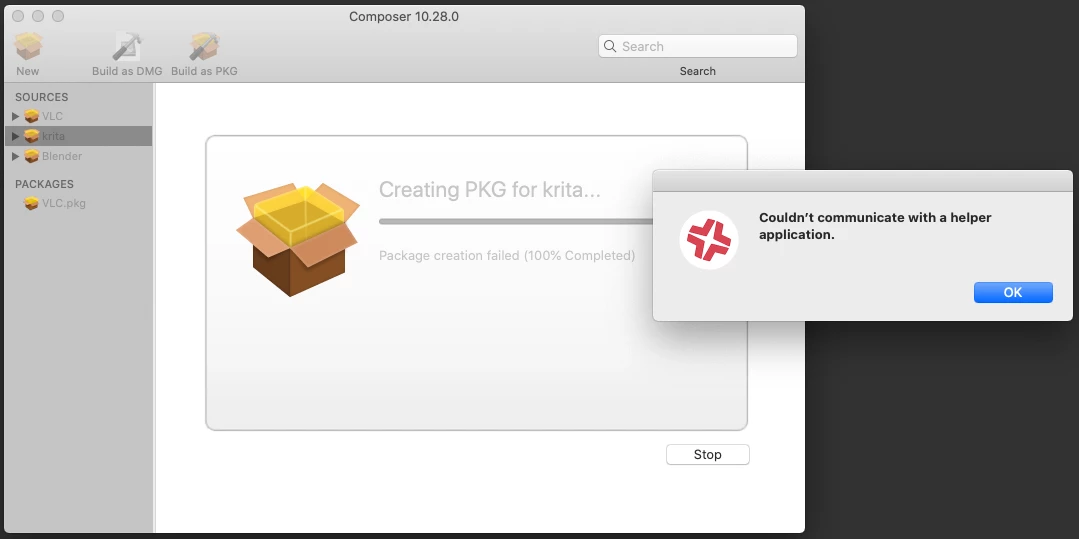
I've never had a problem before using composer to package apps until version 10.28. When packaging a drag and drop app such as Krita or Blender, Composer has started displaying this error message during the 'Build as PKG' build process - Couldn't communicate with a helper application.

I've never seen this before, it's doing it on a clean install of Catalina 10.15.7 and on a different machine with an upgrade to Big Sur 11.2.3.

It will package VLC successfully but not Krita or Blender.
It will create DMGs ok for all three.

All three are given the same owner/group & permissions before creating a new PKG. Root, Admin and 755.

Has anyone else encountered this issue and were you able to resolve it?
Thanks for any info!
Best answer by Reiven

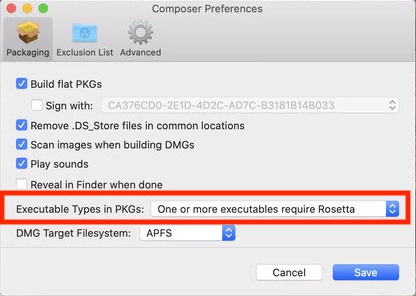
I was having the same issue. I checked the online manual and found that they added a new Preference for executable type I found that to be causing the issue. I can only hazard a guess that it is not detecting the executable type correctly. I went into Preferences and changed "Executable Types in PKGs:" to "One or More executables require Rosetta" from "Automatically detect executable types" it fixed the error.

36 replies

Forum|alt.badge.img+5
  • New Contributor
  • Answer
  • April 14, 2021

I was having the same issue. I checked the online manual and found that they added a new Preference for executable type I found that to be causing the issue. I can only hazard a guess that it is not detecting the executable type correctly. I went into Preferences and changed "Executable Types in PKGs:" to "One or More executables require Rosetta" from "Automatically detect executable types" it fixed the error.


snowfox
Forum|alt.badge.img+9
  • Author
  • Contributor
  • April 16, 2021

Many thanks @reiven
That worked. Looks like the auto detect isn't detecting intel and universal binaries properly.


Kapil
Forum|alt.badge.img+5
  • New Contributor
  • May 10, 2021

@Reiven You save my day... Thanks a lot Buddy


Forum|alt.badge.img+7
  • Valued Contributor
  • May 15, 2021

@Reiven this worked for us thanks so much!


Forum|alt.badge.img+20
  • Contributor
  • June 3, 2021

got the same error and just made the same change in Composer and now it looks to be processing and just completed.


Forum|alt.badge.img+7
  • Contributor
  • June 11, 2021

Ditto. Thanks-a-lot!!!


chrisB
Forum|alt.badge.img+7
  • Valued Contributor
  • June 25, 2021

Thumbs up - thanks!


Forum|alt.badge.img+18
  • Valued Contributor
  • July 8, 2021

Thanks! We are digging into M1s now and that was literally a 60 second fix for our issue!


Forum|alt.badge.img+1
  • New Contributor
  • July 21, 2021

Thanks!


Hayden_Webb
Forum|alt.badge.img+6
  • Contributor
  • August 18, 2021

I was having the same issue. I checked the online manual and found that they added a new Preference for executable type I found that to be causing the issue. I can only hazard a guess that it is not detecting the executable type correctly. I went into Preferences and changed "Executable Types in PKGs:" to "One or More executables require Rosetta" from "Automatically detect executable types" it fixed the error.


Thank you!


EXP_SimonF
Forum|alt.badge.img+3
  • New Contributor
  • February 1, 2022

I was having the same issue. I checked the online manual and found that they added a new Preference for executable type I found that to be causing the issue. I can only hazard a guess that it is not detecting the executable type correctly. I went into Preferences and changed "Executable Types in PKGs:" to "One or More executables require Rosetta" from "Automatically detect executable types" it fixed the error.


it's now a year later, Jamf is up to 10.35 and this is still an issue. Thank you very much for this solution - worked a treat on my M1 Pro!


Forum|alt.badge.img+1
  • New Contributor
  • February 1, 2022

Thanks, resolved my problem with Composer


Forum|alt.badge.img+4
  • New Contributor
  • May 2, 2022

I was having the same issue. I checked the online manual and found that they added a new Preference for executable type I found that to be causing the issue. I can only hazard a guess that it is not detecting the executable type correctly. I went into Preferences and changed "Executable Types in PKGs:" to "One or More executables require Rosetta" from "Automatically detect executable types" it fixed the error.


Many Thanks 😊 


jordan_m1
Forum|alt.badge.img+5
  • Contributor
  • May 26, 2022

I was having the same issue. I checked the online manual and found that they added a new Preference for executable type I found that to be causing the issue. I can only hazard a guess that it is not detecting the executable type correctly. I went into Preferences and changed "Executable Types in PKGs:" to "One or More executables require Rosetta" from "Automatically detect executable types" it fixed the error.


Late reply but thank you! I've been beating my head against a Stata 17 package build for days. Finally got it!


Forum|alt.badge.img+4
  • New Contributor
  • June 15, 2022

Yes!  thank you spent a day trying to figure it out thinking it was my pacakge contents. 


AlanSmith
Forum|alt.badge.img+8
  • Valued Contributor
  • June 29, 2022

it's now a year later, Jamf is up to 10.35 and this is still an issue. Thank you very much for this solution - worked a treat on my M1 Pro!


And another 6 months later with 10.39  it is still a 'thing'.

The fix works perfectly, thanks.


Forum|alt.badge.img+4
  • Contributor
  • August 31, 2022

Yes!  thank you spent a day trying to figure it out thinking it was my pacakge contents. 


Thank you for this. Still seems to be the fix in 2022 with Composer v.10.40.0


Forum|alt.badge.img+3
  • New Contributor
  • September 20, 2022

I was having the same issue. I checked the online manual and found that they added a new Preference for executable type I found that to be causing the issue. I can only hazard a guess that it is not detecting the executable type correctly. I went into Preferences and changed "Executable Types in PKGs:" to "One or More executables require Rosetta" from "Automatically detect executable types" it fixed the error.


thank you that helped me a lot!!!


rcole
Forum|alt.badge.img+7
  • New Contributor
  • October 27, 2022

I was having the same issue. I checked the online manual and found that they added a new Preference for executable type I found that to be causing the issue. I can only hazard a guess that it is not detecting the executable type correctly. I went into Preferences and changed "Executable Types in PKGs:" to "One or More executables require Rosetta" from "Automatically detect executable types" it fixed the error.


Thank you for this. Fixed my issue with 10.42.0 as well.


Forum|alt.badge.img
  • New Contributor
  • October 28, 2022

@Reiven you saved my day. Cheers mate!


Forum|alt.badge.img+1
  • New Contributor
  • November 10, 2022

Still an issue on 10.41 and this is still the fix.  Thank you!!


summoner2100
Forum|alt.badge.img+7
  • Contributor
  • December 9, 2022

Glad I found this post. Still an issue on 10.42.1 and on a Ventura client. lol 


mvu
Forum|alt.badge.img+20
  • Jamf Heroes
  • March 8, 2023

Worked for me on 10.44.1 and Ventura client. Oddly, this didn't happen before when I tried to package the same stuff. Started today.


asuneson
Forum|alt.badge.img+3
  • New Contributor
  • April 4, 2023

Late reply but thank you! I've been beating my head against a Stata 17 package build for days. Finally got it!


a bit late but how did you create the stata 17 and activation package in composer without it failing? i havent been able to figure it out!


Forum|alt.badge.img+1
  • New Contributor
  • August 3, 2023

This fix worked for me. I was experiencing this issue when packaging Krita today on an M2 Max-enabled MacBook pro. Using composer 10.48.1