Solved

Connected Backup 8.8.4 and Java 8.x

  • August 7, 2015
  • 14 replies
  • 23 views

donmontalvo
Forum|alt.badge.img+36

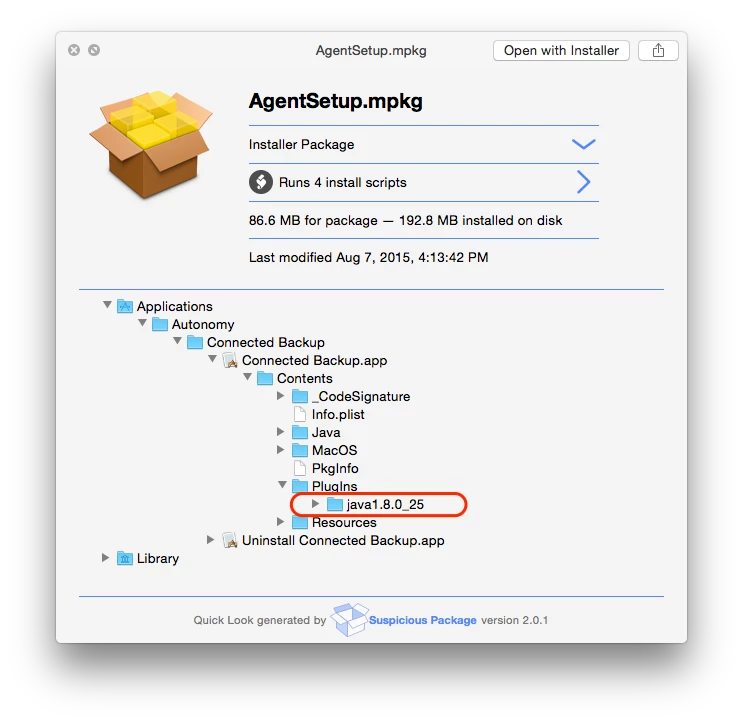
Does anyone know if Connected Backup 8.8.4 has Java 8.x embedded?

Best answer by eddiel0w

@donmontalvo found a command to kick of the update:

sudo path/AgentSetup.mpkg/Contents/Resources/install REINSTALL=ALL

Thanks!

14 replies

bradtchapman
Forum|alt.badge.img+20
  • Valued Contributor
  • August 8, 2015

Hello Don,

Have you already examined the application bundle to see what's in the Contents, Resources, and MacOS folders?

Personally, if I had a copy of Connected Backup, I would look there for a "Java" binary and run /path/to/connectedbackup/contents/resources/Java/bin/java --version .

(FYI, that path is completely made up. YMMV.)


bradtchapman
Forum|alt.badge.img+20
  • Valued Contributor
  • August 8, 2015

Does the documentation on Autonomy's website say anything? It's at https://customers.autonomy.com/support/login.jsf .


donmontalvo
Forum|alt.badge.img+36
  • Author
  • Hall of Fame
  • August 8, 2015

I spoke to the person working on the project on Friday and advised the same on both points. Look in the bundle and check their documentation. ;) I posted here to see if anyone might know.


  • August 11, 2015

Got my hands on an installer and things look good from here. As for Autonomy's past documentation, it's not been very good. When we've asked the developer for clarification for the Mac client, they always came back that the Java piece "coexists" with whatever Apple had running natively.

It appears that someone may have shown them a different way of doing things.


bradtchapman
Forum|alt.badge.img+20
  • Valued Contributor
  • August 11, 2015

WOW. Good show. That clears it right up.

What is the name of that QuickLook extension?

edit: never mind, I can't read. Suspicious Package.


donmontalvo
Forum|alt.badge.img+36
  • Author
  • Hall of Fame
  • August 11, 2015

Green for @makingtortillas, AKA "person working on the project". ;)


Forum|alt.badge.img+7
  • Contributor
  • October 18, 2015

@donmontalvo can you share a high level workflow of updating Connected to 8.8.4.0? Looks there needs to be an un-install, then re-install.


Forum|alt.badge.img+14
  • Contributor
  • October 18, 2015

Slightly off topic. I just downloaded Suspicious Package (thanks for posting @bradtchapman) and I got this interesting message.

optional image ALT text

optional image ALT text

Gatekeeper blocked it from being opened even thought it's signed by an Apple Developer ID.


bradtchapman
Forum|alt.badge.img+20
  • Valued Contributor
  • October 18, 2015

@Abdiaziz What did you expect? OS X is treating it like a "Suspicious Package." (I'll show myself out).

In all seriousness, I have 10.10.5 and I did not receive that error message. Maybe you could try cycling the security setting to "anywhere" and then back to the 2nd option.


donmontalvo
Forum|alt.badge.img+36
  • Author
  • Hall of Fame
  • October 18, 2015

@eddiel0w wrote:

@donmontalvo can you share a high level workflow of updating Connected to 8.8.4.0? Looks there needs to be an un-install, then re-install.

I haven't been involved in the Connected Backup project. I heard our team members were spending a lot of time/effort on its Java dependency. So I chimed in to ask the team to reach out to the developer to ask them to embed. Along the way I advised the analyst to check if the new version is embedded and to check the documentation. The usual exploration 101 stuff.

Connected Backup is not very well designed but as long as the vendor is making money they don't care. CrashPlan is a much better product, and we've recommended it to our client so we can stop wasting time/effort on this cr@p.

EDIT: Come to think of it @SeanA and I packaged and deployed Connected Backuo at JCP, and we scripted first launch so cached credentials could be used to set up the first Backup. He is still there, maybe he'll pop his head in the door to respond. I don't have my notes on how we did it, since it's been several years. It was cr@p back then too.

Don


donmontalvo
Forum|alt.badge.img+36
  • Author
  • Hall of Fame
  • October 18, 2015

@Abdiaziz the Suspicious Package developer is cool and a few months ago provided us written permission to freely deploy to our team - they love it.

A few of us also use Pacifist, which does a lot more, but has a weaker QuickLook plug-in. Too bad so many packages are so poorly written that these tools are needed.

Don


Forum|alt.badge.img+7
  • Contributor
  • Answer
  • October 18, 2015

@donmontalvo found a command to kick of the update:

sudo path/AgentSetup.mpkg/Contents/Resources/install REINSTALL=ALL

Thanks!


  • October 18, 2015

@eddiel0w We had cause to uninstall and reinstall in cases where invalid account numbers [00000000] were created because the Connected Backup server had hit capacity.

Does the reinstall command retain the original account number on the Mac?


donmontalvo
Forum|alt.badge.img+36
  • Author
  • Hall of Fame
  • March 8, 2016

Bumping this thread to see if anyone can answer @makingtortillas' question.

@eddiel0w thanks for the command, curious if there was a reason for dropping LOGFILE=fileName in your command? Usually /path/to/AgentSetup.mpkg/Contents/Resources/install REINSTALL=ALL LOGFILE=fileName is used, but I guess not as important as initial install.

Thanks,
Don