Solved

CrowdStrike Falcon - Filter Network Content Prompt

  • September 9, 2021
  • 11 replies
  • 496 views

Forum|alt.badge.img+4

Hi team,

Is there any way to suppress the notification asking permission for Falcon to filter network content (screenshot below).
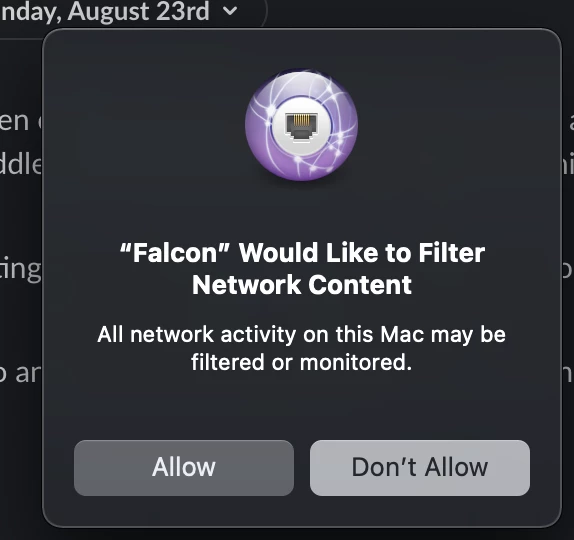
Our fleet is on either Catalina or Big Sur. I have created the relevant Configuration Profiles as per the deployment guide supplied by CrowdStrike. Functionally everything works as expected. I am wondering if it is possible to have that message automatically approve or if this is just part of macOS?

Thanks!
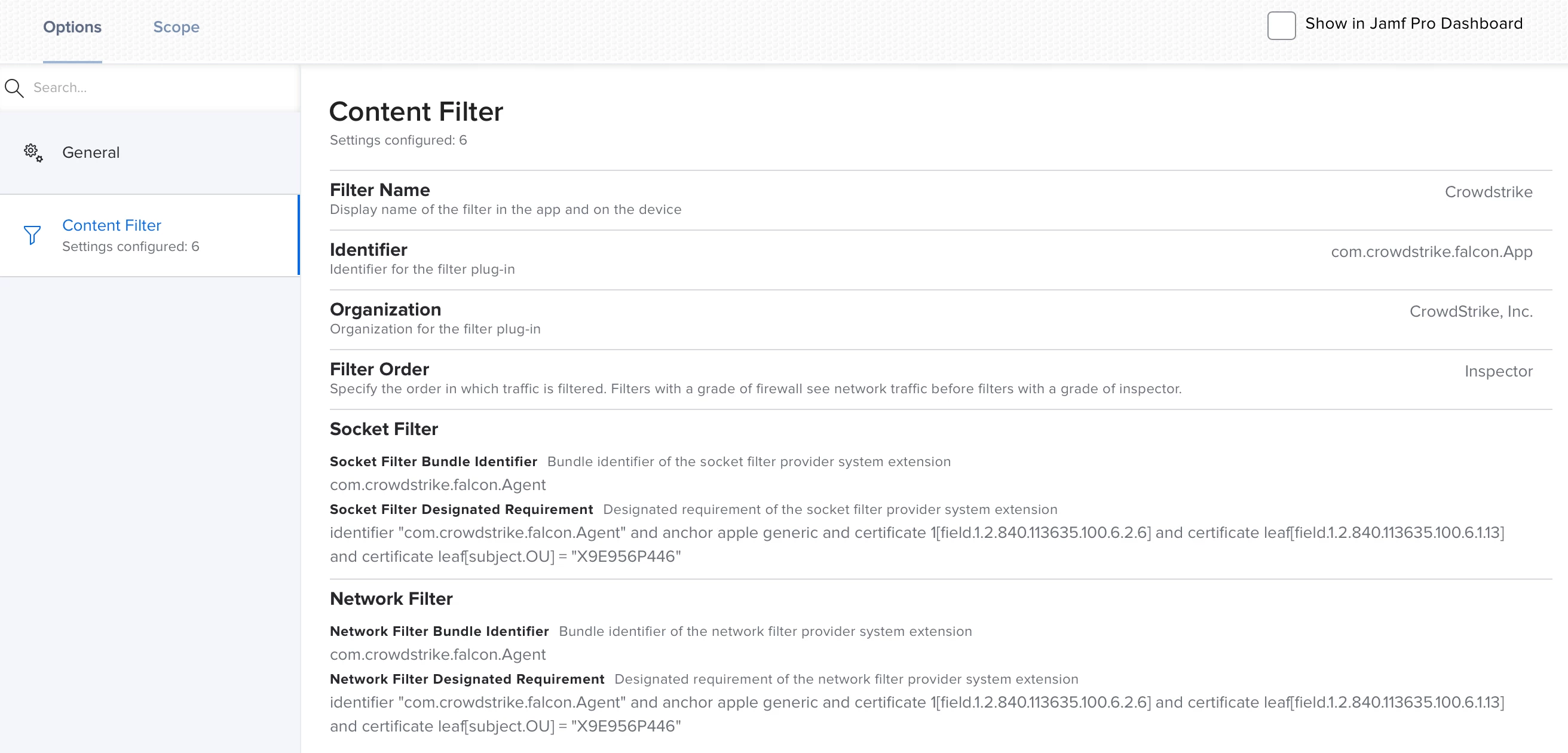
Best answer by gachowski

Sorry, I cant get it to make it work, would you be kid and make a screenshot of it ?


11 replies

Forum|alt.badge.img+14
  • Honored Contributor
  • September 9, 2021

Forum|alt.badge.img+4
  • Author
  • Contributor
  • September 9, 2021

Please see here: https://community.jamf.com/t5/jamf-pro/falcon-sensor-system-extension-approval/td-p/225879


Thanks for the link. I have gone through and all the settings provided are set to how they should be however still getting the pop-up to allow for the network content.


AJPinto
Forum|alt.badge.img+26
  • Legendary Contributor
  • September 13, 2021

We have problems with this popup from AnyConnect. What JAMF support told me months back is it has something to do with what loads first. If the System Extension loads before the approval from the JAMF configuration profile it will prompt the user regardless. This answer does not sit well with me, but it is what I was given and I have not had a chance to dig deeper. Network extensions seem to be a mess all around.


Forum|alt.badge.img+16
  • Honored Contributor
  • September 15, 2021

I don't think there is a way to avoid those prompts. I we have CS and another vendor that requires network filters. I have not found any documentation from Apple or the vendors that helped. 


seanhansell
Forum|alt.badge.img+15
  • Contributor
  • November 23, 2022

Create a "Content Filter" configuration profile payload that accepts the content filter.


<?xml version="1.0" encoding="UTF-8"?> <!DOCTYPE plist PUBLIC "-//Apple//DTD PLIST 1.0//EN" "http://www.apple.com/DTDs/PropertyList-1.0.dtd"> <plist version="1.0"> <dict> <key>PayloadContent</key> <array> <dict> <key>FilterDataProviderBundleIdentifier</key> <string>com.crowdstrike.falcon.Agent</string> <key>FilterDataProviderDesignatedRequirement</key> <string>identifier "com.crowdstrike.falcon.Agent" and anchor apple generic and certificate 1[field.1.2.840.113635.100.6.2.6] and certificate leaf[field.1.2.840.113635.100.6.1.13] and certificate leaf[subject.OU] = "X9E956P446"</string> <key>FilterGrade</key> <string>inspector</string> <key>FilterPackets</key> <false/> <key>FilterSockets</key> <true/> <key>FilterType</key> <string>Plugin</string> <key>Organization</key> <string>CrowdStrike Inc.</string> <key>PayloadDisplayName</key> <string>Web Content Filter Payload</string> <key>PayloadOrganization</key> <string>JAMF Software</string> <key>PayloadType</key> <string>com.apple.webcontent-filter</string> <key>PayloadVersion</key> <integer>1</integer> <key>PluginBundleID</key> <string>com.crowdstrike.falcon.App</string> <key>UserDefinedName</key> <string>Falcon</string> </dict> </array> <key>PayloadDescription</key> <string></string> <key>PayloadDisplayName</key> <string>Crowdstrike Falcon Content Filter</string> <key>PayloadEnabled</key> <true/> <key>PayloadRemovalDisallowed</key> <true/> <key>PayloadScope</key> <string>System</string> <key>PayloadType</key> <string>Configuration</string> <key>PayloadVersion</key> <integer>1</integer> </dict> </plist>


Forum|alt.badge.img+5
  • Contributor
  • March 30, 2023

Create a "Content Filter" configuration profile payload that accepts the content filter.


<?xml version="1.0" encoding="UTF-8"?> <!DOCTYPE plist PUBLIC "-//Apple//DTD PLIST 1.0//EN" "http://www.apple.com/DTDs/PropertyList-1.0.dtd"> <plist version="1.0"> <dict> <key>PayloadContent</key> <array> <dict> <key>FilterDataProviderBundleIdentifier</key> <string>com.crowdstrike.falcon.Agent</string> <key>FilterDataProviderDesignatedRequirement</key> <string>identifier "com.crowdstrike.falcon.Agent" and anchor apple generic and certificate 1[field.1.2.840.113635.100.6.2.6] and certificate leaf[field.1.2.840.113635.100.6.1.13] and certificate leaf[subject.OU] = "X9E956P446"</string> <key>FilterGrade</key> <string>inspector</string> <key>FilterPackets</key> <false/> <key>FilterSockets</key> <true/> <key>FilterType</key> <string>Plugin</string> <key>Organization</key> <string>CrowdStrike Inc.</string> <key>PayloadDisplayName</key> <string>Web Content Filter Payload</string> <key>PayloadOrganization</key> <string>JAMF Software</string> <key>PayloadType</key> <string>com.apple.webcontent-filter</string> <key>PayloadVersion</key> <integer>1</integer> <key>PluginBundleID</key> <string>com.crowdstrike.falcon.App</string> <key>UserDefinedName</key> <string>Falcon</string> </dict> </array> <key>PayloadDescription</key> <string></string> <key>PayloadDisplayName</key> <string>Crowdstrike Falcon Content Filter</string> <key>PayloadEnabled</key> <true/> <key>PayloadRemovalDisallowed</key> <true/> <key>PayloadScope</key> <string>System</string> <key>PayloadType</key> <string>Configuration</string> <key>PayloadVersion</key> <integer>1</integer> </dict> </plist>


Sorry, I cant get it to make it work, would you be kid and make a screenshot of it ?


Forum|alt.badge.img+16
  • Honored Contributor
  • Answer
  • March 30, 2023

Sorry, I cant get it to make it work, would you be kid and make a screenshot of it ?


Forum|alt.badge.img+5
  • Contributor
  • March 31, 2023

Thanks for the invaluable help ! Issue solved !


seanhansell
Forum|alt.badge.img+15
  • Contributor
  • April 18, 2023

@TMPlatform would you be so kind as to mark my reply as the solution to this issue?


howie_isaacks
Forum|alt.badge.img+23
  • Esteemed Contributor
  • June 7, 2023


This screenshot helped me. Thanks for posting!


DrumBum213
Forum|alt.badge.img+3
  • New Contributor
  • September 18, 2023


Does this enable the Network Filter? I placed this into one of the Falcon Configuration Profiles I thought was set for testing and it ended up knocking all my MAC users offline and off internet. Lesson learned on my part but trying to make sure I understand what this does.