Question

Crowdstrike TCC.xml for PPPC

  • October 16, 2019
  • 38 replies
  • 300 views

Forum|alt.badge.img+2

Anyone have to create a TCC.xml for crowdstrike yet? Looking for some assistance as I am having some troubles getting the proper informaiton needed to build it out.

38 replies

iJake
Forum|alt.badge.img+23
  • Contributor
  • October 16, 2019

We don't use Crowdstrike so can't specifically help with that but if you haven't already seen jamf's PPPC-Utility it can assist you in build the profile if you know which binary to grant access.

https://github.com/jamf/PPPC-Utility


Forum|alt.badge.img+13
  • Honored Contributor
  • October 16, 2019

You should be able to contact your support engineer as they have a Crowdstrike&JAMF integration document they can provide.


Forum|alt.badge.img+31
  • Honored Contributor
  • October 16, 2019

here is mine which seems to be working so far, please test though


Forum|alt.badge.img
  • New Contributor
  • October 17, 2019

@tlarkin Thanks for sharing the mobileconfig file, mine is almost the same but I noticed that yours says com.company.sensor.payload identifier ID (line13). Mine only has payload identifier ID (see below), Do I need to add it? Also, did you see falcond in Security&Privacy>Privacy>Full Disk Access? I don't see it listed on mine.

<key>PayloadIdentifier</key> <string>EAB58228-70E2-424C-934A-C5CB9E95C708</string>


Forum|alt.badge.img+31
  • Honored Contributor
  • October 17, 2019

You cannot trust the GUI, you need to search for an MDM Override file in /Library/Application Support/com.apple.TCC

plutil -p MDMOverrides.plist
{
  "/Library/CS/falcond" => {
    "kTCCServiceSystemPolicyAllFiles" => {
      "Allowed" => 1
      "CodeRequirement" => "identifier falcond and anchor apple generic and certificate 1[field.1.2.840.113635.100.6.2.6] /* exists */ and certificate leaf[field.1.2.840.113635.100.6.1.13] /* exists */ and certificate leaf[subject.OU] = X9E956P446"
      "CodeRequirementData" => {length = 148, bytes = 0xfade0c00 00000094 00000001 00000006 ... 35365034 34360000 }
      "Identifier" => "/Library/CS/falcond"
      "IdentifierType" => "path"
      "StaticCode" => 0
    }
  }

Forum|alt.badge.img+9
  • Valued Contributor
  • October 17, 2019

I'm struggling with this one too. I can't seem to get the full disk access to work. I've tried using the PPPC utility and I must be missing something.


Forum|alt.badge.img+22
  • Employee
  • October 17, 2019

@robert.guzman This is a common confusion point. Your only methods to verify whats installed/controlled via mdm deployed configuration profiles is to look at the Profiles pane in System Preferences for the payloads pushed down or look at the MDMOverrides.plist with the following command:

/usr/libexec/PlistBuddy -c "print" /Library/Application Support/com.apple.TCC/MDMOverrides.plist

FYI, Terminal needs Full Disk Access/SystemPolicyAllFiles to read that file otherwise you get the message Error Reading File: /Library/Application Support/com.apple.TCC/MDMOverrides.plist. So basically it's a chicken or the egg scenario, you need TCC access granted to read MDM TCC applied settings. Fun times.

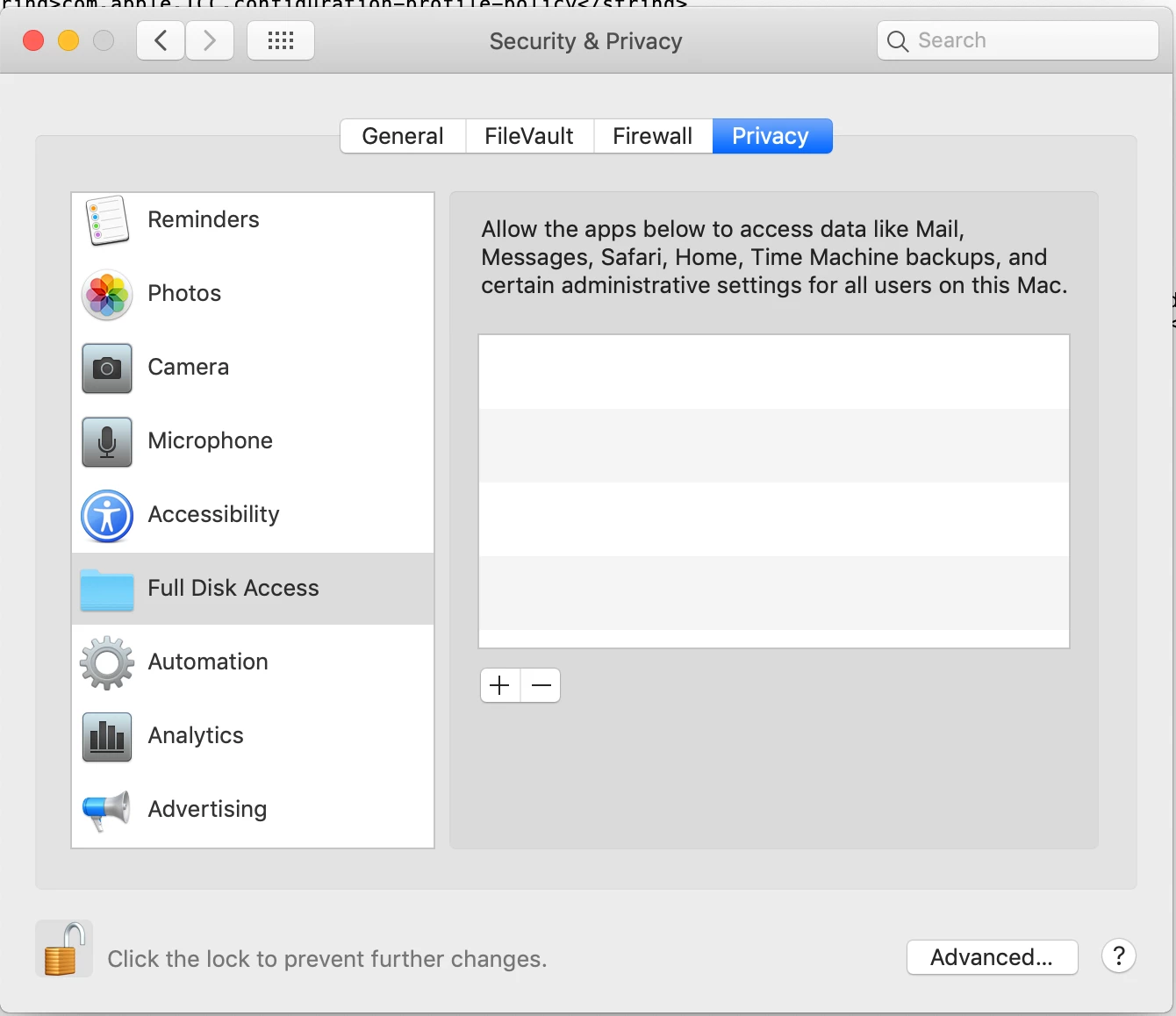
Whats displayed in System Preferences > Security & Privacy > Privacy are only the decisions end users made with prompts presented to them and not settings pushed via Profiles. Its essentially displaying the values that are stored in the TCC databases that can be found at /Library/Application Support/com.apple.TCC/TCC.db or ~/Library/Application Support/com.apple.TCC/TCC.db


Forum|alt.badge.img+31
  • Honored Contributor
  • October 17, 2019

So, this is 100% confusing and I had to confirm some of this stuff with an actual Crowdstrike employee on Slack. The actual TCC.db is for Apple Internal use only, and you are not guaranteed anything from it at all. I have two systems right now where one displays the TCC settings for falcond in the TCC.db properly, and the other system it doesn't show up at all.

If you properly deploy the profile you will see the setting in the MDMOverrides.plist file mentioned above. You then should also see very few deny messages in Console.app. Just open up Console.app and search for falcond deny and you will still see some denies, probably around the /prviate/var/folders, and this is expected. Apple does not actually grant full disk access when you enable full disk access, certain parts are still fully denied on disk. Your deny messages should go way down if properly enabled.

Yes, this is lame, yes CS should have better documentation, but in my testing the profile I linked above is working for us so far. Open up tickets with CS and request better docs and profile examples moving forward.


Forum|alt.badge.img+31
  • Honored Contributor
  • October 17, 2019

@robert.guzman the payload identifier isn't a required/unique field I don't think, you can put in acme company or the like if you wish.

I am pretty sure this dictionary item here isn't even required for a profile payload to work, so you can fill out whatever you want here:

        <dict>
            <key>PayloadDescription</key>
            <string>Allows CrowdStrike Falcon Sensor disk access</string>
            <key>PayloadDisplayName</key>
            <string>CrowdStrike Sensor Access</string>
            <key>PayloadIdentifier</key>
            <string>com.company.sensor.A3B7521C-EEA7-11E9-A8DF-ACDE48001122</string>
            <key>PayloadOrganization</key>
            <string>Your Company</string>
            <key>PayloadType</key>
            <string>com.apple.TCC.configuration-profile-policy</string>
            <key>PayloadUUID</key>
            <string>A3B7521C-EEA7-11E9-A8DF-ACDE48001122</string>
            <key>PayloadVersion</key>
            <integer>1</integer>
            <key>Services</key>
            <dict>

Forum|alt.badge.img+5
  • New Contributor
  • November 1, 2019

Thank you @tlarkin for your work on this. Your Mobileconfig script worked as is.


Forum|alt.badge.img+31
  • Honored Contributor
  • November 1, 2019

Glad it worked for you, I had to hack at it myself since TCC/PPPC is really not very clear and Apple is using ambiguous terminology. Like when Apple states it needs the identifier for an app to be approved, I assume bundle-id but in fact identifier in this scenario can just be a file path. I don't expect many people to fully understand the ins and outs of TCC/PPPC, and in fact I typically remove it from memory every time I have to deal with it.


Forum|alt.badge.img+2
  • Author
  • New Contributor
  • November 19, 2019

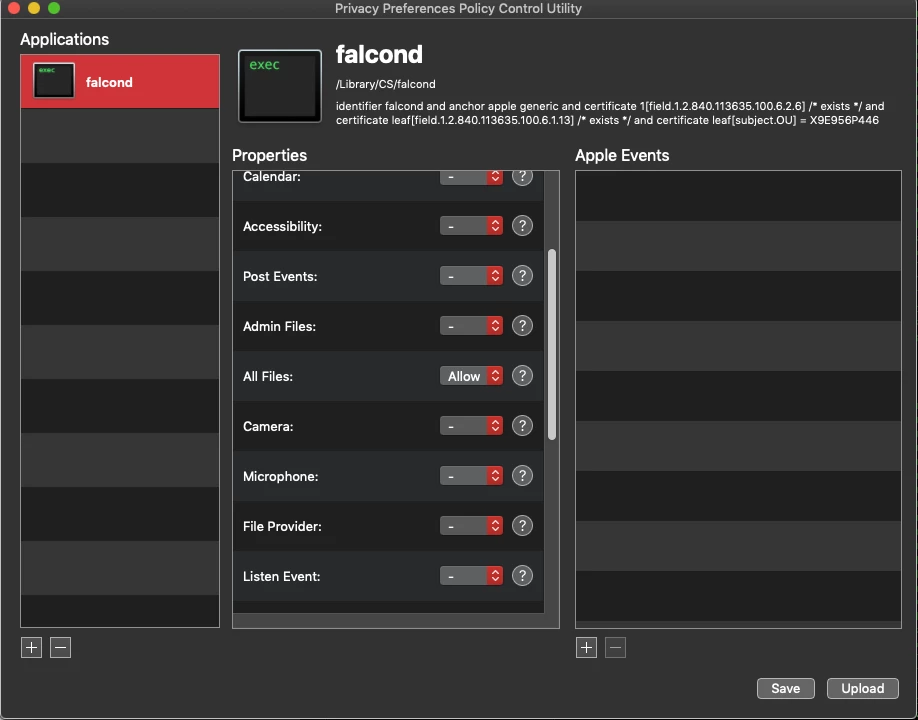
Sorry for the late responses guys, but I was able to utilize the PPPC utility successfully. It was pretty simple too, "Full Disk access" just equals "All files" in the utility. I just pointed it to falcond, allowed all files access and created the xml. Thanks for eveyones responses on this.


Forum|alt.badge.img+3
  • New Contributor
  • December 3, 2019

@Roan How did you get it to take the falconctl and falcond executables? The PPPC utility won't take it.


Forum|alt.badge.img
  • New Contributor
  • December 4, 2019

@Roan We're running into an issue where we get everything setup in PPPC properly but the permissions do not show up in systems preferences. Did you have to do anything afterwards?


Forum|alt.badge.img+5
  • New Contributor
  • December 4, 2019

Having the same issue as @danielgrm, PPPC Utility (v1.1.2) won't ingest falcond.


Forum|alt.badge.img
  • New Contributor
  • December 10, 2019

Hi @tlarkin in your script https://gist.github.com/t-lark/7fa2896a0dd9135025fc2c309599b907
The line that says <string>com.company.sensor.A3B7521C-EEA7-11E9-A8DF-ACDE48001122</string>
Is that number different with companies?


Forum|alt.badge.img+31
  • Honored Contributor
  • December 12, 2019

@peterdao_expanse I don't believe that key is required, as I posted a scrubbed config profile to GitHub. You can probably remove a lot of those keys that are descriptive. The only thing you need to accomplish is to tell macOS to give a folder path of falcond full disk access, and then verify that is returns FDA via that MDMOverrides file


AVmcclint
Forum|alt.badge.img+21
  • Esteemed Contributor
  • December 19, 2019

@tyra.robertson @danielgrm I figured out how to get the falcond to be recognized in PPPC Utility. The default permissions on the falcond file is -rwx------ I had to change it to -rwx---r-- and then PPPC Utility would allow me to add it and create a profile with All Files > Allow set


Forum|alt.badge.img+31
  • Honored Contributor
  • December 20, 2019

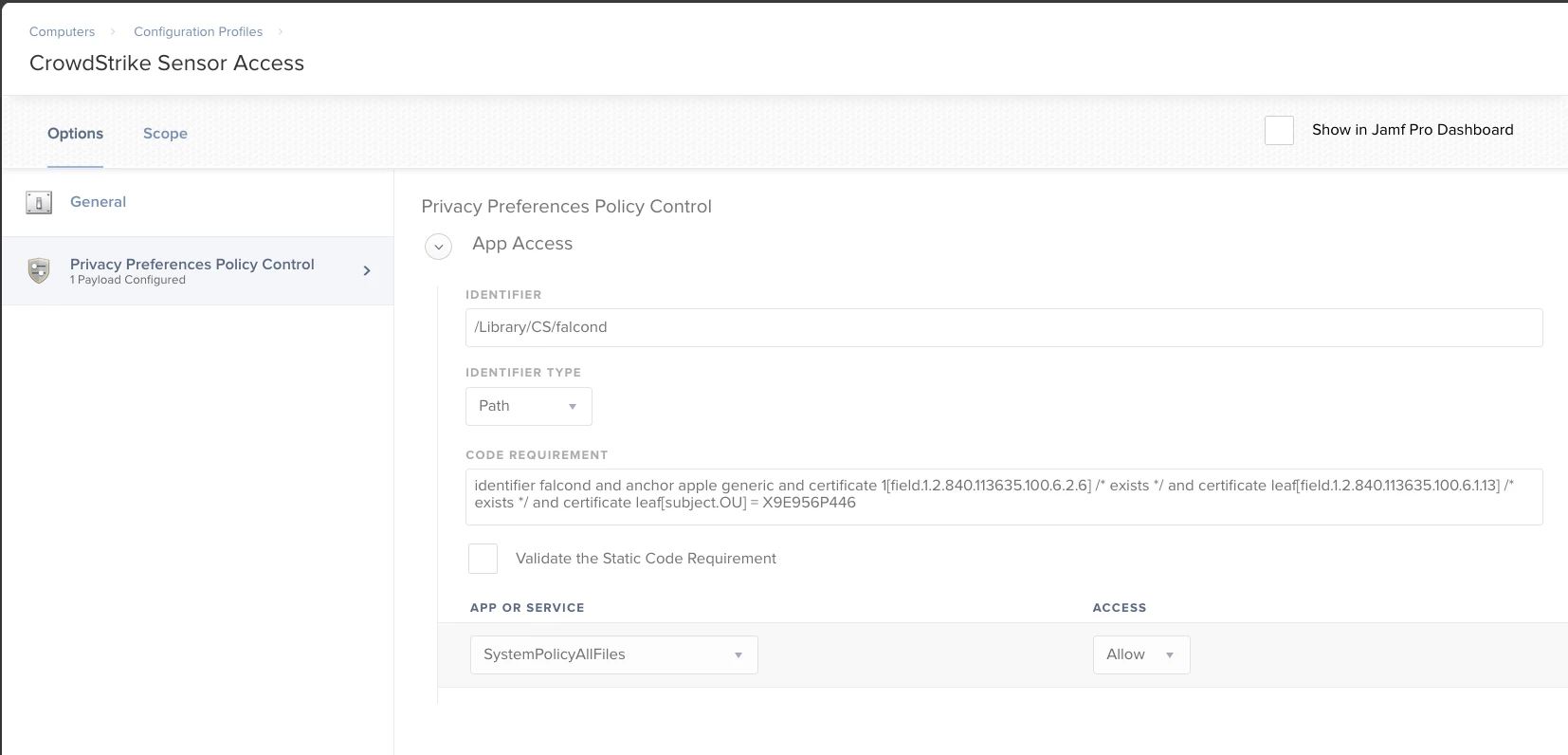
See attached screen shot to do it via MDM payload


beeboo
Forum|alt.badge.img+7
  • Contributor
  • January 15, 2020

we have CS installed but no PPPC/config file for the above, we only have KEXT enabled per the original documentation.

curiously, what is the need for the whitelisting?

Admittedly ours is used for monitoring purposes now as we move away from another AV app, but I assume once the AV portion of CS is enabled for our environment we would need to whitelist the app?


Forum|alt.badge.img+31
  • Honored Contributor
  • January 15, 2020

You should open a ticket with CS and ask them to explain it to you, but the TL;DR version is that in Catalina new TCC/PPPC controls now require that falcond have full disk access to operate


beeboo
Forum|alt.badge.img+7
  • Contributor
  • January 15, 2020

i just saw their new doc, updated oct 2019 :(

ill just add this to my workflow!


mykool
Forum|alt.badge.img+10
  • Contributor
  • January 23, 2020

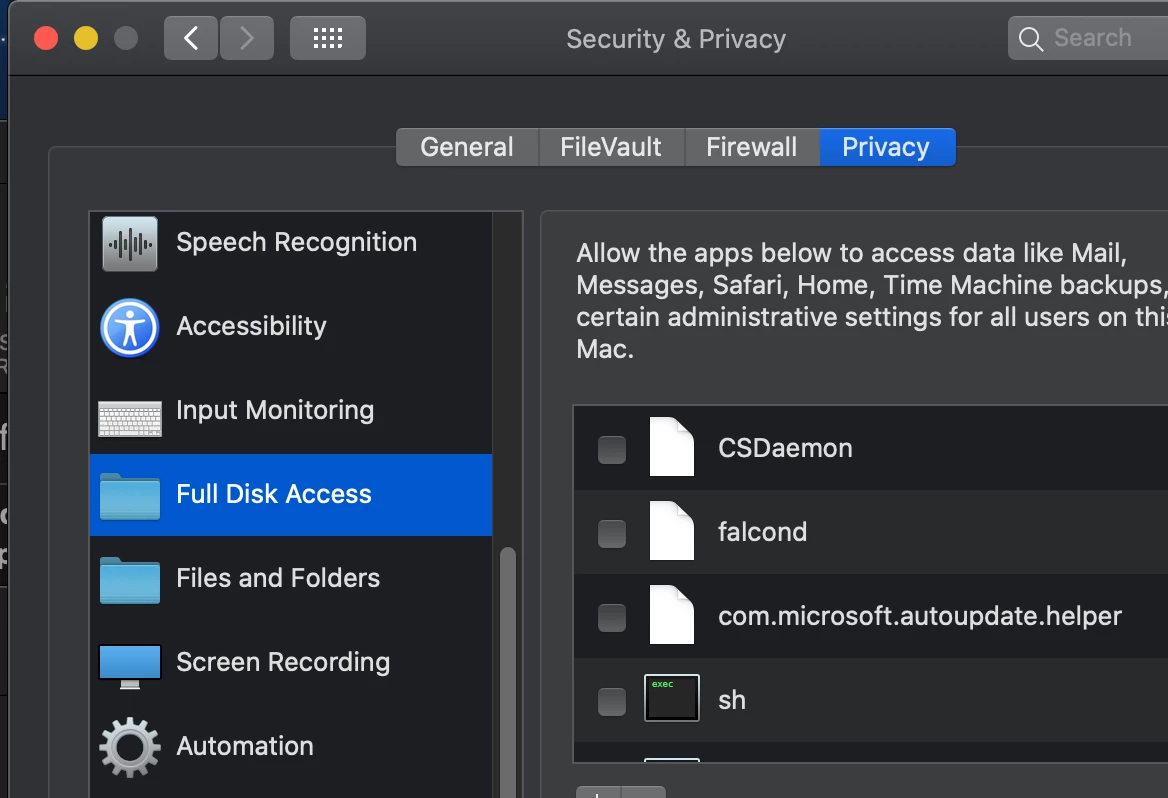
AVmcclint This was what I was trying to accomplish. It adds the app when going to look at system preferences, however, it isn't checked.


beeboo
Forum|alt.badge.img+7
  • Contributor
  • January 23, 2020

i get the same issue, albeit i allowed another option or two just to be extra safe.

Thats what i get, but SSHD is auto checked for me, so im not sure why that is vs the rest of my PPPC.
and to be frank, ONLY SSHD is auto checked, the rest are just entries there with no check mark.


Forum|alt.badge.img

plutil -p /Library/Application Support/com.apple.TCC/MDMOverrides.plist

{ "/Library/CS/falcond" => { "kTCCServiceSystemPolicyAllFiles" => { "Allowed" => 1 "CodeRequirement" => "identifier falcond and anchor apple generic and certificate 1[field.1.2.840.113635.100.6.2.6] / exists / and certificate leaf[field.1.2.840.113635.100.6.1.13] / exists / and certificate leaf[subject.OU] = X9E956P446" "CodeRequirementData" => {length = 148, bytes = 0xfade0c00 00000094 00000001 00000006 ... 35365034 34360000 } "Identifier" => "/Library/CS/falcond" "IdentifierType" => "path" "StaticCode" => 0 }