Question

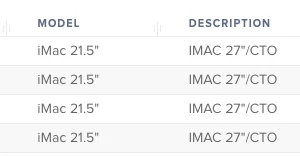
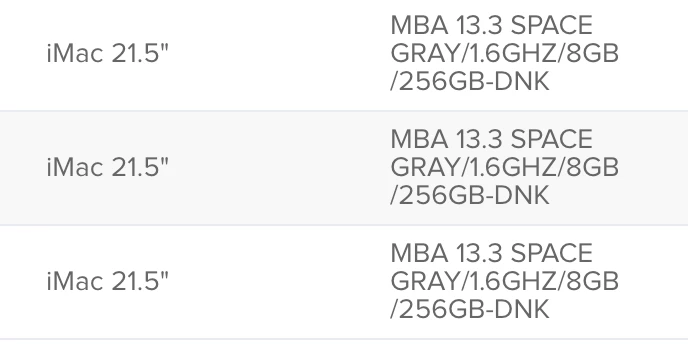
DEP MacBook Pro Model says its a iMac 21.5 but description says its a MBP 13.3?

  • May 21, 2019
  • 16 replies
  • 85 views

Forum|alt.badge.img+11

Has anyone seen this? After importing a new MBP via Apple Business Manager it comes up in DEP as a Model iMac 21.5 but the Description says MBP 13.3? This is not allowing us to use our DEP image on this device. JAMF says its Apple and Apple says it's JAMF. What say you?


16 replies

Forum|alt.badge.img
  • New Contributor
  • May 21, 2019

Hi,

This is also showing up for me too. iMac 21.5" for the MBP 13.3 SPACE GRAY. I literally logged into to Jamf Nation to create a ticket. This is causing some issues with my policies when trying to setup targets for MBP's.

Sam


Forum|alt.badge.img+11
  • Author
  • Contributor
  • May 21, 2019

This has to be Apple right? Ironic that it's the exact same MBP I have.


ImAMacGuy
Forum|alt.badge.img+23
  • Esteemed Contributor
  • May 21, 2019

+1 here


Forum|alt.badge.img+1
  • New Contributor
  • May 29, 2019

Same here!


RaymoJamf
Forum|alt.badge.img+4
  • Contributor
  • May 29, 2019

It's the reverse for me. My Macbook Pros appear as iMacs!
Interesting.


Forum|alt.badge.img+16

We understand this to be an issue with Apple's DEP API responding with incorrect model information. Once a device enrolls, the inventory should display correctly according to the device response. You can open a case with Jamf (PI-006983), however this is actually a third party product issue tied to a radar with Apple. As such, filing an Apple radar and referencing either rdar://50318529 or rdar://51222311 will ensure Apple hears the feedback.


Forum|alt.badge.img+13
  • Contributor
  • May 30, 2019

+1 It's the reverse for us. MacBook Pros appear as iMacs!


Forum|alt.badge.img+4
  • New Contributor
  • May 31, 2019

Same here for our DEP, have you found a solution?


Forum|alt.badge.img+11
  • Author
  • Contributor
  • July 18, 2019

I got this again this time with iMacs 27 inch saying they are 21.5? SMH. I swear.


Forum|alt.badge.img
  • New Contributor
  • August 22, 2019

Same here... what to doo?


Forum|alt.badge.img+12
  • Contributor
  • August 24, 2019

There is a file in jamf websetver called computer models.xml and that contains the model mapping. If that’s wrong your display will be wrong. Jamf should be aware and fix next release, check with your account manager


Forum|alt.badge.img+7
  • Contributor
  • September 22, 2020

@marklamont , your reply seems to get to the bottom of this issue. Have you reported it and gotten any feedback to know if it is in fact something Jamf can/will fix? I'm still getting the wrong models a year+ after this post.


Forum|alt.badge.img+4
  • New Contributor
  • April 12, 2021

@DougE, wondering if you heard anything further on this subject yet? I also am seeing nearly all of my multi-year 13" MBPs all reporting as 2018 models. Hello Jamf?!


Forum|alt.badge.img+1
  • New Contributor
  • April 22, 2021

We are seeing these same issue. Our MacBook Air 2017 is reported as MacBook Air Early 2015 model.


Cayde-6
Forum|alt.badge.img+22
  • Honored Contributor
  • April 23, 2021

@skentfive9 Depends where the false info is, if its Apple Business Manager then you need to raise an AppleCare ticket, if its Jamf its better to raise a support ticket with Jamf rather than the forum.


Forum|alt.badge.img+5
  • Contributor
  • November 20, 2021

+1 here. But not facing with iPad. Why Apple or Jamf can't use the same script to get the model of Mac device?