Solved

DEP Sync Failing

  • December 9, 2019
  • 71 replies
  • 365 views

Forum|alt.badge.img+7

I've noticed lately that ASM is not syncing with JSS intermittently, it will come up with the error:

Sync failed. Awaiting next sync.

I've already placed public token in ASM and have uploaded the ASM token to JSS. No changes have been made to our firewall or filtering system.

We are on version 10.17.1

Is there anything I'm overlooking?

Best answer by bentoms

Sounds a lot like: https://macmule.com/2019/10/01/more-dep-sync-errors/

71 replies

Forum|alt.badge.img+10
  • Valued Contributor
  • December 9, 2019

We are on JP 10.15.1 and we are seeing the same thing.


Forum|alt.badge.img+7
  • Contributor
  • December 9, 2019

same here and we were on 10.8 then upgraded to 10.13 and still having the issue


Forum|alt.badge.img+18
  • Esteemed Contributor
  • December 9, 2019

Had to replace our DEP token today for that same issue. Nothing on our end changed. Once we redid the DEP token it died again. I keep wondering why this would just fail randomly. We are on 10.16.1

Gabe Shackney
Princeton Public Schools


dan-snelson
Forum|alt.badge.img+30
  • Honored Contributor
  • December 9, 2019

We're seeing this as well in our Stage lane (Jamf Pro 10.17.1) and our Production lane (Jamf Pro 10.16.1).

Case #: JAMF-0841146
AppleCare Case No.: 100971412807


Forum|alt.badge.img+18
  • Honored Contributor
  • December 9, 2019

Apple seems to keep having issues either provisioning new nodes for ABM or in a maintenance script, as certain ABM nodes lose the ability to accept TLS1.3 from time to time.


Forum|alt.badge.img+12
  • Valued Contributor
  • December 9, 2019

Id see this pop up the odd time, but after waiting 15-20 mins and rechecking all seems to be ok.


Person
Forum|alt.badge.img+11
  • Jamf Heroes
  • December 9, 2019

Yes, I am running into this today as well. Seems like an issue with Apple side.


Forum|alt.badge.img+13
  • Contributor
  • December 9, 2019

We've seen this a couple times in the past month. Only really matters if you're moving stuff from prestage to prestage and want to reprovision right away. Annoying.


gcarmichael
Forum|alt.badge.img+10
  • Contributor
  • December 9, 2019

Ive seen it since 10.14.0 forward on and off. Especially after the legacy vpp/dep portals have gone away. Check back in on it an hour or so later and it seems to be fine.


Forum|alt.badge.img+5
  • New Contributor
  • December 9, 2019

Echoing that we've seen it in 10.15.1 ans 10.17.0, thanks for sharing the ticket numbers @dan-snelson.


bentoms
Forum|alt.badge.img+35
  • Hall of Fame
  • Answer
  • December 9, 2019

Forum|alt.badge.img
  • New Contributor
  • December 10, 2019

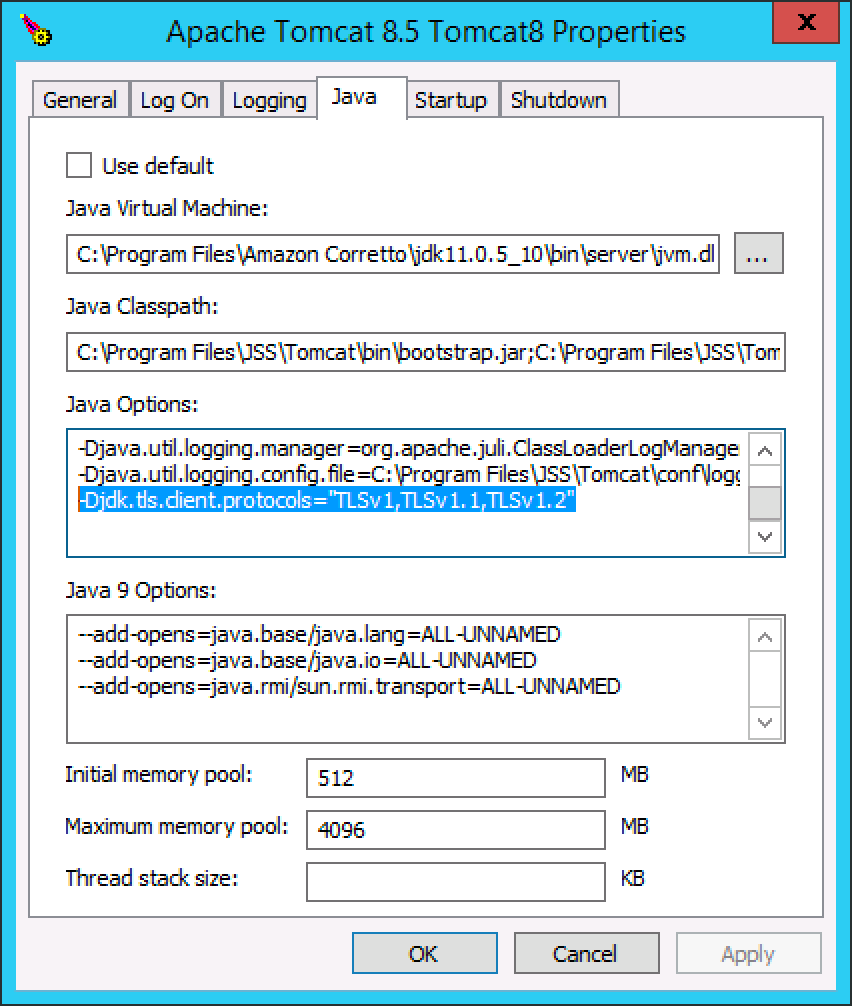
Can confirm that @bentoms fix worked. Added -Djdk.tls.client.protocols="TLSv1,TLSv1.1,TLSv1.2" to the Java Options in the Tomcat Properties, restarted the JSS, and ASM sync'd right away. Thanks!


Forum|alt.badge.img+8
  • Valued Contributor
  • December 10, 2019

I modified the JAVA_OPTS in my setenv.sh file on my jss master node to this and it resolved the issue:
export JAVA_OPTS="$JAVA_OPTS -Xmx8192M -Xms256M -Djava.awt.headless=true -Djdk.tls.client.protocols="TLSv1,TLSv1.1,TLSv1.2""


Forum|alt.badge.img+7
  • Contributor
  • December 10, 2019

Just had this on an instance and Ben's fix worked for me as well.

A little concerned about enabling TLS 1.0 and 1.1....


Forum|alt.badge.img+11
  • Valued Contributor
  • December 10, 2019

no issues until today, modified my JAVA_OPTS as mentioned above, working now. RHEL 7 with RHEL OpenJDK 11.0.3


Forum|alt.badge.img+3
  • New Contributor
  • December 10, 2019

I also added the line -Djdk.tls.client.protocols="TLSv1,TLSv1.1,TLSv1.2" which resolved the issue. Thanks!


Forum|alt.badge.img+7
  • Author
  • Valued Contributor
  • December 10, 2019

That fix worked for us, thanks! I still can't enroll iPads via DEP but thats another issue.


jbisgett
Forum|alt.badge.img+12
  • Honored Contributor
  • December 10, 2019

We have been getting the sync errors on and off for a couple of months, but they would always resolve themselves after a few sync attempts. Today was the longest run where the syncs had consistently failed for over a day.

Modified the setenv.sh on my Ubuntu master as mentioned above and all errors went away immediately after restarting the servers.


Forum|alt.badge.img+10
  • Valued Contributor
  • December 10, 2019

This fixed ours as well. I only need to add TLSv1.2 and everything seems fine.


Forum|alt.badge.img+7
  • Contributor
  • December 11, 2019

@m.donovan ditto, just re-applied the fix with only TLSv1.2 and sync is still good. That made my Security brain much happier.


  • December 11, 2019

Tested successfully with -Djdk.tls.client.protocols="TLSv1.2" on Jamf Pro 10.17.1. Thanks a lot for the tips


Forum|alt.badge.img+13
  • Valued Contributor
  • December 11, 2019

if you are editing the setenv.sh file manually, it's required that the addition is added thus: export JAVA_OPTS="$JAVA_OPTS -Xmx4096M -Xms512M -Djava.awt.headless=true -Djdk.tls.client.protocols=TLSv1.1,TLSv1.2"

otherwise, Tomcat will not startup.

as soon as I added it, bingo! We're back communicating again...


Forum|alt.badge.img+5
  • Contributor
  • December 11, 2019

Followed the above added -Djdk.tls.client.protocols="TLSv1,TLSv1.1,TLSv1.2" and its just started syncing for me again, i also managed to update token whilst i was at it (although we had till July 20. Thanks.


Forum|alt.badge.img+1
  • New Contributor
  • December 11, 2019

any assistance as to where to add that to a macOS instance


Forum|alt.badge.img+1
  • New Contributor
  • December 11, 2019

I applied the above solution by HVIKE. After I restarted our JSS I came to the wonferful screen of Unable to connect to the Database...
I have followed this KB to solve this. https://www.jamf.com/jamf-nation/articles/135/title
All was correct and it did not solve the issue.

Only after I removed the line "-Djdk.tls.client.protocols="TLSv1,TLSv1.1,TLSv1.2" and rebooted our whole JSS environment it started working again.

Please be carefull by performing the provided solution as it did our JSS environment not good.

If people have a other solutions on how to perform this, I would be glad to hear it.
Because our DEP does not sync at the moment en we need to enroll our Devices manual.
We use Server 2016 for our JSS, and the version is 10.17