Solved

Deploying Chrome Extensions via DMG

  • March 26, 2020
  • 30 replies
  • 630 views

danny_gutman
Forum|alt.badge.img+7

Trying to deploy extensions via DMG, but everytime I deploy it and I launch Chrome, the extension simply disappears from the folder... anyone have any idea why?

Best answer by talkingmoose

@danny.gutman, let's see if we can take advantage of one of Jamf Pro 10.19's new features to make this easier.

First, if you already have configuration profiles for Google Chrome but they don't include the ExtensionInstallForcelist key, then you can deploy this new configuration profile side-by-side with yours and it won't conflict.

  1. Copy the JSON Schema manifest here to your clipboard.
  2. In Jamf Pro, navigate to Computers > Configuration Profiles and click the New button to create a new profile. Name it something like "Google Chrome Extensions".
  3. In the list of payloads in the middle, scroll down to the Application & Custom Settings payload and click the Configure button.
  4. Choose Creation Method > Configure settings. Source > Custom Schema. Preference Domain: com.google.Chrome
  5. Paste the manifest into the Custom Schema field at the bottom of the window.
  6. Click the Properties tab.
  7. Click the Add Value button and enter the Extension ID in front of the text in the field (no spaces). You can Click the Add Value button to add more extensions.
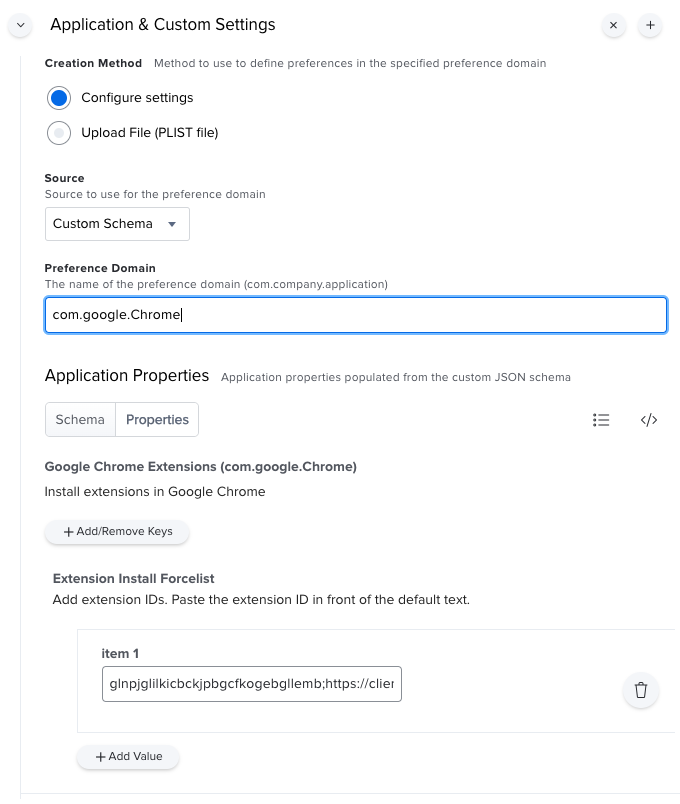
Scope and save to deploy to your Macs. When you launch Google Chrome and view your extensions, you should see your new extension appear in just a few seconds.

30 replies

talkingmoose
Forum|alt.badge.img+36
  • Community Manager
  • March 26, 2020

How are you trying to install the extension? I've found a configuration profile works best.

This one is for Okta, but you can use it as a guide. On your Mac, enable Developer mode in Google Chrome and you should see the extension's ID. Replace the one at the beginning of the value below, just before the semi-colon.

Domain: com.google.Chrome
Key: ExtensionInstallForcelist
Value: glnpjglilkicbckjpbgcfkogebgllemb;https://clients2.google.com/service/update2/crx


danny_gutman
Forum|alt.badge.img+7
  • Author
  • Contributor
  • March 26, 2020

@talkingmoose, sure, I can find the extension ID, no problem, and I found the payload for the Config Profile.... but I'm not sure how to create the plist. I see the current plist for Google Chrome has values in it already.... does the plist I create overwrite those? Is the plist modified everytime I use Chrome?


talkingmoose
Forum|alt.badge.img+36
  • Community Manager
  • Answer
  • March 27, 2020

@danny.gutman, let's see if we can take advantage of one of Jamf Pro 10.19's new features to make this easier.

First, if you already have configuration profiles for Google Chrome but they don't include the ExtensionInstallForcelist key, then you can deploy this new configuration profile side-by-side with yours and it won't conflict.

  1. Copy the JSON Schema manifest here to your clipboard.
  2. In Jamf Pro, navigate to Computers > Configuration Profiles and click the New button to create a new profile. Name it something like "Google Chrome Extensions".
  3. In the list of payloads in the middle, scroll down to the Application & Custom Settings payload and click the Configure button.
  4. Choose Creation Method > Configure settings. Source > Custom Schema. Preference Domain: com.google.Chrome
  5. Paste the manifest into the Custom Schema field at the bottom of the window.
  6. Click the Properties tab.
  7. Click the Add Value button and enter the Extension ID in front of the text in the field (no spaces). You can Click the Add Value button to add more extensions.

Scope and save to deploy to your Macs. When you launch Google Chrome and view your extensions, you should see your new extension appear in just a few seconds.


Forum|alt.badge.img+3
  • New Contributor
  • April 2, 2020

@talkingmoose A big thank you for your post, solved my issue deploying Chrome Remote Desktop which I had been struggling with for a while!


Forum|alt.badge.img+5
  • New Contributor
  • April 2, 2020

@talkingmoose Thanks !! I used your instructions to deploy a Grid Extension for Google Meet. Appreciate it


danny_gutman
Forum|alt.badge.img+7
  • Author
  • Contributor
  • April 2, 2020

Absolutely brilliant @talkingmoose, thank you so much.


Forum|alt.badge.img+8
  • Contributor
  • April 10, 2020

@talkingmoose is the updated link to the JSON this: https://github.com/talkingmoose/jamf-manifests/blob/master/Google%20Chrome%20Extensions%20(com.google.Chrome).json ?


talkingmoose
Forum|alt.badge.img+36
  • Community Manager
  • April 10, 2020

Thanks, @krispayne! Yes, that's it. Did a little housekeeping and renamed it without thinking.

I've updated the link in my original reply but you can also find it here:

https://github.com/talkingmoose/jamf-manifests/blob/master/Google Chrome Extensions (com.google.Chrome).json


Forum|alt.badge.img
  • New Contributor
  • June 6, 2020

@talkingmoose Thank you for your post! It was extremely helpful. I was also wondering if there's a way to deploy extensions for Firefox and Safari using this method?


Forum|alt.badge.img+9
  • Contributor
  • July 20, 2020

@talkingmoose Thanks for the post - it made deploying a chrome extension a breeze!


Forum|alt.badge.img+7
  • Contributor
  • July 22, 2020

Thanks @talkingmoose Works great. Now I am looking for a way to block extension.


Forum|alt.badge.img+1
  • New Contributor
  • July 28, 2020

Hi @talkingmoose This seems to be using force_installed as installation_mode, since I'm not able to remove the extension once it's installed.
How can I use normal_installed as installation_mode?


talkingmoose
Forum|alt.badge.img+36
  • Community Manager
  • July 29, 2020

@SoundCloud, not sure what you mean by "force_installed" and "normal_installed". If you're referring to the old MCX settings of "Once", "Often" or "Always", Apple and Jamf only support profiles as "Always".

If you're referring to something else, point me in the right direction and I'll take a look.


Forum|alt.badge.img+1
  • New Contributor
  • July 30, 2020

Hi @talkingmoose Sorry, I didn't not explain properly, here is more context;

I am using your "Custom Schema" to deploy a Chrome extension, however the scheme is using the ExtensionInstallForcelist policy which apparently is setting the installation mode to:
force_installed - Automatically install extensions that you specify without user interaction. Users can’t disable or remove them. You also need to define the extension download location.

On the below link, It is mentioned that we could use the ExtensionSettings policy and use the installation mode normal_installed, which in this case will allow users to remove the extension if they want, however I couldn't make it running.

https://support.google.com/chrome/a/answer/7517624


Forum|alt.badge.img+3
  • New Contributor
  • November 12, 2020

Hello @talkingmoose . Thank you I was able to push the extension. Now I am looking to remove the extension and then remove the configuration file created. Could you please help me with the steps?


talkingmoose
Forum|alt.badge.img+36
  • Community Manager
  • November 19, 2020

@VinV, from what I see in my testing, simply removing the configuration profile and restarting the browser app will remove the extensions.


Forum|alt.badge.img+1
  • New Contributor
  • April 26, 2021

Thanks for your help @talkingmoose quick question from me. Our proxy blocks access to the Chrome Web Store so any download of a chrome extension is blocked. Any idea what I would need to package and deploy along with the above Config Profile to make the extension work?


talkingmoose
Forum|alt.badge.img+36
  • Community Manager
  • April 26, 2021

@gkofos, I'm not sure how easy Google is making manual deployments with the latest versions of Chrome. From what I've read, they're making it more difficult. My advice is to not fight any software developer when they're steering you down a certain path (in this case installing directly from the Chrome store).

I believe you can set a configuration profile to disable your end users from installing their own extensions. If you can do that, I would speak with your proxy folks, tell them you can manage the profiles that get installed and then ask they lift the block in the proxy.

Google may have other methods they endorse for installing extensions. I suggest following their guidance.


Forum|alt.badge.img
  • New Contributor
  • June 25, 2021

@talkingmoose thank you so much for your detailed explanation of how to push a Chrome extension via Jamf.

But now I would like to reverse it, so remove the same Chrome extension via Jamf. How can I do that?
EDIT: I was just blind, removing the configuration profile + restart Chrome worked!


donmontalvo
Forum|alt.badge.img+36
  • Hall of Fame
  • August 11, 2021

Jamf should clone @talkingmoose, we need more of him. 🙂


scottb
Forum|alt.badge.img+18
  • Valued Contributor
  • August 11, 2021

Yep, we need a herd of mooses here!


vcparra
Forum|alt.badge.img+4
  • New Contributor
  • July 16, 2022

@talkingmoose thank you for the JSON, worked great. I see others have commented on removing the extensions, however my case seems a bit different. I would like to Forcelist extensions a and b, however Blocklist extension c. I attempted to modify your JSON (see below) to fit this goal, but it is giving me a syntax error. Please advise.

I read that the Blocklist will "disable already installed extensions if blocked, without a way for the user to enable them." During testing (chrome://policy), the Forcelist was applied, however the Blocklist was not. I manually deleted extension c and at that point, the Blocklist policy was applied and I was unable to reinstall extension c. Ideally, I would like extension to be uninstalled completely, but at the very least it be disabled as stated in the policy. Any suggestions? Perhaps I needed to give it more time?


{ "title": "Google Chrome Extensions (com.google.Chrome)", "description": "Install extensions in Google Chrome", "__feedback": "bill@talkingmoose.net", "properties": { "ExtensionInstallForcelist": { "title": "Extension Install Forcelist", "description": "Add extension IDs. Paste the extension ID in front of the default text.", "property_order": 5, "type": "array", "items": { "title": "Extension ID", "default": "<paste extension ID here>;https://clients2.google.com/service/update2/crx", "type": "string", "ExtensionInstallBlocklist": { "title": "Extension Install Blocklist", "description": "Add extension IDs. Paste the extension ID in front of the default text.", "property_order": 6, "type": "array", "items": { "title": "Extension ID", "default": "<paste extension ID here>;https://clients2.google.com/service/update2/crx", "type": "string" } } } }


 Any help would be much appreciated.


sdagley
Forum|alt.badge.img+25
  • Jamf Heroes
  • July 16, 2022

@talkingmoose thank you for the JSON, worked great. I see others have commented on removing the extensions, however my case seems a bit different. I would like to Forcelist extensions a and b, however Blocklist extension c. I attempted to modify your JSON (see below) to fit this goal, but it is giving me a syntax error. Please advise.

I read that the Blocklist will "disable already installed extensions if blocked, without a way for the user to enable them." During testing (chrome://policy), the Forcelist was applied, however the Blocklist was not. I manually deleted extension c and at that point, the Blocklist policy was applied and I was unable to reinstall extension c. Ideally, I would like extension to be uninstalled completely, but at the very least it be disabled as stated in the policy. Any suggestions? Perhaps I needed to give it more time?


{ "title": "Google Chrome Extensions (com.google.Chrome)", "description": "Install extensions in Google Chrome", "__feedback": "bill@talkingmoose.net", "properties": { "ExtensionInstallForcelist": { "title": "Extension Install Forcelist", "description": "Add extension IDs. Paste the extension ID in front of the default text.", "property_order": 5, "type": "array", "items": { "title": "Extension ID", "default": "<paste extension ID here>;https://clients2.google.com/service/update2/crx", "type": "string", "ExtensionInstallBlocklist": { "title": "Extension Install Blocklist", "description": "Add extension IDs. Paste the extension ID in front of the default text.", "property_order": 6, "type": "array", "items": { "title": "Extension ID", "default": "<paste extension ID here>;https://clients2.google.com/service/update2/crx", "type": "string" } } } }


 Any help would be much appreciated.


@vcparra Speaking strictly on the formatting of the JSON snippet posted you are missing the } needed to close your ExtensionInstallForcelist as well as the "items" list contained in the ExtensionInstallForcelist. You also need to remove the , from the end of the "type" line in that "items" list because the , indicates there will be additional lines. With those changes your JSON would like like:

{ "title": "Google Chrome Extensions (com.google.Chrome)", "description": "Install extensions in Google Chrome", "__feedback": "bill@talkingmoose.net", "properties": { "ExtensionInstallForcelist": { "title": "Extension Install Forcelist", "description": "Add extension IDs. Paste the extension ID in front of the default text.", "property_order": 5, "type": "array", "items": { "title": "Extension ID", "default": "<paste extension ID here>;https://clients2.google.com/service/update2/crx", "type": "string" } } "ExtensionInstallBlocklist": { "title": "Extension Install Blocklist", "description": "Add extension IDs. Paste the extension ID in front of the default text.", "property_order": 6, "type": "array", "items": { "title": "Extension ID", "default": "<paste extension ID here>;https://clients2.google.com/service/update2/crx", "type": "string" } } } }


vcparra
Forum|alt.badge.img+4
  • New Contributor
  • July 16, 2022

@vcparra Speaking strictly on the formatting of the JSON snippet posted you are missing the } needed to close your ExtensionInstallForcelist as well as the "items" list contained in the ExtensionInstallForcelist. You also need to remove the , from the end of the "type" line in that "items" list because the , indicates there will be additional lines. With those changes your JSON would like like:

{ "title": "Google Chrome Extensions (com.google.Chrome)", "description": "Install extensions in Google Chrome", "__feedback": "bill@talkingmoose.net", "properties": { "ExtensionInstallForcelist": { "title": "Extension Install Forcelist", "description": "Add extension IDs. Paste the extension ID in front of the default text.", "property_order": 5, "type": "array", "items": { "title": "Extension ID", "default": "<paste extension ID here>;https://clients2.google.com/service/update2/crx", "type": "string" } } "ExtensionInstallBlocklist": { "title": "Extension Install Blocklist", "description": "Add extension IDs. Paste the extension ID in front of the default text.", "property_order": 6, "type": "array", "items": { "title": "Extension ID", "default": "<paste extension ID here>;https://clients2.google.com/service/update2/crx", "type": "string" } } } }


@sdagley still getting the "JSON format is incorrect. Validate the content and fix errors to continue." from your corrections.


vcparra
Forum|alt.badge.img+4
  • New Contributor
  • July 16, 2022

@sdagley still getting the "JSON format is incorrect. Validate the content and fix errors to continue." from your corrections.


Needed a , after the } on line 16. Thank you!!