Question

Deploying Palo Alto Traps

  • May 16, 2017
  • 94 replies
  • 323 views

Show first post

94 replies

udhayakumar
Forum|alt.badge.img+4
  • Contributor
  • May 13, 2020

@davidhiggs Can you help me on this, I can't able to reach you in slack.


evan_stewart
Forum|alt.badge.img+3

test comment


Forum|alt.badge.img+11
  • Valued Contributor
  • May 14, 2020

@udhayakumar you can include in one config profile no problem. the config on their page has now been correctly updated, so please check again for any issues: https://docs.paloaltonetworks.com/cortex/cortex-xdr/7-1/cortex-xdr-agent-admin/cortex-xdr-agent-for-mac/install-the-cortex-xdr-agent-for-mac-using-jamf.html


RAW-ONLY
Forum|alt.badge.img+2
  • New Contributor
  • May 15, 2020

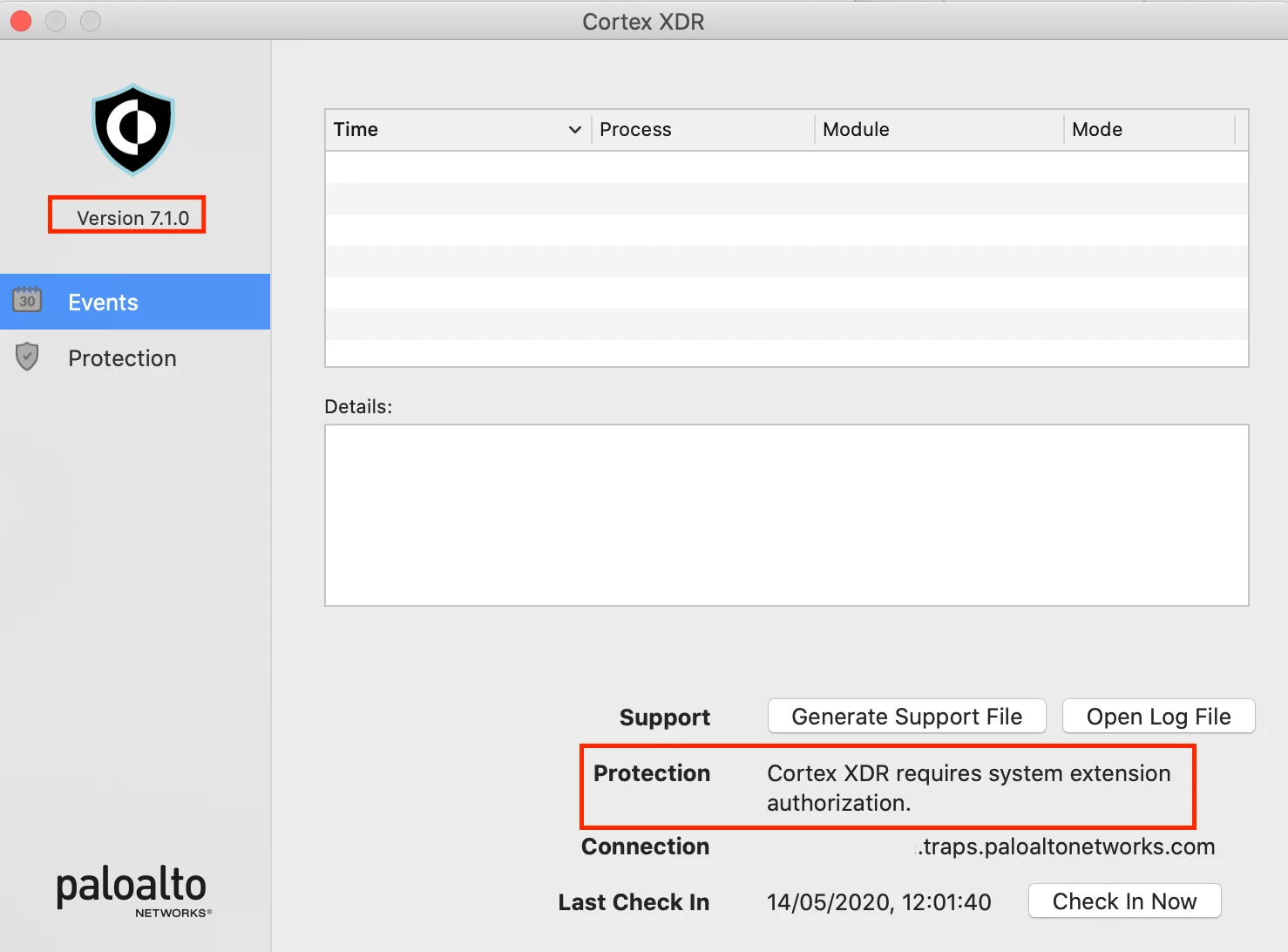
@davidhiggs When i deploy the 7.02 version with this configuration policy settings everthing works fine. But when we push the new update to 7.1.0 we get the following extension block.
Before this update everything was set to enabled and seems working fine.

Do you know if 7.1.0 needs more authorization.

The config policy works ok on 7.0.2


Forum|alt.badge.img+11
  • Valued Contributor
  • May 15, 2020

@Rappange Indeed it does. the move from 7.1 from 7.0.x was bigger than the change from 6.1.x to 7.0.x.

I'd take a fresh look at the new config requirements. Since 7.1.0 they now include information for Jamf setup on their website. go here: https://docs.paloaltonetworks.com/cortex/cortex-xdr/7-1/cortex-xdr-agent-admin/cortex-xdr-agent-for-mac/install-the-cortex-xdr-agent-for-mac-using-jamf.html

They don't detail what's changed for each OS, but if you read above you'll see my own breakdown after some testing.


RAW-ONLY
Forum|alt.badge.img+2
  • New Contributor
  • May 15, 2020

I created the Configuration Policy as described but somehow it keeps blocking and its driving me nuts :D.


iOllie
Forum|alt.badge.img+3
  • New Contributor
  • May 25, 2020

I have the same issue with the version 7.1.0 -- Cortex XDR requires system extension authorization. Also, I investigated that the application v. 7.02 has kproc_ctrl.kext in the /Library/Extensions/ folder. Now the app v.7.1 hasn't it, but we have two newest kexts bundles: com.paloaltonetworks.traps.securityextension and com.paloaltonetworks.traps.networkextension. However, I can't understand where the bundles are located


Forum|alt.badge.img+11
  • Valued Contributor
  • May 26, 2020

@osokhan They aren't kext bundles and not treated the same. You'll be adding them as system extensions via their bundleid so location won't matter. But if you're interested, they're inside the application in /Applications. If you follow the v7.1 guide linked above, you'll have no troubles. I've verified the original errors have been fixed by Palo Alto and working correctly.


Forum|alt.badge.img+1
  • New Contributor
  • May 27, 2020

I have followed the guide, and while it has worked for most endpoints, and all the tests I have made on a recently wiped machine, we are still facing issues in some cases, for example, when upgrading to Cortex to 7.1 from a previous version or upgrading from Mojave to Catalina: it is still prompting to allow the system extension.
I have triple checked the guide, created a separate profile with all payloads in a single config profile to apply to the affected machines, and still nothing, the prompt will not go away until manually approved.


Forum|alt.badge.img+11
  • Valued Contributor
  • May 27, 2020

@JBauza interesting to hear, I haven’t seen this in my small testing and deployment so far. I do have a concern with machines upgrading to Catalina from Mojave, I believe there are some race conditions to be mindful of in that scenario when it comes to config profiles. If I have some time I’ll do a test with a clean Mojave machine with 7.0.2, upgrade to 7.1.0 then upgrade to Catalina.

I am currently investigating a very small number of machines that seem to be causing the machine slow down or lock up, I think this might be due to kext cache issues but still very early to tell at this stage.


Forum|alt.badge.img+1
  • New Contributor
  • May 27, 2020

I will try a couple of more things, but I will most likely end up contacting PaloAlto support.
If it can be of interest, all issues we've seen have been on Catalina machines, it's been working fine for Mojave.


iOllie
Forum|alt.badge.img+3
  • New Contributor
  • May 27, 2020

I tried to install the Cortex 7.1 with the profile based on the Palo Alto manual (https://docs.paloaltonetworks.com/cortex/cortex-xdr/7-1/cortex-xdr-agent-admin/cortex-xdr-agent-for-mac/install-the-cortex-xdr-agent-for-mac-using-jamf.html#install-the-cortex-xdr-agent-using-jamf), but I am still in need to allow the system extensions. I hadn't had the macOS 10.15 Catalina upgrade from 10.14. However, I made the uninstall v.7.0.2 before attempts at v.7.1 installation. I made recreation of the profile a few times, but the manual doesn't work.


Forum|alt.badge.img+1
  • New Contributor
  • May 28, 2020

We have pushed the Cortex 7.1.1 update on one of the affected machines, and it has solved the issue. Everything in Jamf is configured as per PaloAlto's procedure (https://docs.paloaltonetworks.com/cortex/cortex-xdr/7-1/cortex-xdr-agent-admin/cortex-xdr-agent-for-mac/install-the-cortex-xdr-agent-for-mac-using-jamf.html)


iOllie
Forum|alt.badge.img+3
  • New Contributor
  • May 28, 2020

The new agent came out. 7.1.1 today! Looks like the update resolved the issue.


Forum|alt.badge.img+11
  • Valued Contributor
  • May 29, 2020

Great to hear! I didn't see any bug fixes in the release notes, I wonder if deployment of an updated systemextension reset the issues some of you were having. I'll be pushing 7.1.1 too just in case.


Forum|alt.badge.img+3
  • New Contributor
  • December 4, 2020

Hello guys, can you help me with one problem? I successfully managed to create pkg and all privacy extensions in profiles. But I am unable to deploy this pkg to mac os. When I manually install this pkg on mac it perfectly installs and load config. But when deployed - it shows no error but won't install at all. Other pkg deploy works fine.

Thank you for help.


udhayakumar
Forum|alt.badge.img+4
  • Contributor
  • December 23, 2020

Hi @user-kVZEFdADCC Download a zip file from the Cortex portal and upload the ZIP file to create a package. And then you can scope it to a device and check.

Thanks


iOllie
Forum|alt.badge.img+3
  • New Contributor
  • January 6, 2021

Does someone have a macOS kernel panic -- mac is crashing after wake up from sleep? The Cortex XDR is 7.2.2 which includes the Cortex XDR network interface.


udhayakumar
Forum|alt.badge.img+4
  • Contributor
  • January 11, 2021

Hi @osokhan

yes we have also faced this issue and we have reached out PA support team and they suggested we upgrade the OS to 11.1. But it's not easy to upgrade the OS like that so there is another workaround is available so please raise a ticket to the PA team they will give you the Jason file to disable the Network Extension permission from Cortex end.


We identified there is an issue with Apple Mac network extension. The issue is not completely fixed in the 7.2.2 and it only provides a partial fix. Apple is working on to fix the issue(it is an apply code issue, not our XDR code issue) and the target version is macOS 11.1(which is still in beta). To workaround the issue for now, please disable the Cortex network preference for the time being.

The Bug ID is CPATR-11830 which you could track in the release note in the future.

Thank you and Best regards,


Regards,
Udhaya


udhayakumar
Forum|alt.badge.img+4
  • Contributor
  • January 22, 2021

Hello Here and @davidhiggs

Does anyone tested for M1 Mac's because i have applied a config profile to allow the bundle ID to Approve Kernal but it's not working we have to enable it manually for the application to be enabled? did anyone faced such an issue, does anyone have the solution.

Regards,
Udhaya


Forum|alt.badge.img+11
  • Valued Contributor
  • January 22, 2021

@udhayakumar Don't have an M1 to see. Kext shouldn't be used or needed? Should all be system extensions from now on. It's possible the installer isn't smart enough to stop it being put on the system though. Even if the kext was still used, Palo Alto would have to recompile it for ARM (I doubt they will) and you would also have to enable kext loading from recovery too.


Forum|alt.badge.img+11
  • Valued Contributor
  • January 22, 2021

@udhayakumar just got my hands on an M1. No issues installing 7.2.2 with the same config profiles I was using for Big Sur/Intel machines. No kproc_ctl.kext installed to /Traps/bin folder that I can see


Forum|alt.badge.img+3
  • New Contributor
  • February 2, 2021

@davidhiggs Hi, we are experiencing same problems with M1 macs. We have to enable kernel maunally too.


Forum|alt.badge.img+11
  • Valued Contributor
  • February 23, 2021

@user-kVZEFdADCC not seeing any kernel here. ARM compiled kext for Cortex does not exist as far an I am aware, because Cortex has moved to using modern system extensions (kext would now be called legacy extension).


Forum|alt.badge.img+11
  • Valued Contributor
  • February 23, 2021

For those that might want to review the health of Cortex in your environment, especially those not communicating back to the console, I am using this EA

#!/bin/sh

status="Not Installed"

if [ -f "/Library/Application Support/PaloAltoNetworks/Traps/bin/cytool" ] ; then
    status=$(sudo /Library/Application Support/PaloAltoNetworks/Traps/bin/cytool opswat protected)
fi

echo "<result>$status</result>"

Now if you think you can remediate issues with modern Endpoint Security system extensions - think again. You won't be able to reload them or delete them to reinstall Cortex without user interaction. I believe this is entirely by Apple design, so send feedback to Apple if you can.