Question

Disable Find My Mac

  • April 15, 2021
  • 43 replies
  • 550 views

Forum|alt.badge.img+3

I set a Restrictions configuration profile to disable Find My Mac. I ensured that I'm part of the scope and that the config profile actually installed on my machine. My machine is checking in with no problem. However, I'm still able to turn on/off Find My Mac after the Restrictions profile is installed
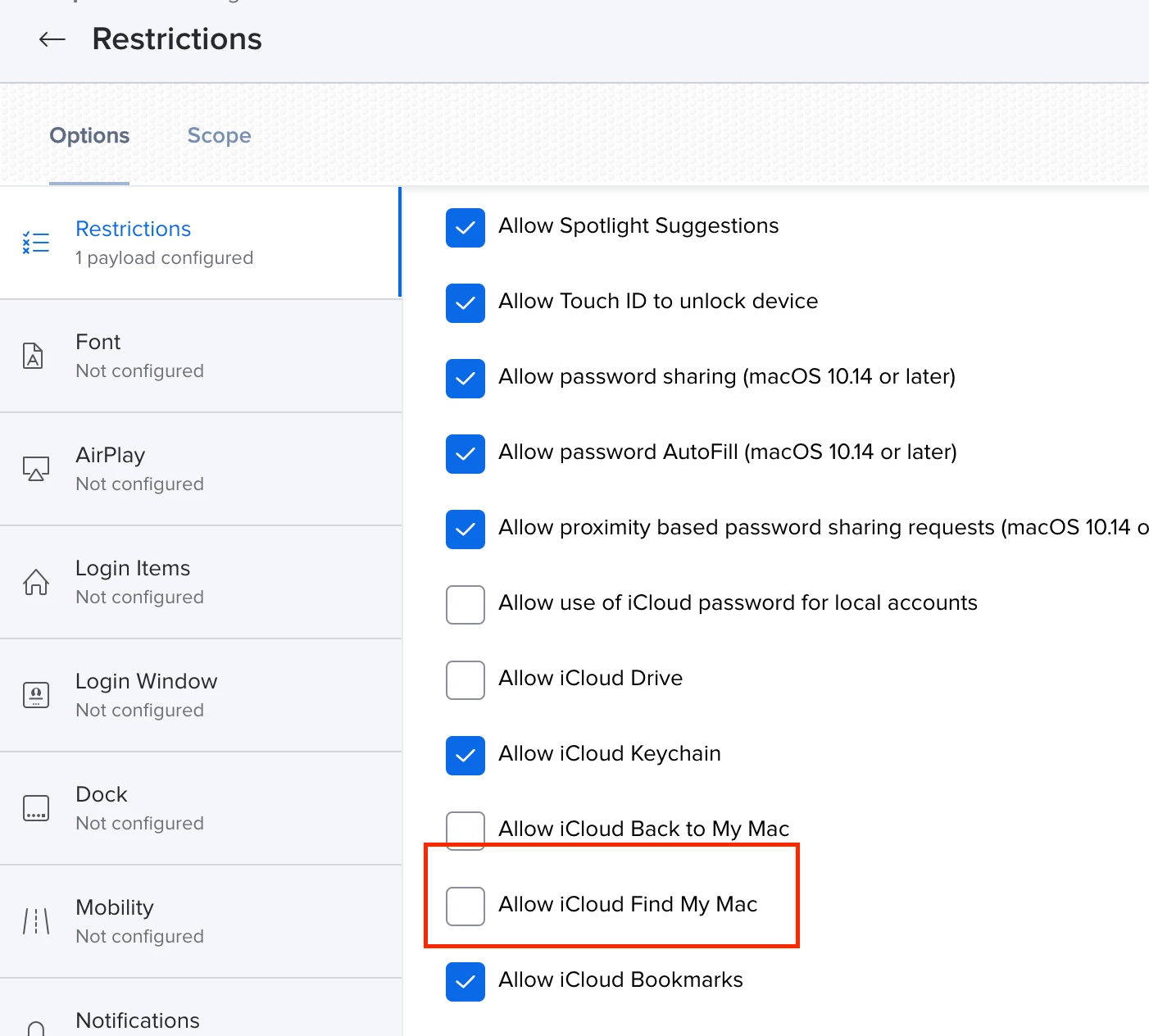
Anyone having this issue or recommend a better way of disabling? What scares me the most is a user being able to remote wipe their Mac without IT's consent.

43 replies

DBrowning
Forum|alt.badge.img+25
  • Esteemed Contributor
  • April 15, 2021

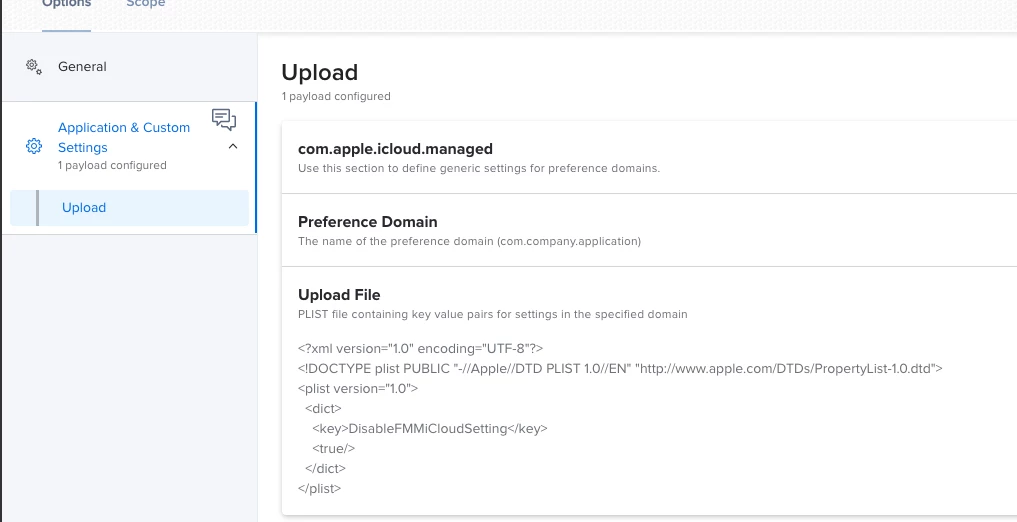
This has been an issue since Catalina. You need to create a manual profile with the following setting. Also, if its already enabled, there is no way to automate to turn it off.


Forum|alt.badge.img+1
  • New Contributor
  • May 4, 2021

@DBrowning I need to do this myself. Would you, or someone, share their profile please?


DBrowning
Forum|alt.badge.img+25
  • Esteemed Contributor
  • May 4, 2021

hey @spoe everything you need can be seen in the screenshot. You'll need to create a plist file with the below and then upload it.

<?xml version="1.0" encoding="UTF-8"?>
<!DOCTYPE plist PUBLIC "-//Apple//DTD PLIST 1.0//EN" "http://www.apple.com/DTDs/PropertyList-1.0.dtd">
<plist version="1.0">
    <dict>
        <key>DisableFMMiCloudSetting</key>
        <true/>
    </dict>
</plist>

Forum|alt.badge.img+4

@DBrowning

Most epic. Will also try this! Will this help disable "Activation Lock"? Have that set in the Prestage.


DBrowning
Forum|alt.badge.img+25
  • Esteemed Contributor
  • May 4, 2021

This will only gray out the option to turn on FindMyMac.


Forum|alt.badge.img+4

Cool!

It sure will help alot.

Is the Activation Lock + Find My Mac feature that unreliable?


DBrowning
Forum|alt.badge.img+25
  • Esteemed Contributor
  • May 4, 2021

There has been a bug in the payload from Jamf for disabling FindMyMac since Catalina. This is just a way to make sure the option is grayed out like it should be if using the payload in the Jamf Restrictions Payload.


Forum|alt.badge.img+4

Ah! I see! Still very nice! Thanks for info and config!


Forum|alt.badge.img+6
  • Contributor
  • May 27, 2021

@DBrowning You can create an extension attribute which shows which Macs have "Find My" turned on.

!/bin/bash

Check if "Find My Mac" is enabled

if nvram -xp | grep '<key>fmm-mobileme-token-FMM</key>' > /dev/null 2>&1; then FindMyMac="Enabled" else FindMyMac="Disabled" fi
echo "<result>$FindMyMac</result>"


Forum|alt.badge.img+6
  • Contributor
  • May 27, 2021

Then you can purge the FMM tokens from NVRAM:

!/bin/bash

/usr/sbin/nvram -d fmm-mobileme-token-FMM
echo "FMM Tokens Purged"
exit 0

N.B. It will require a restart for changes to take effect.


DBrowning
Forum|alt.badge.img+25
  • Esteemed Contributor
  • May 27, 2021

@AHolmdahl I just manually ran the nvram -d fmm-mobileme-token-FMM command rebooted and FMM is still enabled.


Forum|alt.badge.img+6
  • Contributor
  • May 27, 2021

@dbrowning My bad ... the nvram command seems to be deprecated.


Forum|alt.badge.img+3
  • New Contributor
  • July 30, 2021

If we push the .plist to disable the Find My Mac button does that mean it will be stuck in the Enabled state for those that already have it turned on? I'm dealing with this headache today on a new laptop from a former employee. 


Forum|alt.badge.img+1
  • New Contributor
  • November 11, 2021

If we push the .plist to disable the Find My Mac button does that mean it will be stuck in the Enabled state for those that already have it turned on? I'm dealing with this headache today on a new laptop from a former employee. 


Did you figure out a way around this? I ran the config profile to disable FMM but it just disabled the option. Users that had FMM on still have it on and now we cannot turn it off.


karthikeyan_mac
Forum|alt.badge.img+18
  • Honored Contributor
  • November 26, 2021

Its the same in macOS Monterey 12.0.1 with Jamf Pro 10.33. Unable to disable Find My Mac with Configuration Profiles.


crCraig
Forum|alt.badge.img
  • New Contributor
  • December 8, 2021

Did you figure out a way around this? I ran the config profile to disable FMM but it just disabled the option. Users that had FMM on still have it on and now we cannot turn it off.


I'm thinking about turning this on for everyone at my org as well. My thought was, yes, maybe those folks that have FMM on won't be able to turn it off, but those individuals could make an IT request and I imagine we could add them to the Exclusion for the Config Profile.

Testing that part out before I scope it to everyone.


Forum|alt.badge.img+1
  • New Contributor
  • December 8, 2021

I'm thinking about turning this on for everyone at my org as well. My thought was, yes, maybe those folks that have FMM on won't be able to turn it off, but those individuals could make an IT request and I imagine we could add them to the Exclusion for the Config Profile.

Testing that part out before I scope it to everyone.


Yes, this is basically what I had to do as well. Two profiles, opposites. I remove the user from one scope then add them to the other to allow us to turn off FMM for repair. 


Forum|alt.badge.img+7
  • Valued Contributor
  • February 9, 2022

@DBrowning You can create an extension attribute which shows which Macs have "Find My" turned on.

!/bin/bash

Check if "Find My Mac" is enabled

if nvram -xp | grep '<key>fmm-mobileme-token-FMM</key>' > /dev/null 2>&1; then FindMyMac="Enabled" else FindMyMac="Disabled" fi
echo "<result>$FindMyMac</result>"


Hi @AHolmdahl, thanks for this small script.

Does it still work?  I have it published in Jamf but the Extension Attribute so it when you look at a machine in inventory is blank


Forum|alt.badge.img+7
  • Valued Contributor
  • February 9, 2022

Hi @AHolmdahl, thanks for this small script.

Does it still work?  I have it published in Jamf but the Extension Attribute so it when you look at a machine in inventory is blank


I was able to get it to work using this:


fmmToken=$(/usr/sbin/nvram -x -p | /usr/bin/grep fmm-mobileme-token-FMM) if [ -z "$fmmToken" ]; then echo "<result>Disabled</result>" else echo "<result>Enabled</result>" fi

Forum|alt.badge.img+7
  • Valued Contributor
  • February 9, 2022

Has anyone figured out a way to disable find my mac through Jamf if it is enabled?  Depressingly we have a good chunk of our fleet that has it on and it would be nice if we can disable it from the MDM.


dpwlg
Forum|alt.badge.img+4
  • Contributor
  • April 1, 2022

Has anyone found out a way to disable FMM on a machine that already has it turned on? Tried the steps above but was only able to grey out the option FMM. But still under options have the option as the user to turn it on/off. But I am trying to forcefully disable this option.


Forum|alt.badge.img
  • New Contributor
  • April 1, 2022

No luck on my end. I made an extension attribute to show the status on each computer, then made smart groups that find all the computers with and without it. I then created the config profile to grey out the on / off switch, applied it to those that are already disabled and excluded those that are currently enabled. I then made a report of all that are enabled and we're manually contacting users to have them disable it. It's a PITA for a global company, but at least we can prevent it from being enabled in the future. Well, until a macOS update unwinds it all.


larsafpetersens
Forum|alt.badge.img+3

No luck on my end. I made an extension attribute to show the status on each computer, then made smart groups that find all the computers with and without it. I then created the config profile to grey out the on / off switch, applied it to those that are already disabled and excluded those that are currently enabled. I then made a report of all that are enabled and we're manually contacting users to have them disable it. It's a PITA for a global company, but at least we can prevent it from being enabled in the future. Well, until a macOS update unwinds it all.


Yes same here, good to know and thanks for sharing! 


dpwlg
Forum|alt.badge.img+4
  • Contributor
  • April 5, 2022

No luck on my end. I made an extension attribute to show the status on each computer, then made smart groups that find all the computers with and without it. I then created the config profile to grey out the on / off switch, applied it to those that are already disabled and excluded those that are currently enabled. I then made a report of all that are enabled and we're manually contacting users to have them disable it. It's a PITA for a global company, but at least we can prevent it from being enabled in the future. Well, until a macOS update unwinds it all.


Hey, mind sharing your extension attribute or the config setup to get this completed? Would really help out.


Jared_Y
Forum|alt.badge.img+14
  • Jamf Heroes
  • July 28, 2022

Hey, mind sharing your extension attribute or the config setup to get this completed? Would really help out.


@dpwlg use the following EA (name it FindMyMac Status):


fmmToken=$(/usr/sbin/nvram -x -p | /usr/bin/grep fmm-mobileme-token-FMM) if [ -z "$fmmToken" ]; then echo "<result>Disabled</result>" else echo "<result>Enabled</result>" fi


Create a Smart Group:

  • name: FindMyMac Enabled
  • (criteria) FindMyMac Status (operator) is (value) Enabled

Create a Configuration Profile:

  • name: Disable iCloud FindMyMac Option
  • Application & Custom Settings
    • domain: com.apple.icloud.managed
    • Upload File (copy & paste the following):


<?xml version="1.0" encoding="UTF-8"?> <!DOCTYPE plist PUBLIC "-//Apple//DTD PLIST 1.0//EN" "http://www.apple.com/DTDs/PropertyList-1.0.dtd"> <plist version="1.0"> <dict> <key>DisableFMMiCloudSetting</key> <true/> </dict> </plist>​


  • Scope: 
    • Targets: All Managed Clients (or relevant scope for your use case)
    • Exclusions: Smart Group: FindMyMac Enabled

Once the config profile is deployed you will be able to then contact the computers that show in the Smart Group "FindMyMac Enabled" (view > export csv). Once they disable FMM on their machine > have the computer check in to Jamf (sudo jamf recon or wait until next check-in) > It will then move them to the Config Profile and grey out/lock FMM in iCloud settings.