Question

Disable iCloud Erase Mac

  • April 1, 2022
  • 9 replies
  • 61 views

dpwlg
Forum|alt.badge.img+4

I have been asked by my manager to find a solution for where our users are allowed to sign into their PC with their own Apple ID. 

The solution we would like to achieve is blocking a user from erasing the machine if they sign into their iCloud account.

9 replies

scottb
Forum|alt.badge.img+18
  • Valued Contributor
  • April 1, 2022

Are you referring to EACS in Monterey?


dpwlg
Forum|alt.badge.img+4
  • Author
  • Contributor
  • April 1, 2022

Are you referring to EACS in Monterey?


No, I am speaking about iCloud specifically where our users are able to sign in with their Apple IDs we would like to block the feature to delete or erase data of the computer.
Most of our machines have iCloud enabled or specifically Find My Mac enabled where they can erase the computer.

[cid:image001.png@01D845C9.213787A0] [cid:image002.png@01D845C9.2DFF9FE0]

Damone Pierre
Senior IT Support Specialist
+1 917-215-3648 Mobile


[cid:did-logo_00424822-827e-4717-9573-96d24400b8c7.png]
www.didagency.com
[cid:mmm_e78959e4-bbc2-4a76-91e3-762085f6d3b1.png]

larsafpetersens
Forum|alt.badge.img+3

You need to have users deactivate FindMy because the activation lock is activated with it.

https://support.apple.com/en-us/HT208987

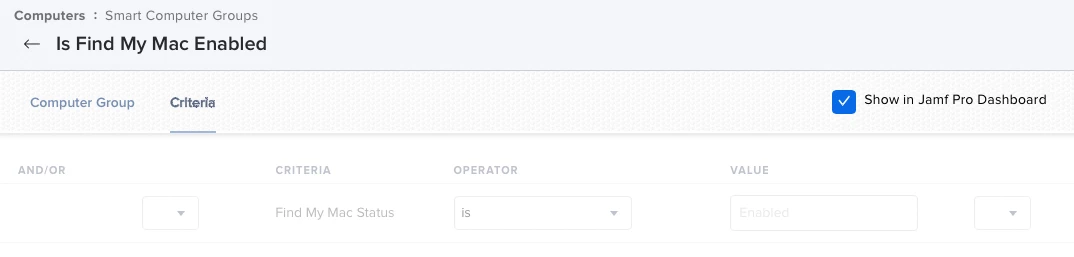
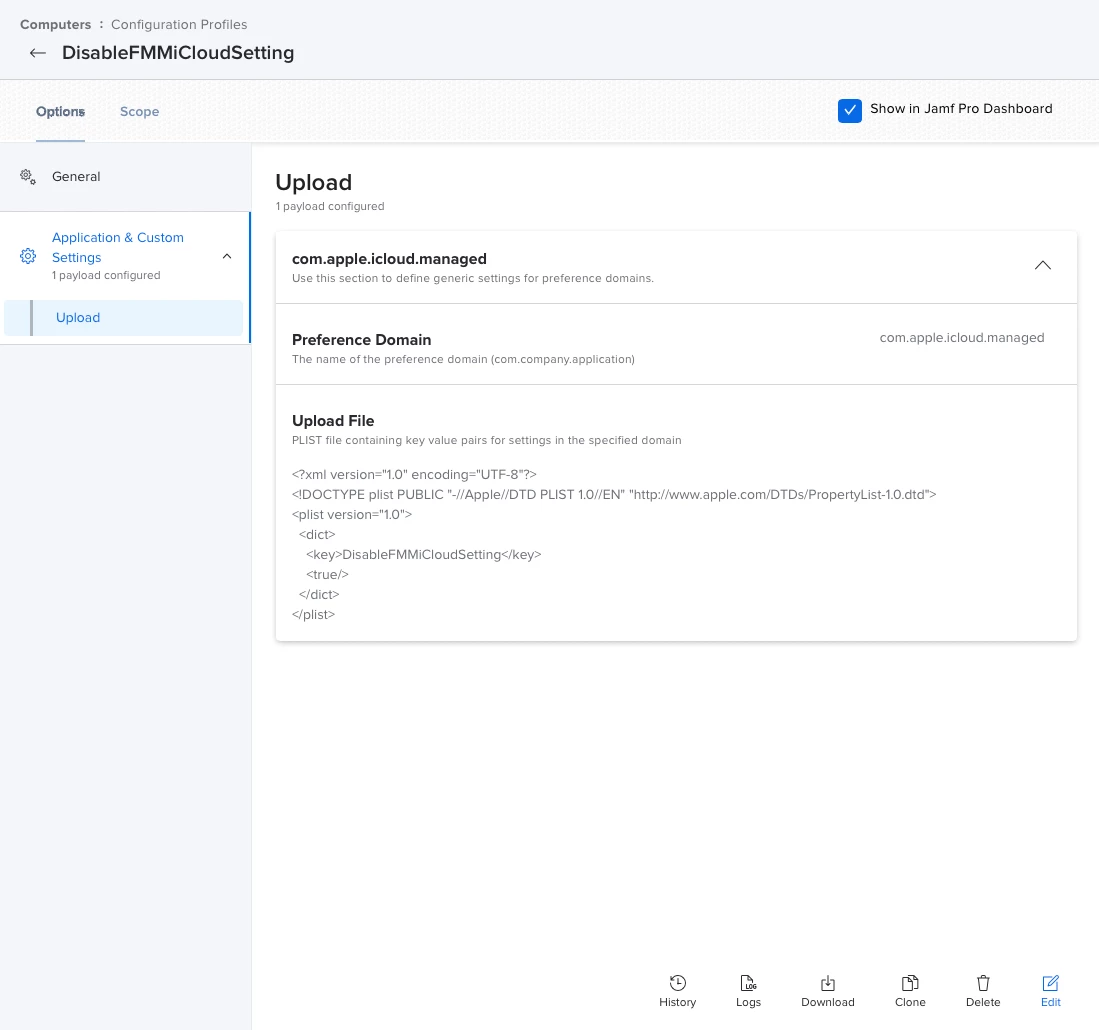
I would make a configuration profile ( Applications and Custom Settings) to "grey" out find my Mac from system preferences scope to all, then an exclusion smart group for "Is Find my Mac Enabled" Criteria: Find My Mac Status Value: Enabled

This way users not having FMM enabled can't enable it, and user with it already enabled can access the preference pane to disable it.


Because of apples security you can't to my knowledge disable FMM remotely, you have to contact the users you find from the smart group having it enabled, and tell them to disable it manually.


Hope this makes sense, and if there is a better way I'm sure someone else can chime in.


MacJunior
Forum|alt.badge.img+9
  • Valued Contributor
  • April 4, 2022

@larsafpetersens how do you create that smart group ?! I don't find a criteria called "Find My Mac Status" ?


larsafpetersens
Forum|alt.badge.img+3

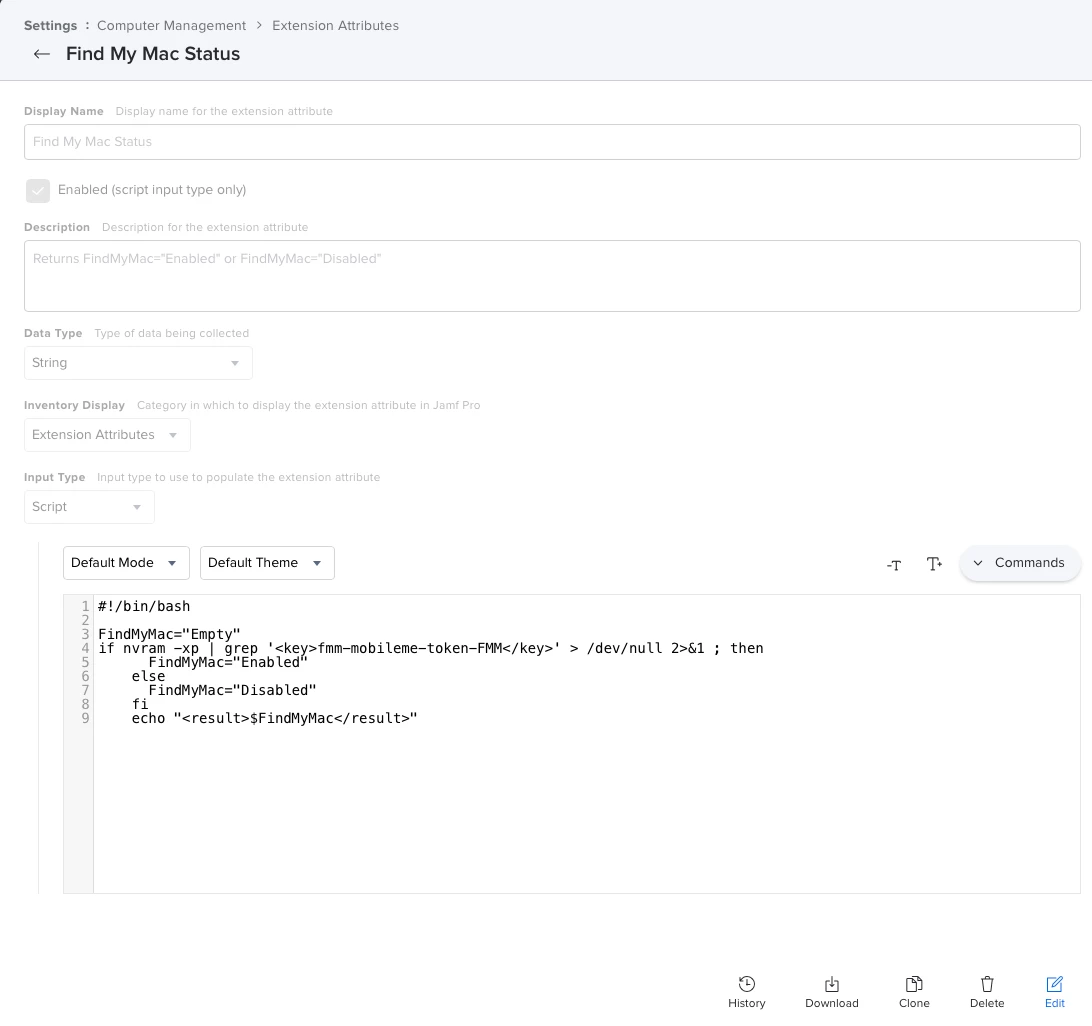
Hi @MacJunior , Yes you will need to create a new Extension Attribute from Settings --> Computer Management -->Extension Attributes. Found the one I'm using here https://community.jamf.com/t5/jamf-pro/disable-find-my-mac/m-p/234558

I edited it to add the variable before to make it work for me

Data Type: String

Input Type :Script


#!/bin/bash
 
FindMyMac="Empty"
if nvram -xp | grep '<key>fmm-mobileme-token-FMM</key>' > /dev/null 2>&1 ; then
 FindMyMac="Enabled"
else
 FindMyMac="Disabled"
fi
echo "<result>$FindMyMac</result>"

dpwlg
Forum|alt.badge.img+4
  • Author
  • Contributor
  • April 4, 2022

@larsafpetersens Appreciate that info. You rock let me see if this works out for me. :) 


dpwlg
Forum|alt.badge.img+4
  • Author
  • Contributor
  • April 8, 2022

Hi @MacJunior , Yes you will need to create a new Extension Attribute from Settings --> Computer Management -->Extension Attributes. Found the one I'm using here https://community.jamf.com/t5/jamf-pro/disable-find-my-mac/m-p/234558

I edited it to add the variable before to make it work for me

Data Type: String

Input Type :Script


#!/bin/bash
 
FindMyMac="Empty"
if nvram -xp | grep '<key>fmm-mobileme-token-FMM</key>' > /dev/null 2>&1 ; then
 FindMyMac="Enabled"
else
 FindMyMac="Disabled"
fi
echo "<result>$FindMyMac</result>"

Can you share screenshots creating this new to jAMF not sure how to set this up?


larsafpetersens
Forum|alt.badge.img+3

Can you share screenshots creating this new to jAMF not sure how to set this up?


Sure, also remember that creating a new extension attribute requires an inventory update to populate its information, default is 1 every day.  so to test the function directly just do a recon manually in terminal.

Extension Attribute:

Smart group:

Configuration Profile for All Managed Clients, Is Find My Mac Enabled excluded:


hope that helps!


dpwlg
Forum|alt.badge.img+4
  • Author
  • Contributor
  • April 8, 2022

Sure, also remember that creating a new extension attribute requires an inventory update to populate its information, default is 1 every day.  so to test the function directly just do a recon manually in terminal.

Extension Attribute:

Smart group:

Configuration Profile for All Managed Clients, Is Find My Mac Enabled excluded:


hope that helps!


Saying it again you Rock! Thanks! :D