Question

Disable OS X's auto detection of shared drives?

  • August 13, 2015
  • 2 replies
  • 29 views

Forum|alt.badge.img+1

Is it possible to disable OS X's auto detection of shared drives? So only mapped network drives will show up

2 replies

RobertHammen
Forum|alt.badge.img+29
  • Esteemed Contributor
  • August 13, 2015

Are you talking about mounting the users' home directory from their AD profile, or are you talking about the list of devices in the Finder sidebar?

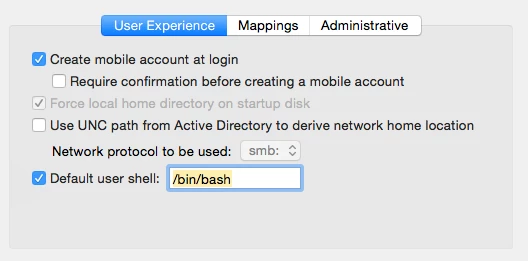
If the user's profile, uncheck the box Use UNC path from Active Directory to derive network home location

If the latter, there's a thread here on disabling NetBIOS...

https://jamfnation.jamfsoftware.com/discussion.html?id=15357


Forum|alt.badge.img+10
  • Contributor
  • August 13, 2015

The Shared section of the Finder sidebar shows Computers on the local subnet that are advertising their services or presence. Finder is set to listen for Macs offering Screen Sharing, AFP or SMB over Bonjour. If they're not offering any services they will not appear in the Shared Sidebar or in the Finder Network window, so one option would be disable the services the computers are advertising. If that is beyond your control however, you can turn off Bonjour Computers in Finder Preferences in the Sidebar Tab.

If they're Windows or SAMBA-based you would need to disable NetBIOS