Question

Disable share Notes on Notes.app

  • October 21, 2021
  • 4 replies
  • 54 views

LaSagesse
Forum|alt.badge.img+6

Hello 🙂

Students chat with the Notes app. They share their note. Do you know if it is possible to turn off note sharing?

Thanks for your help.

 

4 replies

naschenbrenner
Forum|alt.badge.img+10

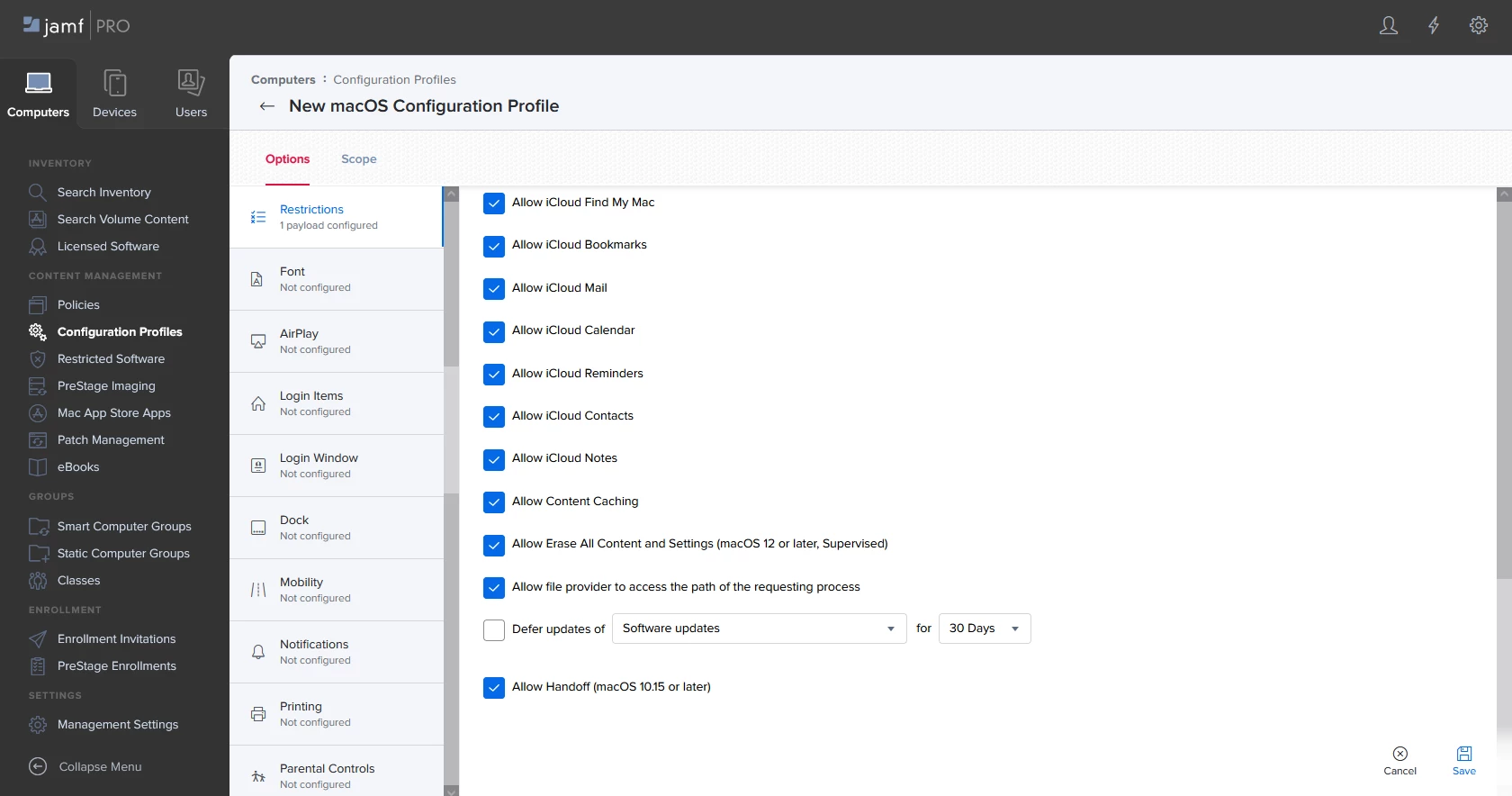
My understanding is that you must have an iCloud account to share notes, which means you should be able to create a configuration profile that disallows Notes being stored in iCloud. To do this you can set up a Permissions configuraton profile, and then uncheck "Allow iCloud Notes" under the Functionality tab. You may also want to disable AirDrop/other sharing services at the same time should they decide to start doing that instead.


LaSagesse
Forum|alt.badge.img+6
  • Author
  • Contributor
  • October 22, 2021

My understanding is that you must have an iCloud account to share notes, which means you should be able to create a configuration profile that disallows Notes being stored in iCloud. To do this you can set up a Permissions configuraton profile, and then uncheck "Allow iCloud Notes" under the Functionality tab. You may also want to disable AirDrop/other sharing services at the same time should they decide to start doing that instead.


Hello nashenbrenner, thanks a lot, it's exactly what i'm looking for. I actually don't find the line "Allow icloud Notes". Could you help me ? 

I use Jamf PRO and i look in : devices / configuration profile / new / restrictions / fonctionnality - it's the good path ? 

Thx 


naschenbrenner
Forum|alt.badge.img+10

Hello nashenbrenner, thanks a lot, it's exactly what i'm looking for. I actually don't find the line "Allow icloud Notes". Could you help me ? 

I use Jamf PRO and i look in : devices / configuration profile / new / restrictions / fonctionnality - it's the good path ? 

Thx 


Yes, that's the path I'm finding it under. If on-prem is your server up to date with the latest Jamf install (10.33)?


LaSagesse
Forum|alt.badge.img+6
  • Author
  • Contributor
  • October 25, 2021

Yes, that's the path I'm finding it under. If on-prem is your server up to date with the latest Jamf install (10.33)?


Too bad for me.. this rule is for computers, not for devices.. and i don't find the same line for iPad.. thanks anyway 🙂