Question

Download Security Update 2021-001 for Catalina

  • February 4, 2021
  • 38 replies
  • 214 views

mhasman
Forum|alt.badge.img+22

Does anyone have URL to download Security Update 2021-001 for macOS 10.15 Catalina?

Is so, would you share, please? Thanks!

38 replies

Forum|alt.badge.img+10
  • Valued Contributor
  • February 9, 2021

@mhasman Just published - https://support.apple.com/kb/DL2068 - for Catalina 2021-001... but nothing yet for Mojave 2021-001. :-(

Tempting me to put Boot Camp on my Intel Macs and get actual timely OS updates and patches from a real OS vendor who understands supporting technologies from more than 2 years ago. :-p


sdagley
Forum|alt.badge.img+25
  • Jamf Heroes
  • February 9, 2021

Be aware that Security Update 2021-001 Catalina does not include the fix for CVE-2021-3156 (sudo vulnerability). For that you'll need macOS Catalina 10.15.7 Supplemental Update 10.15.7 which is not yet available to download from support.apple.com (it is however available to install via Software Update)


mhasman
Forum|alt.badge.img+22
  • Author
  • Valued Contributor
  • February 10, 2021

Question now is where to download Supplemental Update 10.15.7 02/09/2021 :)


sdagley
Forum|alt.badge.img+25
  • Jamf Heroes
  • February 10, 2021

Or more to the point, how long will it take Apple to release the standalone .pkg installer for it? It was 8 days from Security Update 2021-001 Catalina being released via Software Update and the .pkg becoming available from support.apple.com. Let's hope Apple beats that time with the macOS Catalina 10.15.7 Supplemental Update 10.15.7 .pkg.


Forum|alt.badge.img+10
  • Valued Contributor
  • February 10, 2021

@sdagley I'd like to think the prolific complaining I have been doing in the past week has helped - they're all posted as downloads now... but not well-named, and ever since Security Update 2020-006 for Mojave I think Apple owes it to us to at least state on the download page whether the update is cumulative or requires the preceding version be installed.

For example, what's the difference between:
https://support.apple.com/kb/DL2068 - Security Update 2021-001 (Catalina)
https://support.apple.com/kb/DL2071 - Security Update 2021-001 (Catalina)

A few minutes ago those pages were identical although except for the download links; while the text of the latter has been updated to read "macOS Catalina 10.15.7 supplemental update" but the header still says Security Update 2021-001 (Catalina)

You would think with the marketing budget Apple has they could pay someone enough to ensure consistency in release naming... they're not winning any bonus points from me:

Big Sur = minor point release
Catalina = supplemental update
Mojave = security update

Speaking of Mojave here's the latest:
https://support.apple.com/kb/DL2070 - Security Update 2021-002 for Mojave
And for those who - I can't anticipate why - might really need it:
https://support.apple.com/kb/DL2069 - Security Update 2021-001 for Mojave

A penultimate complaint - this naming scheme (or lack thereof) is really going to muddy the waters when the NEXT security updates are released... presumably we'll be looking at 2021-003 for Mojave, 2021-002 for Catalina, and Big Sur 11.2.2 or 11.3.1 depending on how far Apple's progressed with features before zero days require them to patch again. leading me to...

One final complaint - https://support.apple.com/en-us/HT212177 defining the security content says it fixes the sudo vulnerability - CVE-2021-3156 - as well as a couple Intel graphics drivers. Do we really need to download 1.7GB+ to each Mac needing updates for a 500k binary (sudo) plus generously 500MB for the graphics drivers? How I miss the old days of incremental updaters and combo updaters... if your fleet's well maintained you should only need to push the 500k to fix sudo!

Oh, to end on a useful note, in my correspondence with Apple where I was complaining about the lack of standalone downloads from the support site, I was advised that, for limited testing on isolated systems that couldn't run software update, one could always download the associated assets from the same catalog ID along with the .dist file, and with them all in the same folder, run:

/usr/sbin/installer -target / -pkg /path/to/folder/with/pkgs.dist

I had no idea you could do that with the .dist files, I always wondered what purpose they served! Mind you this is for TESTING and specifically NOT RECOMMENDED for deployment to your fleet... but it's another tool in my belt.


sdagley
Forum|alt.badge.img+25
  • Jamf Heroes
  • February 10, 2021

@gabester Thanks for sharing that .dist trick, but after looking at today's version of Security Update 2021-001 with a post date of 2021-02-08 (https://support.apple.com/kb/DL2071?viewlocale=en_US&locale=en_US) as opposed to the version made available yesterday with a post date of 2021-02-05 (https://support.apple.com/kb/DL2068?viewlocale=en_US&locale=en_US) it appears that Apple is re-writing history by re-releasing macOS Catalina 10.15.7 Supplemental Update 10.15.7 as Security Update 2021-001 (Catalina)


Forum|alt.badge.img+10
  • Valued Contributor
  • February 10, 2021

@sdagley according to my NetSUS, they re-released "macOS Catalina Security Update 2021-001" (19H524) and there's the "macOS Catalina 10.15.7 Supplemental Update" maybe is the latter for those Macs with the first release of "Security Update 2021-001" installed (19H512) ???


sdagley
Forum|alt.badge.img+25
  • Jamf Heroes
  • February 10, 2021

@carlo.anselmi Probably as users seeing Security Update 2021-001 (Catalina) re-appear after it was installed would be a definite cause of confusion.


Forum|alt.badge.img+10
  • Valued Contributor
  • February 11, 2021

@sdagley I agree
Well explained and links here


Forum|alt.badge.img+12
  • Valued Contributor
  • February 16, 2021

Is there a direct link anywhere to the actual February 9th release (only available in Software Update)? Everything I can find is the "older" 20201-001 released on 2-8-2021.


Forum|alt.badge.img+10
  • Valued Contributor
  • February 16, 2021

@tomt https://support.apple.com/kb/DL2071 is the URL to download the DMG containing the standalone pkg, which is effectively a combo updater for Catalina 10.15.7 to build 19H524. You don't need to install the previous same-named Security Update 2021-001 to build 19H512 first.


Forum|alt.badge.img+12
  • Valued Contributor
  • February 16, 2021

@gabester So I downloaded the file you linked to and attempted to install it on a 2018 MBP with OS build 19H15. Install failed.

I think I'm slowly losing my mind. Time to wipe this box and start again. Just in case it is something on this particular machine. I do appreciate the help so far.


sdagley
Forum|alt.badge.img+25
  • Jamf Heroes
  • February 16, 2021

@tomt Any chance that Mac is subject to SSL inspection on traffic to external sites? One thing that .pkg doesn't contain is the bridgeOS update for Build 16H524. That has to be downloaded from Apple's servers, and will fail if SSL inspection is used.


Forum|alt.badge.img+12
  • Valued Contributor
  • February 16, 2021

@sdagley That's a good thought. While it's possible our messed up network could be doing inspection, I've had Apple's CDNs added to our bypass list for a while now. I'm thinking you are onto something with the bridgeOS update being a prerequisite.

I miss the days of simple Combo updates...


sdagley
Forum|alt.badge.img+25
  • Jamf Heroes
  • February 16, 2021

@tomt It's an ongoing battle :-). Note that Apple did update the Use Apple products on enterprise networks KB article in December, and there are several additions that I'm guessing are Big Sur related.


Forum|alt.badge.img+12
  • Valued Contributor
  • February 16, 2021

Bridge versions are identical between my successful machine and the failing one. iBridge: 18.16.14346.0.0,0


Forum|alt.badge.img+12
  • Valued Contributor
  • February 17, 2021

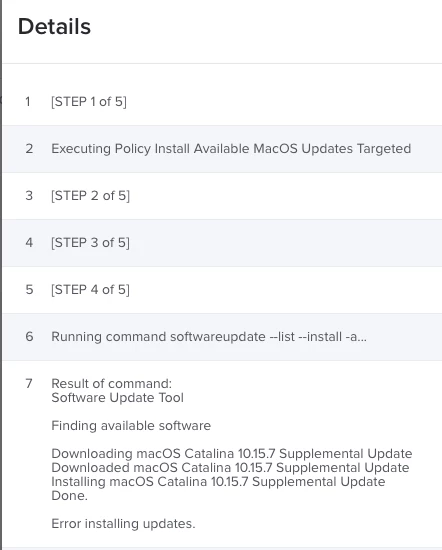
This is getting weirder...

Command Line update fails on both Jamf and Manual with the following error. This is while not on VPN and I had removed our public proxy just to be sure.

Then I used the system preference update and it went through fine. Unfortunately my users will not be able to do that.


mhasman
Forum|alt.badge.img+22
  • Author
  • Valued Contributor
  • February 17, 2021

@tomt Same here. Getting tons of errors deploying system updates with downloaded packages and/or by pushing simple, correct "softwareupdate" command - and manual software updates by System Preferences are executing properly


Forum|alt.badge.img+12
  • Valued Contributor
  • February 17, 2021

@mhasman Well, at least I'm not crazy. :)


Forum|alt.badge.img+12
  • Valued Contributor
  • February 23, 2021

Has anyone found a solid way of deploying this update? I need to get all my systems on 19H524 but the softwareupdate commands are failing.


Forum|alt.badge.img+1
  • New Contributor
  • February 23, 2021

I just downloaded the installer via the link above, and installed the .pkg via ARD with no issues.


Forum|alt.badge.img+12
  • Valued Contributor
  • February 23, 2021

@unclemac What build were you on before the update?


Forum|alt.badge.img+1
  • New Contributor
  • February 24, 2021

Some were 19H2, and some were 19H15. All updated with the Install function in ARD pushing out the pkg.

Now reporting 19H524.


Forum|alt.badge.img+12
  • Valued Contributor
  • February 24, 2021

Thanks @unclemac, it gives me something to look at. Of course our security blocks the install function of ARD (I'm lucky to have remote control capabilities at all), but this gives me something to go on.


mhasman
Forum|alt.badge.img+22
  • Author
  • Valued Contributor
  • February 24, 2021

I put that pkg attached to the police for Macs with 10.5.7 but not 19H524. Still getting "failed" during the installation with Self Service. Not all, but some. Never happened before with Apple's combo updates. IMO means Software Updates provides something else