Question

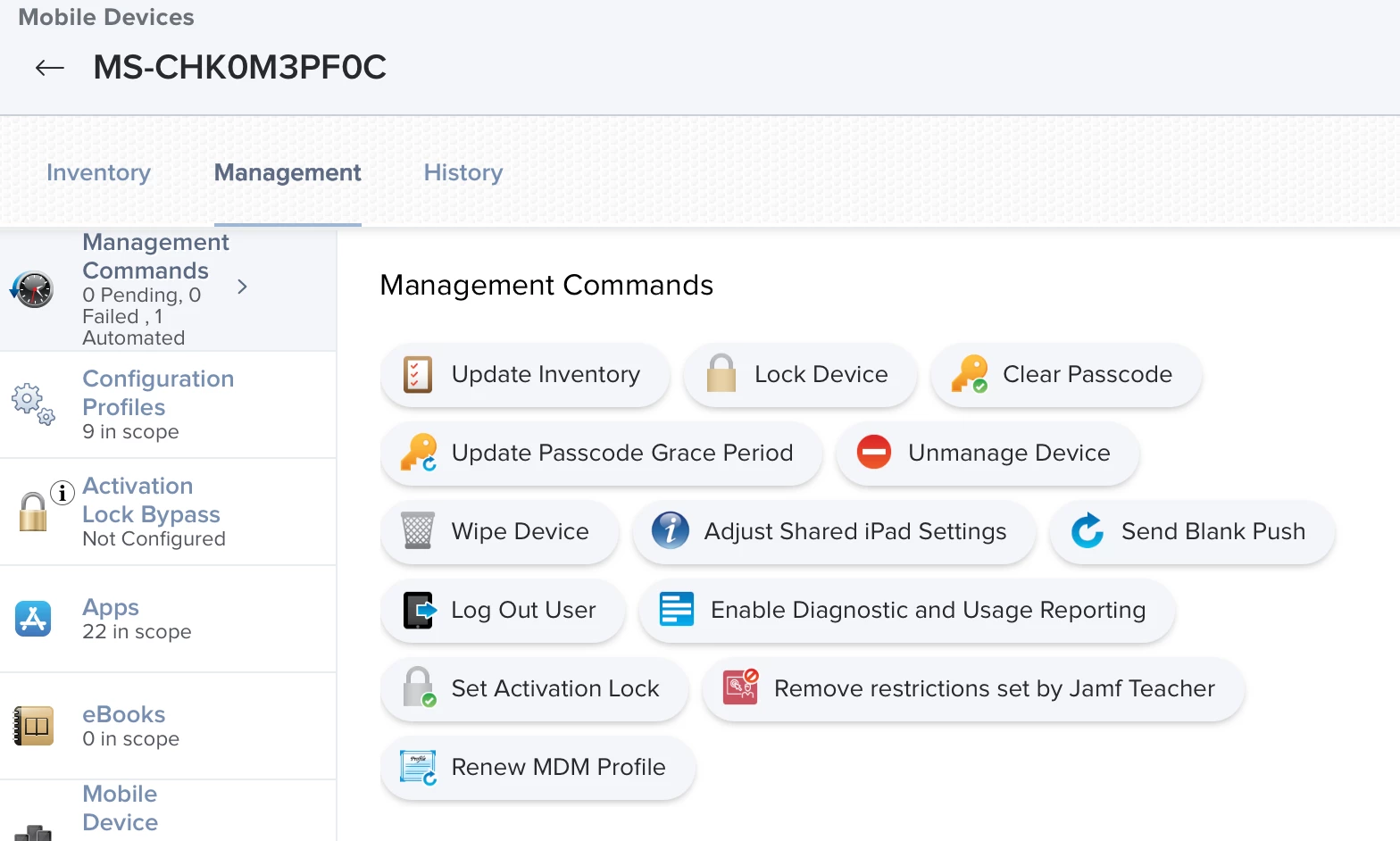
ENABLE LOST MODE Missing in Management Tab iOS 16.2 only

  • December 17, 2022
  • 26 replies
  • 174 views

ssagola
Forum|alt.badge.img+11

Weird thing. All our iPads that updated to 16.2 in JAMF PRO no longer have the ENABLE LOST MODE button in the management tab.

I always seem to have strange issues

Sara

26 replies

ssagola
Forum|alt.badge.img+11
  • Author
  • Contributor
  • December 17, 2022


ssagola
Forum|alt.badge.img+11
  • Author
  • Contributor
  • December 17, 2022

All the devices that do not have ENABLE LOST MODE now show unsupervised in the inventory >security tab
BUT the prestage all have supervise devices.


Forum|alt.badge.img+1
  • New Contributor
  • December 20, 2022

Dear @ssagola, we are expirencing the same issue. It only affects Shared iPad under iPadOS 16.2.

I'm currently working on it with Jamf Support Case Number CS0895802.

Best regards, Philipp


Forum|alt.badge.img+1
  • New Contributor
  • December 20, 2022

Thanks @Philipp_Weibel! I have the same issue with several customers and happy to see that you opened a Jamf Support Case!


ssagola
Forum|alt.badge.img+11
  • Author
  • Contributor
  • December 20, 2022

I opened one as well!


ssagola
Forum|alt.badge.img+11
  • Author
  • Contributor
  • December 20, 2022

What seems to be happening, when I wipe a device 16.2 it says "SUPERVISED" but the second I click (Update inventory which fails.) It then says "UNSUPERVISED" rendering a ton of Jamf features inoperable. 

I have tried many things myself to get it to go to SUPERVISED but have failed


Forum|alt.badge.img+1
  • New Contributor
  • December 20, 2022

Yes that's exactly it, the Shared iPad loose the supervised Status under iPadOS 16.2. It also happens under 16.3 Beta. We'll have to await response from support, there is nothing you can do in the Web Gui.


ssagola
Forum|alt.badge.img+11
  • Author
  • Contributor
  • December 20, 2022

I tried updating a few in different ways, that had 16.1 on them, that failed as well. So far nothing back from the case I filed but will post if I hear something NEW


ssagola
Forum|alt.badge.img+11
  • Author
  • Contributor
  • December 20, 2022

Yes that's exactly it, the Shared iPad loose the supervised Status under iPadOS 16.2. It also happens under 16.3 Beta. We'll have to await response from support, there is nothing you can do in the Web Gui.


Well, I just found out they were able to duplicate the issue and said they will open a product issue ticket.

Get Outlook for iOS<>

Forum|alt.badge.img+1
  • New Contributor
  • December 21, 2022
Well, I just found out they were able to duplicate the issue and said they will open a product issue ticket.

Get Outlook for iOS<>

Great, thanks for the update @ssagola !


schul-it_krz
Forum|alt.badge.img
  • New Contributor
  • December 22, 2022

Hello, similar environment and same issue here: shared iPad, iPadOS 16.2, button "ENABLE LOST MODE" existing no more in Management tab. Under the "Inventory" > "Security" tab I can also confirm "Lost Mode (supervised only)" has the status "Unsupervised Device".

But there is another big issue:

Since updating to iPadOS 16.2 "Update Inventory" is not working anymore on shared iPads. After sending the "Update Inventory" command it immediately fails ("History" tab > "Failed Command").

Anyone else with this problem?


Forum|alt.badge.img+1
  • New Contributor
  • December 22, 2022

Hello, similar environment and same issue here: shared iPad, iPadOS 16.2, button "ENABLE LOST MODE" existing no more in Management tab. Under the "Inventory" > "Security" tab I can also confirm "Lost Mode (supervised only)" has the status "Unsupervised Device".

But there is another big issue:

Since updating to iPadOS 16.2 "Update Inventory" is not working anymore on shared iPads. After sending the "Update Inventory" command it immediately fails ("History" tab > "Failed Command").

Anyone else with this problem?


Yes, all supervised activity, including "Update Inventory" will no longer work. In fact, it's the "Update Inventory" command which will set the device to "Unsupervised". Please refrain from updating any Shared iPad Devices to Version 16.2 while Jamf is investigating this Product Issue (PI110838). If necessary deploy a Restrictions config profile with "Defer software update" for 90 days to all Shared iPad. 


ssagola
Forum|alt.badge.img+11
  • Author
  • Contributor
  • December 22, 2022

Yes, all supervised activity, including "Update Inventory" will no longer work. In fact, it's the "Update Inventory" command which will set the device to "Unsupervised". Please refrain from updating any Shared iPad Devices to Version 16.2 while Jamf is investigating this Product Issue (PI110838). If necessary deploy a Restrictions config profile with "Defer software update" for 90 days to all Shared iPad. 


Any work around yet?

Get Outlook for iOS<>

ssagola
Forum|alt.badge.img+11
  • Author
  • Contributor
  • December 22, 2022

Hello, similar environment and same issue here: shared iPad, iPadOS 16.2, button "ENABLE LOST MODE" existing no more in Management tab. Under the "Inventory" > "Security" tab I can also confirm "Lost Mode (supervised only)" has the status "Unsupervised Device".

But there is another big issue:

Since updating to iPadOS 16.2 "Update Inventory" is not working anymore on shared iPads. After sending the "Update Inventory" command it immediately fails ("History" tab > "Failed Command").

Anyone else with this problem?


Seems to be a product issue in this thread above someone posted the #for the product issue

Get Outlook for iOS<>

Forum|alt.badge.img
  • New Contributor
  • December 22, 2022

I also have this exact same issue. Shared iPads on 16.2 becoming unsupervised following an inventory update.


ssagola
Forum|alt.badge.img+11
  • Author
  • Contributor
  • December 22, 2022

I also have this exact same issue. Shared iPads on 16.2 becoming unsupervised following an inventory update.


I would file a case if you have not already.


ssagola
Forum|alt.badge.img+11
  • Author
  • Contributor
  • December 22, 2022

Yes, all supervised activity, including "Update Inventory" will no longer work. In fact, it's the "Update Inventory" command which will set the device to "Unsupervised". Please refrain from updating any Shared iPad Devices to Version 16.2 while Jamf is investigating this Product Issue (PI110838). If necessary deploy a Restrictions config profile with "Defer software update" for 90 days to all Shared iPad. 


LOL good to know... most of mine updated while I was on vacation. Hopefully there is a work around


ssagola
Forum|alt.badge.img+11
  • Author
  • Contributor
  • December 30, 2022

Has anyone gotten a work around yet? It seems the case is still open and people still have issues


Forum|alt.badge.img+1
  • New Contributor
  • December 30, 2022

Has anyone gotten a work around yet? It seems the case is still open and people still have issues


Jamf is working on it in Product Issue (PI110838), there is no other workaround other than (as mentioned above) don't update Shared iPad to 16.2. We'll have to await a solution from Jamf. 


Forum|alt.badge.img+1
  • New Contributor
  • December 30, 2022

Thanks @Philipp_Weibel. Hope a fix is coming early 2023 :)


ssagola
Forum|alt.badge.img+11
  • Author
  • Contributor
  • January 3, 2023

Well, they closed my case said they do not know when the issue will be fixed and as of this moment there is no work around.  School starts back up in two days :( I have no way of locating LOST iPads. Or know which student has them. Shared mode has been nothing but a pain. This will be the last year I use shared mode. 


Forum|alt.badge.img+1

Well, they closed my case said they do not know when the issue will be fixed and as of this moment there is no work around.  School starts back up in two days :( I have no way of locating LOST iPads. Or know which student has them. Shared mode has been nothing but a pain. This will be the last year I use shared mode. 


I know it's annoying and i feel you. But disregarding the Shared mode because of one Jamf Bug is also not very fair, it's a very mighty addition to a iPad fleet if a personal device per student is not possible. In a 1to2 upto 1to5 setting i really like to use Shared iPad. 


ssagola
Forum|alt.badge.img+11
  • Author
  • Contributor
  • January 3, 2023

I know it's annoying and i feel you. But disregarding the Shared mode because of one Jamf Bug is also not very fair, it's a very mighty addition to a iPad fleet if a personal device per student is not possible. In a 1to2 upto 1to5 setting i really like to use Shared iPad. 


Yes, I agree.  I have used shared mode since 2019. It offered a TON of awesome features and seem to make it a bit easier for me to control them all. but if this was the first issue I would not have made that statement. Sorry just frustrated :)


ssagola
Forum|alt.badge.img+11
  • Author
  • Contributor
  • January 19, 2023

Forum|alt.badge.img+1
  • New Contributor
  • January 19, 2023

UPDATE: Issue will be resolved on the new release

https://docs.jamf.com/prerelease-jamf-pro/10.43.0/rc/RC4SQJV8YU/Resolved_Issues.html


And Shared iPad who already lost the supervised status will regain it, no need for re-enrollment.
Official statement from Jamf:
With the PI, the supervision status of the devices never really changed. Only the way it is reported to Jamf Pro has changed.
In the latest iOS release, Apple unexpectedly changed a value that caused Jamf Pro to incorrectly state the devices were unsupervised, even though the supervision hadn't changed. Once the PI is fixed, devices that were incorrectly reported as "not supervised" will be correctly reported as "supervised".