Question

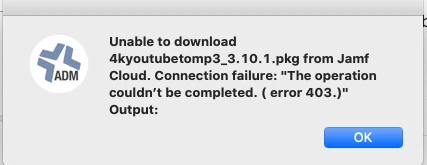
Error: Package was not successfully downloaded. 403

  • June 22, 2020
  • 36 replies
  • 158 views

Show first post

36 replies

Forum|alt.badge.img+7
  • Contributor
  • October 12, 2020

Same issue here. Pkg's will work via Self Service for a couple weeks, then eventually fail to download with a "Error. Package was not successfully downloaded. 403". Some fail immediately after initial upload then work after re-uploading with a different name. Seems to be specific to Self Service based policies/pkgs.


Forum|alt.badge.img+1
  • New Contributor
  • October 13, 2020

If it helps, the basic thing you should check is whether your Activation code is not expired. In jamf nation account one can find this


Forum|alt.badge.img+3
  • New Contributor
  • November 2, 2020

How can i fixe the erreur 403 ?


Forum|alt.badge.img+4
  • Contributor
  • November 23, 2020

Has anyone found a resolution to this?
Error: package was not successfully downloaded. 403
Error: FalconSensor 6.12.12505.pkg is not available on HTTP server. I am using Jamf Cloud distribution point.


Forum|alt.badge.img+2
  • New Contributor
  • November 24, 2020

I'm having this problem too. Jamf Cloud Distro. Trying to download a new pkg.
Error: Package was not successfully downloaded. 403
The network connection was interrupted while downloading


Forum|alt.badge.img+12
  • Valued Contributor
  • November 27, 2020

This has been happening constantly for many months. When users were in the office and pulling from our local DPs, we didn't see as much of it. But since everyone moved home and are now pulling from Jamf's cloud, we are seeing this multiple times daily.


snowfox
Forum|alt.badge.img+9
  • Contributor
  • November 27, 2020

Ok after reading more through this thread I may be referencing a different download problem...

I sometimes have this problem with large packages downloaded from a resellers remote DP. To fix it I have to select Cache the package first in the packages section of the policy and then Install cached package as a second package step in the same policy.

This ensures the full package downloads first before the workstation tries to install it.
If a policy just has 'install' it can try to kick off the package installation before it has fully downloaded the package. Doesn't always happen but I have seen it.

It started doing it for our self service install of Catalina 10.15.7, which it wasn't doing before we upgraded to 10.25.2. So I change it to cache and then install cached and that fixed it.

I've also seen it happen when a large package is still syncing from our on prem DP to the resellers DP.
Jamf will download the unfinished package and try to extract it. You'll get an error 'saying the upgrade failed' the package may be corrupt. When you change it to cache instead of install, you'll find your 8Gb package is only downloading 3Gb to the waiting room folder on the workstation. That's how you know the package hasn't finished syncing to the cloud DP.


Forum|alt.badge.img+7
  • Contributor
  • September 16, 2021

I often run into this problem now and again but it seems to be only certain packages that create this issue. The quickest way around this is to use Packages.app.

You can drop the pkg into packages the Additional Resources of the Scripts tab and add a Post-installation script to install the pkg.

This is an example script I used to install a software called Melodyne which I could not install the pkg I downloaded from the site...

 
#!/bin/bash
# Program: Melodyne 5_1_1_003.pkg.sh
# Determine OS version
osvers=$(sw_vers -productVersion | awk -F. '{print $2}')
# Determine working directory
install_dir=`dirname $0`
# Install Melodyne 5_1_1_003
/usr/sbin/installer -dumplog -verbose -pkg $install_dir/"Melodyne 5_1_1_003.pkg" -target "$3"
Upload the pkg and install... it always works for me when I get that error.


DWilliams-cmsd
Forum|alt.badge.img+3

Glad I found this thread.  Had the same issue with select Adobe CC packages.  Changed name, re-uploaded via JSS web interface, and re-deployed with complete success.  Thanks to all above for posting your experience.  Made solving the issue easy.


Forum|alt.badge.img+1
  • New Contributor
  • March 19, 2024

Glad I found this thread.  Had the same issue with select Adobe CC packages.  Changed name, re-uploaded via JSS web interface, and re-deployed with complete success.  Thanks to all above for posting your experience.  Made solving the issue easy.


Yep, same here with an Adobe CC package that I pre-zipped. I removed a space, and a + sign in the name and then the file came out of pending within a few minutes and now deploys properly.


Forum|alt.badge.img+3
  • New Contributor
  • June 4, 2024

Has anyone found a resolution to this?
Error: package was not successfully downloaded. 403
Error: FalconSensor 6.12.12505.pkg is not available on HTTP server. I am using Jamf Cloud distribution point.


Did you ever resolve this issue? I am trying to push the latest version of CrowdStrike to my devices and keep getting an error 400 message saying the package was not successfully downloaded.