Solved

Eset agent error when pushed

  • October 16, 2018
  • 44 replies
  • 110 views

Forum|alt.badge.img+7

So eset has a script to install the agent which worked great. Now im getting a script error 1. I have no idea whats going on here. Im not getting alot of detail. Anyone else see this?

Sending Wake On LAN command... Opening SSH Connection to 10.10.160.21... Authenticating... Successfully authenticated. Verifying Computer's Identity... The MAC Address has been verified. Checking Operating System Version... Running Mac OS X 10.14 (18A391) Verifying /usr/local/jamf/bin/jamf... /usr/local/jamf/bin/jamf is current (10.7.1-t1536934276) Verifying /usr/sbin/jamf... /usr/sbin/jamf does not exist. Verifying /Library/Preferences/com.jamfsoftware.jamf.plist... Preparing Policy... Executing Policy 2018-10-16 at 3:16 PM | jalcorn | 1 Computer Running script Eset Agent Installer... Script exit code: 1 Script result: Error running script: return code was 1. Submitting log to https://jamf.chathamfinancial.com:8443/ Finished.

Best answer by Look

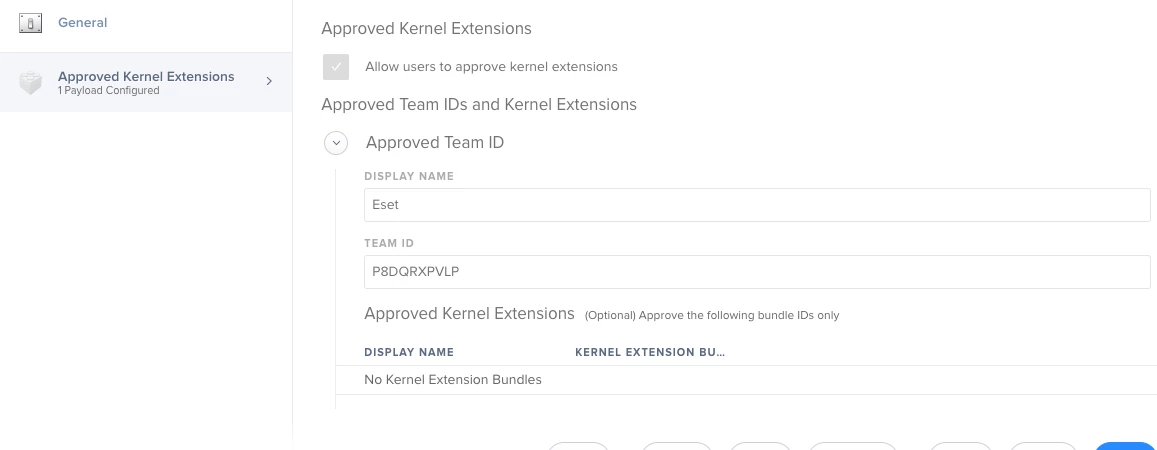
You need the actual KEXT Bundles in there, try adding the following in the lower part.
com.eset.kext.esets-kac
com.eset.kext.esets-mac
com.eset.kext.esets-pfw
com.eset.kext.esets_kac

44 replies

Forum|alt.badge.img+16
  • Valued Contributor
  • October 16, 2018

Do you have the ESET kexts and Team ID as Approved Kernel Extensions? These are pushed out using a Configuration Profile and required on 10.13.6 or later.


Forum|alt.badge.img+7
  • Author
  • Valued Contributor
  • October 17, 2018

Yeah i have that set up. Unless you spot something wrong @Look


Forum|alt.badge.img+16
  • Valued Contributor
  • Answer
  • October 19, 2018

You need the actual KEXT Bundles in there, try adding the following in the lower part.
com.eset.kext.esets-kac
com.eset.kext.esets-mac
com.eset.kext.esets-pfw
com.eset.kext.esets_kac


Forum|alt.badge.img+7
  • Author
  • Valued Contributor
  • October 19, 2018

thanks @Look


Forum|alt.badge.img+8
  • Valued Contributor
  • November 27, 2018

Hi @jalcorn, did you use the add_token tool to license ESET?


Forum|alt.badge.img+7
  • Author
  • Valued Contributor
  • November 27, 2018

@a.simmons No, turns out it was activity all the macs with the same licenses.


Forum|alt.badge.img+7
  • Valued Contributor
  • November 29, 2018

Does anyone know the location of where the ESET config file is saved?

We would like to push out the config file, and while we can export and import it, I cannot find where it is saved when imported (does not look to be the same location as for SCEP).

Many thanks

Found it: Library/Application Support/ESET/esets/modules/data/backup/ (or is this just the backup of the config file) distributing to this location does not seem to work? Any suggestions gratefully received.


Forum|alt.badge.img+7
  • Valued Contributor
  • November 29, 2018

@jalcorn where did you get the script to install agent? Can you share please?


Forum|alt.badge.img+5
  • Contributor
  • November 29, 2018

I think you get it here https://support.eset.com/kb7026/?locale=en_EN&segment=business


Forum|alt.badge.img+7
  • Author
  • Valued Contributor
  • November 29, 2018

@jkaigler You can log into your set portal and download it there. They give it out.


Forum|alt.badge.img+8
  • Valued Contributor
  • November 29, 2018

Is there any way to make the application run in the background the first time it runs?


Forum|alt.badge.img+7
  • Author
  • Valued Contributor
  • November 30, 2018

@a.simmons I have it run the agent at enrollment. Then Once the agent is installed ESET sees it and installs the app.


Forum|alt.badge.img+13
  • Honored Contributor
  • November 30, 2018

@sdunbar

Trying to run the esets_set command throws this error when I test:

"Cannot open file /Library/Application Support/ESET/esets/etc/esets.cfg: No such file or directory"

So I assume thats where it may save them. I've also been toying with moving around the settings.json from /Library/Application Support/ESET/esets/cache/data/ but I've not made much headway.

Also I'm unsure if there is any script available to those of us moving over from SCEP for Mac, and when I contacted their support about it I was told there was no way to customize the installer at the time of installation, even though the pkg file allows for GUI customization choices.


Forum|alt.badge.img+7
  • Valued Contributor
  • November 30, 2018

@jalcorn I opened a ticket with ESET support, this is their response ...

Thank you for contacting ESET North America Technical Support.

At this point there is no official script that is offered to assist wit the deployment. With JAMF you should be able to preload the kernel extensions and push out the package installer.


Forum|alt.badge.img+7
  • Author
  • Valued Contributor
  • November 30, 2018

@jkaigler This link will point you to the right spot.

https://support.eset.com/kb6541/?locale=en_US&viewlocale=en_US


Forum|alt.badge.img+13
  • Honored Contributor
  • December 3, 2018

@jalcorn Are you an ESET customer outright or are you cutting over from SCEP for Mac?


Forum|alt.badge.img+7
  • Author
  • Valued Contributor
  • December 3, 2018

@andrew.nicholas I have Jamf installing the agent and then ESET sees the agent but no app and then installs it.


Forum|alt.badge.img+13
  • Honored Contributor
  • December 3, 2018

@jalcorn Thanks for responding. Did you work with ESET as a vendor directly and thus got the ERA or did you claim the ESET licenses and app installer per Microsoft on their decomming of SCEP for Mac (rebranded ESET)?


Forum|alt.badge.img+7
  • Author
  • Valued Contributor
  • December 3, 2018

@andrew.nicholas Im not sure if i understand. We have never used SCEP, we have only used eset.


Forum|alt.badge.img+13
  • Honored Contributor
  • December 3, 2018

@jalcorn Thanks, that helps confirm what I thought. Microsoft and ESET are offering users a free year of the client as Microsoft is EOLing SCEP for Mac at the end of the year, however it appears to be only the client and there are no real configuration or deployment options available to the installer.


Forum|alt.badge.img+7
  • Author
  • Valued Contributor
  • December 3, 2018

@andrew.nicholas ahh okay. Yeah there full suite is worth it.


Forum|alt.badge.img+8
  • Valued Contributor
  • December 3, 2018

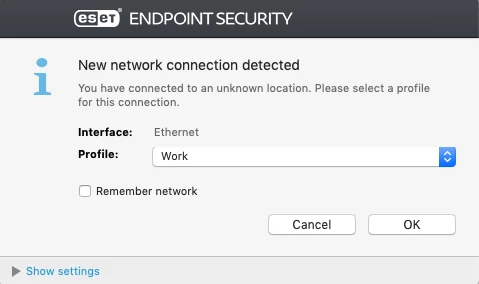
@andrew.nicholas I'm in the same situation as you, moving from SCEP to ESET. I haven't found a way to configure it or suppress prompts like the one below


Forum|alt.badge.img+12
  • Valued Contributor
  • December 4, 2018

@a.simmons : To configure it you should run the 'business' installer, select the remote option and configure it as needed. This will produce setting files (/tmp/esets_setup.dat and /tmp/program_components.dat) you ship with the installer (or create by a pre-pre-install script). I did so, but still get the same pop-up about 'New network connection' :( So I am not sure whether my config was not taken, or whether this is a feature that can not be configured.

I find it very hard to find mac related info on the ESET website, and in particular anything related to remote install without using their Remote Admin Console.


Forum|alt.badge.img+13
  • Honored Contributor
  • December 4, 2018

@mschroder I've had a rather long email thread with their support and the culmination is that customization of this product without the ERA is not possible. Logic would dictate that since options can be changed manually when running the GUI installation then there must be a command line method of doing so, but I've not been able to come up with anything yet.


Forum|alt.badge.img+12
  • Valued Contributor
  • December 5, 2018

@andrew.nicholas That is an interesting message, makes me wonder what the famous program_components.dat is good for. I don't think we want to go for the ERA, but seems we have to have another look before deciding on that.