Question

ESET EndPoint Security requesting full disk access

  • January 4, 2019
  • 30 replies
  • 118 views

Forum|alt.badge.img+7

I am testing a migration from Microsoft SCEP to ESET EndPoint Security. I have the package installing and activating, but on launch ESET prompts requesting full disk access. Has anyone gotten around this?

The ESET support page says this must be done manually on 10.14

I am testing with 10.14.1 and JAMF Pro 10.8

30 replies

Forum|alt.badge.img+13

This is currently an issue with the product that is supposed to be released in the next iteration, which is hopefully this month.

https://forum.eset.com/topic/17606-eset-675000-and-1014-mojave-tcc-issue/?tab=comments#comment-87721


Forum|alt.badge.img+23
  • Valued Contributor
  • January 4, 2019

ESET needs to provide a Privacy Preferences Policy Control profile for their product. By stating that this must be done manually in their public KB, ESET is displaying an ignorance of the security and privacy controls built into macOS.

Any vendor whose product(s) require a profile to operate as advertised ought to be providing these profiles, or at least templates and examples. This includes products with kernel extensions (KEXTs), and those that access protected user data (TCC/Privacy Preferences Policy Control). These profiles are required deliverables, just as important as the apps/software. I have gotten some initial positive responses on this point from a few security tool vendors.

Other related and important questions for organizations and CISOs to ask themselves are:
• Do we want to use 'security tools' that require creating 'back doors' and/or disabling the security tools built into macOS? A back door increases the computer's attack surface.
• What benefits do we gain from this tool?
• Do those benefits outweigh the risk inherent in creating the 'back door'?


Forum|alt.badge.img+7
  • Author
  • Valued Contributor
  • January 4, 2019

So far I am not impressed with ESET. It's free for one year for us, then probably on to something new.


Forum|alt.badge.img+13
  • Honored Contributor
  • January 14, 2019

The latest supposedly compatible version of ESET has been released

https://support.eset.com/news7093/


Forum|alt.badge.img+7
  • Author
  • Valued Contributor
  • January 14, 2019

I downloaded 6.7.6000.0, still prompting for full disk access


Forum|alt.badge.img+12
  • Valued Contributor
  • January 17, 2019

Yes, it is still prompting for full disk access. But now you can use tccprofile.py from https://github.com/carlashley/tccprofile (thanks carlashley!) to create the profile needed to whitelist ESET AV and you can install via JAMF. Still a shame that ESET does not provide all bits and pieces needed for a silent remote install.


Forum|alt.badge.img+7
  • Author
  • Valued Contributor
  • January 17, 2019

Ah, thanks! I'll test that today if I get chance.


Forum|alt.badge.img+4

I've tried tccprofile.py from https://github.com/carlashley/tccprofile, but I still get prompted for full disk access after the upgrade. If I ignore the prompt without telling it to not show me the prompt again, then reboot, I don't get the prompt when I log back in. This lead me to believe that the config profile had worked until I checked the full disk access location under Security and Privacy. It still isn't showing up, but I'm also no longer getting prompted to add it. Will it necessarily show up in Security and Privacy, or am I good to go once it stops prompting me to add the access?


Forum|alt.badge.img+15
  • Valued Contributor
  • February 26, 2019

@asher.wilkinson Ignoring a prompt is equivalent to a denial in that the user won't actually get prompted to enable it again (as you experience). To get the approval prompt back, run tccutil reset All and relaunch the app.


Forum|alt.badge.img+22
  • Employee
  • February 26, 2019

Like most antivirus and security software, ESET does require additional access granted to it to allow its previous functionality on 10.14 due to changes with TCC.

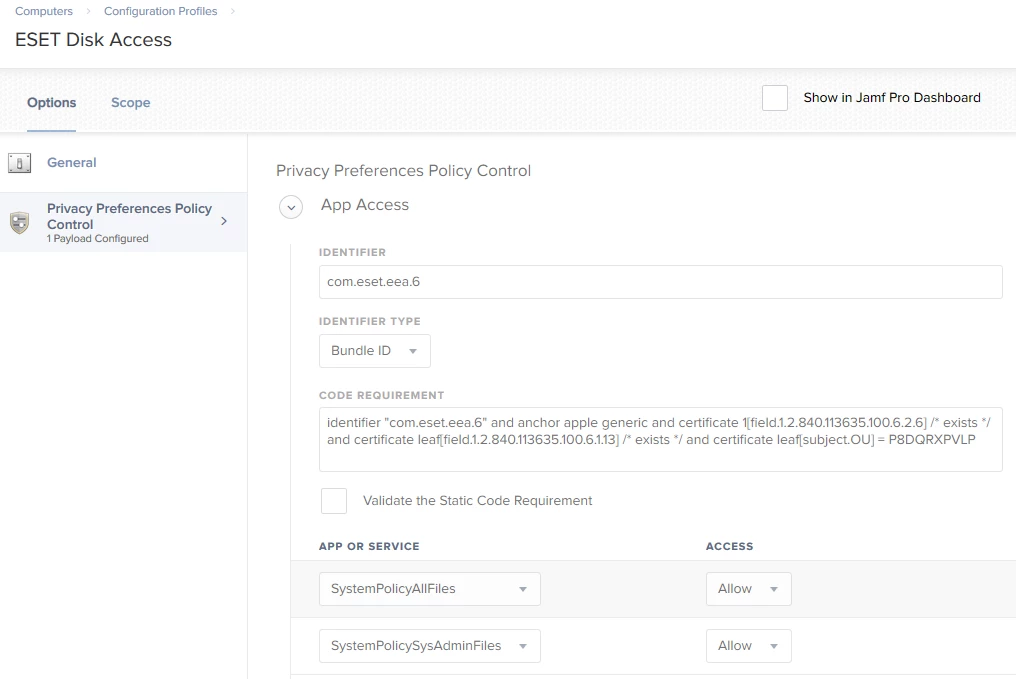
I have found that if I do a PPPC profile to whitelist bundle ID: com.eset.eea.6 with code signature:

identifier "com.eset.eea.6" and anchor apple generic and certificate 1[field.1.2.840.113635.100.6.2.6] /* exists */ and certificate leaf[field.1.2.840.113635.100.6.1.13] /* exists */ and certificate leaf[subject.OU] = P8DQRXPVLP

and ALLOW access to SystemPolicyAllFiles (equivalent to full disk access in system preferences) I am able to have the software installer and run without prompts.

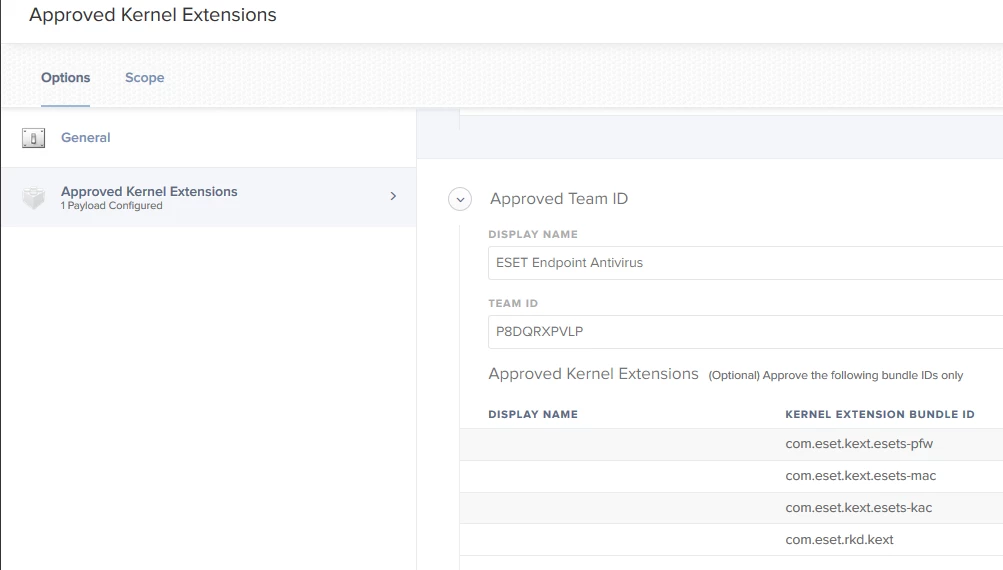
I did also have to push out a KEXT profile for that part of the functionality as well with the following team ID: P8DQRXPVLP and respective kernel extension bundle IDS: com.eset.rkd.kext, com.eset.kext.esets-kac, com.eset.kext.esets-mac and com.eset.kext.esets-pfw


Forum|alt.badge.img+4

@mike.paul When you do all that, ESET shows under Full Disk Access in Security and Privacy?


Forum|alt.badge.img+22
  • Employee
  • February 26, 2019

@asher.wilkinson, Nope. Nothing related to PPPC/TCC pushed via MDM is shown in System Preferences > Security & Privacy. Security & Privacy only shows what's stored in the two tcc.db databases which contains user prompt choices.

Thats by design from Apple.

You can see the settings pushed via MDM in the Profiles Pane in System Preferences or by reading the MDMOverrides.plist file. In order to read that MDMOverrides file though terminal does need to be granted Full Disk Access in Security & Privacy:

/usr/libexec/PlistBuddy -c "print" /Library/Application Support/com.apple.TCC/MDMOverrides.plist

Forum|alt.badge.img+4

I get the following error when running that script

Error Reading File: /Library/Application Support/com.apple.TCC/MDMOverrides.plist

Forum|alt.badge.img+22
  • Employee
  • February 26, 2019

@asher.wilkinson, as mentioned above that is to be expected unless you granted Terminal Full Disk Access in Security & Privacy. It's kind of a chicken and the egg type thing, you cant read the deployed settings for TCC without a TCC grant. But if you are an admin on a computer and want to take a look at that files contents you can manually go grant that access in System Preferences.


Forum|alt.badge.img+4

Alright, I didn't catch that when I first read through it. Thanks!


Forum|alt.badge.img+4

@mike.paul How do I identify the respective kernel extension bundle for the KEXT profile?


Forum|alt.badge.img+22
  • Employee
  • February 26, 2019

@asher.wilkinson I had put the four ones I found in my post above. When deploying those for that team ID I provided I found I wasn't prompted for any kext related things.


Forum|alt.badge.img+4

Great! I'll try that. Thanks!


Forum|alt.badge.img+5
  • Contributor
  • May 9, 2019

Just checking to see if there has been any progress or alternatives to grant full disk access to ESET or other apps like Cisco AMP.


Forum|alt.badge.img+4

@reidg For ESET, see @mike.paul's replies. Creating the configuration profile per his instructions fixed me right up.


Forum|alt.badge.img+5
  • Contributor
  • May 16, 2019

@asher.wilkinson and @mike.paul - Thanks for the help and information. I have two configuration profiles as shown in the attached images.

Is that similar to your config?


Forum|alt.badge.img+4

That looks like what I have. Is that not working for you?


Forum|alt.badge.img+5
  • Contributor
  • May 16, 2019

@asher.wilkinson - It appers to be working. We had one computer prompt for full disk access but most seem to be working. Thanks for confirming the config profiles. It's good to have a second set of eyes from a different system.


Forum|alt.badge.img+4

Generally, after reinstalling the OS, I still get the prompt once, but after a reboot, it doesn't prompt again. As long as the config profile shows up under Profiles in System Preferences, you should be fine.


Forum|alt.badge.img+4

Has the kernel extension information changed for Mojave? I'm getting the prompts again, but my configuration profile is in place with the same information in the screenshot above.