Solved

Extension Attribute for AD

  • May 10, 2019
  • 11 replies
  • 67 views

Forum|alt.badge.img+4

Hello,

Is it possible to add an object from AD into Jamf? If so, can someone walk me through it. I would like to add something that needs to be turned on or off by another team, but would like to reflect this so our help desk can look at the user and verify if its been turned off or on.
Best answer by robii


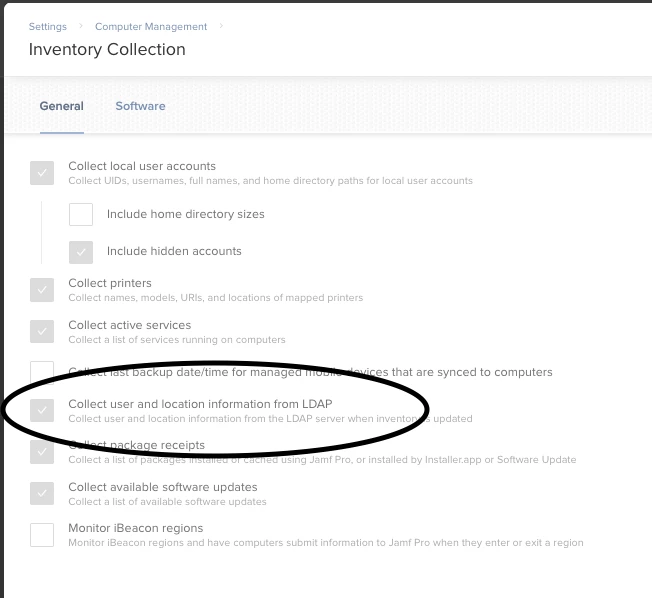
Do you have "Collect user and location information from LDAP" enabled in Inventory Collection?

11 replies

Forum|alt.badge.img+14
  • Contributor
  • May 10, 2019

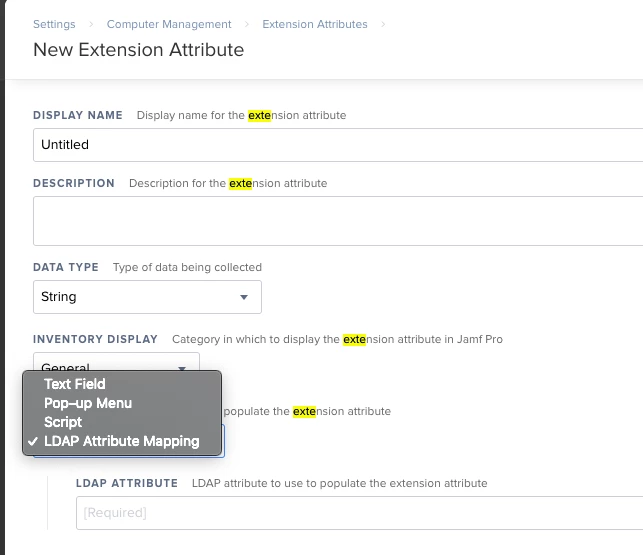
If you create a new computer extension attribute you can select "LDAP Attribute Mapping" as the Input Type and use whatever LDAP Attribute you'd like


Forum|alt.badge.img+4
  • Author
  • Contributor
  • May 10, 2019

It doesn't appear for me even though I have it, any suggestions?


mm2270
Forum|alt.badge.img+24
  • Legendary Contributor
  • May 10, 2019

Is your Jamf Pro server connected to AD? I believe that option only shows up if it’s connected to an LDAP server.


Forum|alt.badge.img+4
  • Author
  • Contributor
  • May 11, 2019

It is, which is why I cannot figure out why this doesn’t populate.


boberito
Forum|alt.badge.img+22
  • Jamf Heroes
  • May 11, 2019

Under I believe Inventory Collection there's a check box you need to enable if I remember right. I had the same issue and was pulling my hair out. I don't currently have access to my jamf server(i'm not at work). So I can't remember the exact name.


talkingmoose
Forum|alt.badge.img+36
  • Community Manager
  • May 11, 2019

You may need to enable the "Collect user and location information from LDAP" option in Jamf Pro Settings > Computer Management > Inventory Collection.


Forum|alt.badge.img+4
  • Author
  • Contributor
  • May 13, 2019

Still not working :-/


Forum|alt.badge.img+9

Have you tested the LDAP Server mappings to verify it is working as expected? Jamf Pro Settings>System Settings>LDAP Servers, click on the name of your LDAP Server. There should be a Test button on the bottom right. I'd check three settings, User Mappings, User Group Mappings, User Group Membership Mappings.


Forum|alt.badge.img+4
  • Author
  • Contributor
  • May 13, 2019

Yes, which is why this is so confusing. I’m not sure why it doesn’t populate.


Forum|alt.badge.img+13
  • Contributor
  • Answer
  • May 13, 2019


Do you have "Collect user and location information from LDAP" enabled in Inventory Collection?


Forum|alt.badge.img+3
  • Contributor
  • November 11, 2019

I've tried setting this up for ages.... I have all the above settings configured, LDAP mappings test works, LDAP extension attribute set to "memberOf" yet when I create a smart group for a specific LDAP group there are no members.
This is driving me and Jamf support to their wits end.