Question

Fine the windows Build in a VM

  • May 8, 2018
  • 7 replies
  • 51 views

Forum|alt.badge.img+7

Can anyone think of a good way to find the build of windows running in a VM? Been looking around and I'm not sure if its possible.

7 replies

Forum|alt.badge.img+5
  • Contributor
  • May 8, 2018

Command+R and type winver - works for me in Fusion.


Forum|alt.badge.img+7
  • Author
  • Valued Contributor
  • May 8, 2018

Anyway to automate with Jamf? @mm2270 magic powers?


Forum|alt.badge.img+7
  • Author
  • Valued Contributor
  • May 10, 2018

we were able to ping them with a windows script.


Forum|alt.badge.img+7
  • Contributor
  • May 10, 2018

For Parallels I created a EA that reads the VM version, here is the script which might help you out:

!/bin/bash

Extended Attribute to report the Windows Virtual Machines from Parallels Desktop

Created by Karthikeyan Marappan on 12/17/2013

Copyright 2012 __Apollogrp__. All rights reserved.

##############################################################################

The below module loops through the Users Documents

echo "<result>"
mdfind -name .pvm > /tmp/vmlist
cat /tmp/vmlist | while read i; do
if [ -f "/$i/VmInfo.pvi" ]; then
vmosversion=$(cat "/$i/VmInfo.pvi" | grep -i realosversion | awk '{print substr($1,16,8)}') 2> /dev/null
if [ "$vmosversion" == "unknown<" ]; then
echo >/dev/null
else echo "$vmosversion -"
fi
else
echo >/dev/null
fi
done
rm -r /tmp/vmlist
echo "</result>"

data type = string
input type = script


Forum|alt.badge.img+7
  • Author
  • Valued Contributor
  • May 10, 2018

awesome, thanks @Cornoir I'll give this a go


Forum|alt.badge.img+7
  • Author
  • Valued Contributor
  • May 14, 2018

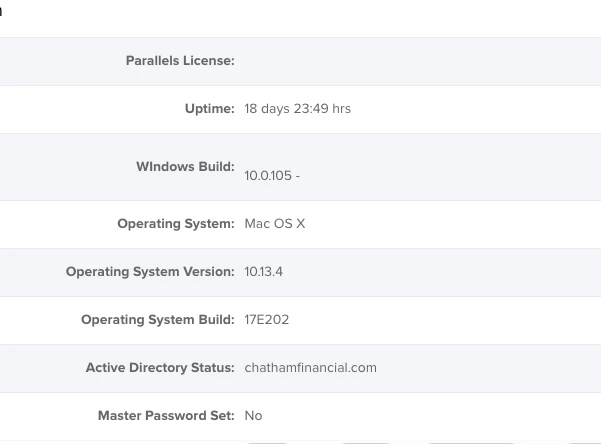
@Cornoir So i tried that script and it seems to cut off the rest of the info. Any thoughts?


Forum|alt.badge.img+7
  • Contributor
  • July 13, 2018

In the script this line is truncating the info:

vmosversion=$(cat "/$i/VmInfo.pvi" | grep -i realosversion | awk '{print substr($1,16,8)}') 2> /dev/null

I suggest running the script from the terminal with the sh -x prefix to see what is getting cut off and then edit the following section to display what you need (and then post the fix here for all):

print substr($1,16,8)