
Question

Global Protect 5.1.x PPPC Settings

  • July 8, 2020
  • 15 replies
  • 104 views

Forum|alt.badge.img+3

Hi All,

So we're moving to a newer version of Global Protect, 5.1.4 from 5.0.4, and have PPPC settings via Configuration Profile allowing access to the Download, Desktop, and Documents folders explicitly - just to reduce the number of click thru's required and potential calls from employees.

The changes in 5.1.4 seems to require an addition to the PPPC settings since apparently the bundle now has an additional '.client' at the end of it. I made the additions but something is still off and and the requests for access are still coming through.
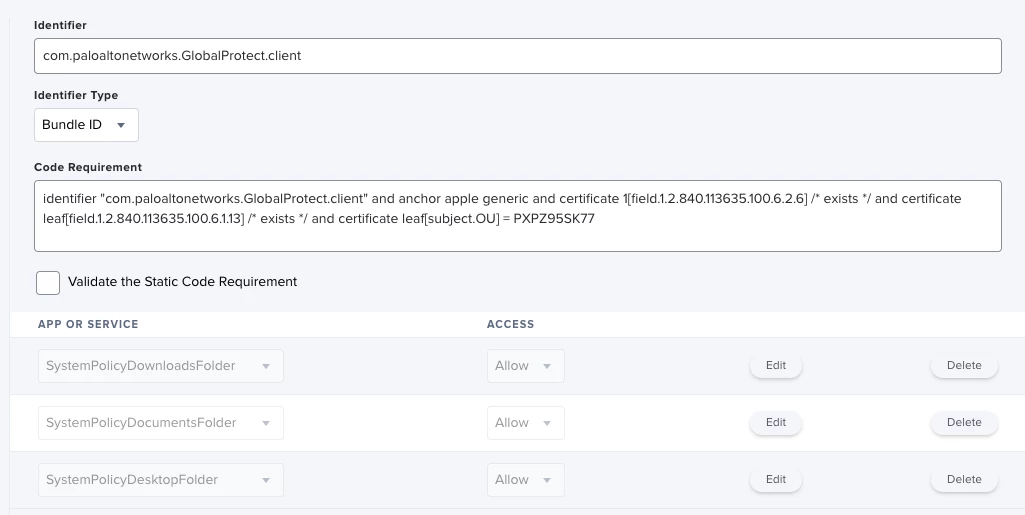
Wondering if anybody else has run into this also or has any ideas.

Thanks.

15 replies

dan-snelson
Forum|alt.badge.img+30
  • Honored Contributor
  • July 9, 2020

@tommersyip Looks right to me, but we're still deploying 5.0.x

What does the output of codesign -dr - /Applications/GlobalProtect.app look like?


Forum|alt.badge.img+3
  • Author
  • New Contributor
  • July 9, 2020

Looks correct, right? Weird.

This is the output of codesign -dr - /Applications/GlobalProtect.app

Executable=/Applications/GlobalProtect.app/Contents/MacOS/GlobalProtect
designated => identifier "com.paloaltonetworks.GlobalProtect.client" and anchor apple generic and certificate 1[field.1.2.840.113635.100.6.2.6] /* exists */ and certificate leaf[field.1.2.840.113635.100.6.1.13] /* exists */ and certificate leaf[subject.OU] = PXPZ95SK77

I did use that to create the PPPC originally. Wouldn't shock me if PAN did something weird with GlobalProtect


Forum|alt.badge.img+3
  • Author
  • New Contributor
  • July 9, 2020

Upon further testing. The PPPC settings do work, for a brand new install of 5.1.4. When upgrading from 5.0.4 to 5.1.4, however, something 'different' is happening which is causing the Download, Desktop, and Documents access requests to pop up.


Forum|alt.badge.img+15
  • Valued Contributor
  • July 9, 2020

I am having the same issue. Upgrading from 5.0.3 to 5.1.4 or 5.1.5 ignores the PPPC profile - even if I do a full uninstall of 5.0.3 first. SUPER annoying...I've tried "Deny" and "Allow" with the same result.


donmontalvo
Forum|alt.badge.img+36
  • Hall of Fame
  • July 9, 2020

Could it be the app is now requiring more access, where the PPPC whitelist needs to be updated?

Anyone open a ticket with Palo Alto yet?


Forum|alt.badge.img+15
  • Valued Contributor
  • July 10, 2020

I've opened a ticket with them and they are no help...


donmontalvo
Forum|alt.badge.img+36
  • Hall of Fame
  • July 11, 2020

My colleague tells me the same thing. Might be time to escalate the ticket. #rollsUpSleeves


Forum|alt.badge.img+3
  • New Contributor
  • November 23, 2020

Hello,
Is there some workflow on how to deploy the 5.1.4 Global Protect pkg with the configuration script and Configuration profile?


Forum|alt.badge.img+16
  • Honored Contributor
  • November 24, 2020

There are GP install directions and docs that are only available, with a support account. They also have profiles to install the right System Extensions.

I think the current release version is 5.2.x there was a few versions back to back last week

C


Forum|alt.badge.img+3
  • New Contributor
  • January 8, 2021

That is a PaloAlto System Engineer support answer:

"We do not currently qualify JAMF as a Mac management vendor. This is why our TAC does not have complete instructions for deploying GlobalProtect with JAMF. There is an existing feature request to support this and "company" has been added as a customer interested in this. However, there is not currently any timeline or commitment for it.

Have you worked with JAMF? I have no experience with it and my inquiries to other colleagues have yielded no additional information. "
Unfortunetly, I do not have GP support account yet.


Forum|alt.badge.img+3
  • New Contributor
  • April 29, 2021
"We do not currently qualify JAMF as a Mac management vendor. "

Wow...


dlondon
Forum|alt.badge.img+14
  • Honored Contributor
  • April 30, 2021

If you deploy your PPPC profile before installing Global Protect, 5.1.4 does it still get ignored?


Forum|alt.badge.img+17
  • Valued Contributor
  • May 4, 2021

We're noticing this as well - newer app version (5.2.6-87) seems to ignore/not like kernel extension whitelisting suddenly... and an additional "WOW" to Palo Alto "not qualifying Jamf as a Mac management vendor"....
Anybody aware of any solutions?


sdagley
Forum|alt.badge.img+25
  • Jamf Heroes
  • May 4, 2021

@mbezzo On Catalina GP 5.2.x will use a System Extension unless you're using the option in GP 5.2.5-H1 and later to use a Kernel Extension instead: https://knowledgebase.paloaltonetworks.com/KCSArticleDetail?id=kA14u0000001UoHCAU


Forum|alt.badge.img+17
  • Valued Contributor
  • May 4, 2021

thanks @sdagley - that's very helpful!

