Solved

Google Chrome Auto Update

  • April 20, 2015
  • 49 replies
  • 279 views

Forum|alt.badge.img+6

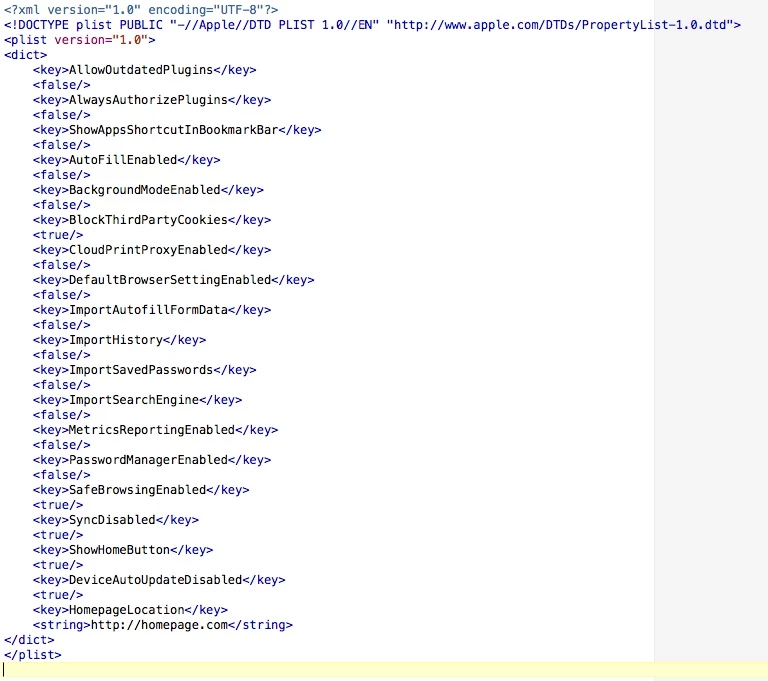
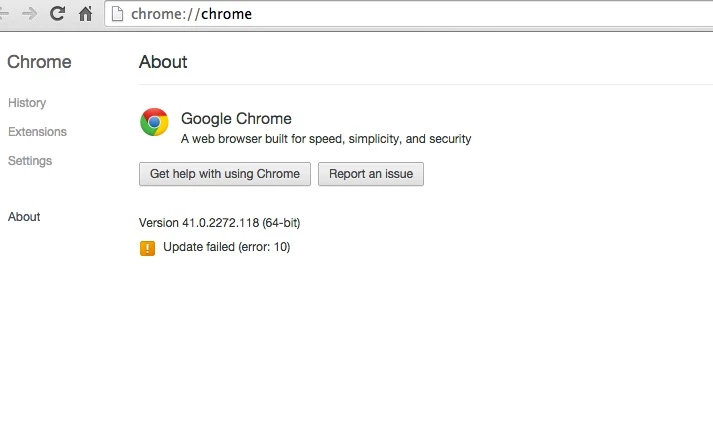
Has anyone actually been able to disable auto updates in a chrome package? - I was Able to create a new mdm configuration profile and upload an edited com.google.Chrome.plist file with a few policy settings. this worked great. I followed the instructions here: https://support.google.com/installer/answer/147176?hl=en&ctx=go

but I am still able to update chrome. as a matter of fact, - I even went as far as changing and even deleting the GoogleSoftwareUpdate folder under user/library/google - and it just builds a new one

I know in windows, it's one reg key and you get "Updates are disabled by the administrator"

can it really be this difficult?
Best answer by jebS

@CasperSally you were right on target!

I actually added a script to create the folders right after the Chrome package is installed. if launched, it can't access these folders and does not update - Thanks

!/bin/sh

mkdir -p ~/Library/Google/GoogleSoftwareUpdate
chown root ~/Library/Google/GoogleSoftwareUpdate
chmod 644 ~/Library/Google/GoogleSoftwareUpdate

49 replies

Forum|alt.badge.img+10
  • New Contributor
  • April 20, 2015

check out this post, has some useful info about it

https://groups.google.com/forum/#!msg/munki-dev/nBkPLR81lDw/w72GFkHxABAJ


Forum|alt.badge.img+11
  • Contributor
  • April 21, 2015

You have to remove the keystone launch agents to avoid auto updating.


Forum|alt.badge.img+14
  • Contributor
  • April 21, 2015

I added:

<key>DeviceAutoUpdateDisabled</key>
                                <true/>

to my configuration profile and updates will fail when the user clicks on 'Update Chrome'. It also stopped Chrome from autoupdating.

My new issue is how can I suppress the yellow bar saying "Google chrome might not be able to keep itself updated" during first launch?


Forum|alt.badge.img+6
  • Author
  • Contributor
  • April 21, 2015

Thanks - but that didn't stop the update - Here is what I have:


Forum|alt.badge.img+17
  • Honored Contributor
  • April 28, 2015

This is what I run at login ongoing. In my testing, in the last year or so Google started putting the GoogleSoftwareUpdate bundle back even if you manually removed it. To get around this, I removed it from current logged in user, then put back a dummy file with permissions that Google can't put its bundle back.

You could get away with once per user probably if you mainly had one user per machine, but we have student machines in carts where many login to the same machine.

Edit: this stops the auto update mechanism, I'm not sure if it stops updates if user goes to settings/about, you'd have to test that. For us, the issue was more about the error from config profile app folder restrictions stopping the SoftwareUpdate.bundle from launching and less about the actual updating happening. I'd probably allow auto updates if they weren't trying to launch out of the User Library folder.

#!/bin/sh

rm -rf /Users/$3/Library/Google/GoogleSoftwareUpdate/GoogleSoftwareUpdate.bundle
touch /Users/$3/Library/Google/GoogleSoftwareUpdate/GoogleSoftwareUpdate.bundle
chown root /Users/$3/Library/Google/GoogleSoftwareUpdate/GoogleSoftwareUpdate.bundle
chmod 644 /Users/$3/Library/Google/GoogleSoftwareUpdate/GoogleSoftwareUpdate.bundle

Forum|alt.badge.img+17
  • Honored Contributor
  • April 28, 2015

@Abdiaziz - in my testing with config profile set to DeviceAutoUpdateDisabled to true, it still tries to run the GoogleSoftwareUpdate.bundle on launch of the app. The chromium site only mentions support for Chromium on this, not OSX, not sure if that's why

if I go to Chrome://policy it doesn't show that setting coming down, though it is listed in the plist in HD/Library/Managed prefs - think it doesn't apply to OSX unfortunately.


Forum|alt.badge.img+6
  • Author
  • Contributor
  • Answer
  • April 29, 2015

@CasperSally you were right on target!

I actually added a script to create the folders right after the Chrome package is installed. if launched, it can't access these folders and does not update - Thanks

!/bin/sh

mkdir -p ~/Library/Google/GoogleSoftwareUpdate
chown root ~/Library/Google/GoogleSoftwareUpdate
chmod 644 ~/Library/Google/GoogleSoftwareUpdate


Forum|alt.badge.img+17
  • Honored Contributor
  • April 29, 2015

@jebba glad i could help.


Forum|alt.badge.img+18
  • Esteemed Contributor
  • April 29, 2015

My problem is that when using the google apps it will always tell the user that the browser is out of date, so then I get inundated with requests to update chrome because they feel it is needed. If I could disable that message that google puts at the top of the page would be even better!

Gabe Shackney
Princeton Public Schools


Forum|alt.badge.img+17
  • Honored Contributor
  • April 30, 2015

I haven't seen that prompt yet. We do update Chrome every month though, just on our schedule after testing.


Forum|alt.badge.img+5

I'm a little late to the game here. I created a script that will be used as a postflight script in the Chrome pkg that I upload to Casper Admin. The script runs the ksinstall -nuke command from all user directories as well as from the app directory in case it got installed in a system directory.

#!/bin/bash

usernames=`/bin/ls /Users`

for user in $usernames
do
    usrloc="/Users/$user/Library/Google/GoogleSoftwareUpdate/GoogleSoftwareUpdate.bundle/Contents/Resources/ksinstall"

    if [ -f "$usrloc" ]; then
        $usrloc --nuke
        chown root:wheel /Users/$user/Library/Google
        chmod a-rwx /Users/$user/Library/Google
    fi
done

apploc="/Applications/Google Chrome.app/Contents/Versions/43.0.2357.132/Google Chrome Framework.framework/Frameworks/KeystoneRegistration.framework/Resources/ksinstall"

if [ -f "$apploc" ]; then
 $apploc --nuke
fi

exit 0

Forum|alt.badge.img+1
  • New Contributor
  • February 23, 2016

Is it possible to apply this in Munki or even a postflight script for Deploystudio?


bpavlov
Forum|alt.badge.img+18
  • Esteemed Contributor
  • February 23, 2016

@kcalderw it's just a script so why not? A nopayload pkg with just a postinstall script or any other mechanism that Munki may use to execute scripts outside of packages if its allowed. I would be sure to test that script out though. It's hardcoding a folder with a version number which may be out of date by this point. You might need to improve upon the script.


AVmcclint
Forum|alt.badge.img+21
  • Esteemed Contributor
  • February 23, 2016

I'm glad this thread popped back up again. I've been using the

defaults write com.google.Keystone.Agent checkInterval 0

command provided by Google to stop the updates and I can unequivocally say it flat out does not work at all. I tried the script from @luke.j.nelson and so far that seems to do the trick.


Forum|alt.badge.img+20
  • Valued Contributor
  • February 23, 2016

I have to ask and I hope I'm not the only one blanking out on this one.

I see the phrase, post flight script being used above, related to having a post flight script in the Google package.

I created a script that will be used as a postflight script in the Chrome pkg that I upload to Casper Admin.

Does this mean you have the script added to the package policy and have it set to run AFTER everything else is finished? I have always been a little fuzzy about pre and post flight scripts.

When working with scripts, there are options to run before or after other items have been run. I have assumed that these are post flight and pre flight but now I am questioning my assumption on that.

Can someone help explain this?

Thank you.

Mick


Forum|alt.badge.img+5
  • Contributor
  • February 23, 2016

@bpavlov Yes I made this script for a specific version on the fly. Here's an updated script that should look at the latest version:

#!/bin/sh

usernames=`/bin/ls /Users`

for user in $usernames
do
    usrloc="/Users/$user/Library/Google/GoogleSoftwareUpdate/GoogleSoftwareUpdate.bundle/Contents/Resources/ksinstall"

    if [ -f "$usrloc" ]; then
        "$usrloc" --nuke
        /usr/sbin/chown root:wheel /Users/$user/Library/Google
        /bin/chmod a-rwx /Users/$user/Library/Google
    fi
done


if [ -e /Applications/Google Chrome.app ]; then
    latestver=`/bin/ls /Applications/Google Chrome.app/Contents/Versions | /usr/bin/sort -n | /usr/bin/tail -1`
    apploc="/Applications/Google Chrome.app/Contents/Versions/$latestver/Google Chrome Framework.framework/Frameworks/KeystoneRegistration.framework/Resources/ksinstall"

    if [ -f "$apploc" ]; then
        "$apploc" --nuke
    fi
fi

exit 0

mm2270
Forum|alt.badge.img+24
  • Legendary Contributor
  • February 23, 2016

@mconners Postflight, preflight, postinstall, preinstall scripts, and a couple of others technically refer to an embedded script within a .pkg or .mpkg installer. While some folks might use those terms interchangeably with a script run in a Casper Suite policy in a "Before" or "After" state, those aren't actually pre/postflight scripts, although they can kind of act like ones.

Also to note, a DMG cannot use an embedded postflight or preflight script. Only .pkg and .mpkg formats can have those. And yes, you create them in an application like Composer or Packages and they ride along with the package itself, so its self contained, not reliant on some other mechanism to deploy the script down from a share.

As further explanation, "post" scripts mean they run after the main payload of the package is deployed down, if there is a payload (see payload-free package for more on that) These are often used as "cleanup" kind of scripts, where some changes are made to the items just laid down, or, in some cases, to install something. A simple example of this would be dropping a .mobileconfig file into /tmp/ and then using a postflight script to actually install the Profile to the Mac. Another example would be loading a new LaunchDaemon/Agent that was just installed, so it starts working right away.

A "pre" script is run before the main payload is laid down, so for example, a simple use case would be to rename a directory, or delete an old version of an application, prior to installing the new one contained in the package itself.

Hopefully that helps explain things a bit.


AVmcclint
Forum|alt.badge.img+21
  • Esteemed Contributor
  • February 24, 2016

@luke.j.nelson I modified the line:
apploc="/Applications/Google Chrome.app/Contents/Versions/43.0.2357.132/Google Chrome Framework.framework...
to say:

apploc="/Applications/Google Chrome.app/Contents/Versions/*/Google Chrome Framework.framework...

and that works too as long as Google doesn't change their folder structure.


Forum|alt.badge.img+5
  • Contributor
  • February 24, 2016

@AVmcclint That doesn't quite work out, the next part:

if [ -f "$apploc" ]; then
    "$apploc" --nuke
fi

returns false because it is looking for * as a character, not a wildcard, and ksinstall --nuke doesn't run. If you test it with the #!/bin/sh -x header you can see verbose results in the command line, here's how it compares.

with *:

+ '[' -e '/Applications/Google Chrome.app' ']'
+ apploc='/Applications/Google Chrome.app/Contents/Versions/*/Google Chrome Framework.framework/Frameworks/KeystoneRegistration.framework/Resources/ksinstall'
+ '[' -f '/Applications/Google Chrome.app/Contents/Versions/*/Google Chrome Framework.framework/Frameworks/KeystoneRegistration.framework/Resources/ksinstall' ']'
+ exit 0

with version variable:

+ '[' -e '/Applications/Google Chrome.app' ']'
++ /bin/ls '/Applications/Google Chrome.app/Contents/Versions'
++ /usr/bin/sort -n
++ /usr/bin/tail -1
+ latestver=48.0.2564.109
+ apploc='/Applications/Google Chrome.app/Contents/Versions/48.0.2564.109/Google Chrome Framework.framework/Frameworks/KeystoneRegistration.framework/Resources/ksinstall'
+ '[' -f '/Applications/Google Chrome.app/Contents/Versions/48.0.2564.109/Google Chrome Framework.framework/Frameworks/KeystoneRegistration.framework/Resources/ksinstall' ']'
+ '/Applications/Google Chrome.app/Contents/Versions/48.0.2564.109/Google Chrome Framework.framework/Frameworks/KeystoneRegistration.framework/Resources/ksinstall' --nuke
+ exit 0

AVmcclint
Forum|alt.badge.img+21
  • Esteemed Contributor
  • February 24, 2016

yeah I just discovered a serious problem with the way I did it. The fans on all the Macs have spun up to full blast constantly and the system.log file is filling up with hundreds of entries every minute like this:

Feb 24 10:18:31 COMPUTERNAME com.apple.xpc.launchd[1] (com.google.keystone.user.agent[59949]): Service setup event to handle failure and will not launch until it fires.
Feb 24 10:18:31 COMPUTERNAME com.apple.xpc.launchd[1] (com.google.keystone.user.agent[59950]): Could not find and/or execute program specified by service: 2: No such file or directory: /Users/tturner/Library/Google/GoogleSoftwareUpdate/GoogleSoftwareUpdate.bundle/Contents/Resources/GoogleSoftwareUpdateAgent.app/Contents/MacOS/GoogleSoftwareUpdateAgent
Feb 24 10:18:31 COMPUTERNAME com.apple.xpc.launchd[1] (com.google.keystone.user.agent[59950]): Service setup event to handle failure and will not launch until it fires.
Feb 24 10:18:31 COMPUTERNAME com.apple.xpc.launchd[1] (com.google.keystone.user.agent[59951]): Could not find and/or execute program specified by service: 2: No such file or directory: /Users/tturner/Library/Google/GoogleSoftwareUpdate/GoogleSoftwareUpdate.bundle/Contents/Resources/GoogleSoftwareUpdateAgent.app/Contents/MacOS/GoogleSoftwareUpdateAgent

Every Mac has HUNDREDS of copies of the system.log file filled with this entry over and over again.

OOPS


AVmcclint
Forum|alt.badge.img+21
  • Esteemed Contributor
  • February 26, 2016

Something still isn't right. I fixed my script to resemble yours @luke.j.nelson and I ran it on a freshly imaged system where I logged in as a user and launched Chrome to let it create the folders it usually does. Then I ran the script and within a few minutes, the fans spun up to full blast and the CPU was pegged out and the system.log file was filling up every couple minutes with the same errors as above. It looks like setting the ~/Library/Google/ folder permissions to 000 really upsets the keystone agent.

I really wish Google would provide a working method of stopping the autoupdate.


Forum|alt.badge.img+8
  • Contributor
  • March 1, 2016
Something still isn't right. I fixed my script to resemble yours @luke.j.nelson and I ran it on a freshly imaged system where I logged in as a user and launched Chrome to let it create the folders it usually does. Then I ran the script and within a few minutes, the fans spun up to full blast and the CPU was pegged out and the system.log file was filling up every couple minutes with the same errors as above. It looks like setting the ~/Library/Google/ folder permissions to 000 really upsets the keystone agent. I really wish Google would provide a working method of stopping the autoupdate.

I just installed the script, as @luke.j.nelson wrote it, and applied to a MacBook Air, running 10.10.5, and had no issues. Works great! Thanks, Luke!

Maybe a fresh copy/paste into your script is in order?

Now, if I can just figure out how to disable Incognito mode....


Edit - our test device's fan hasn't sped up or anything, but the log is definitely filling up with complaints from keystone. I'm going to undo the script, darn it.


Forum|alt.badge.img+4

After foolishly running the script posted above: !/bin/sh
mkdir -p ~/Library/Google/GoogleSoftwareUpdate
chown root ~/Library/Google/GoogleSoftwareUpdate
chmod 644 ~/Library/Google/GoogleSoftwareUpdat

I am having the fan issues on all my machines. Console is reading out the error Feb 24 10:18:31 COMPUTERNAME com.apple.xpc.launchd[1] (com.google.keystone.user.agent[59949]): Service setup event to handle failure and will not launch until it fires.
com.apple.xpc.launchd[1] (com.google.keystone.user.agent[59950]): Could not find and/or execute program specified by service: 2: No such file or directory:

I am still relatively new to this game. Could anyone please please help me out. What do I need to do to get this script undone?


AVmcclint
Forum|alt.badge.img+21
  • Esteemed Contributor
  • March 9, 2016

@gabriel_martinez I did the same thing. I ended up doing this to fix it

#!/bin/sh

rm -rf /Users/$3/Library/Google/GoogleSoftwareUpdate/GoogleSoftwareUpdate.bundle
mkdir -p /Users/$3/Library/Google/GoogleSoftwareUpdate/
touch /Users/$3/Library/Google/GoogleSoftwareUpdate/GoogleSoftwareUpdate.bundle
chown root /Users/$3/Library/Google/GoogleSoftwareUpdate/GoogleSoftwareUpdate.bundle
chmod 644 /Users/$3/Library/Google/GoogleSoftwareUpdate/GoogleSoftwareUpdate.bundle

Then after all the dust settled and the fans spun down, I went into /var/log/ on each computer and saw HUNDREDS of system.log.* files. I deleted all but the most recent. I still don't know if this is really stopping the autoupdate, but we shall see.


donmontalvo
Forum|alt.badge.img+36
  • Hall of Fame
  • March 16, 2016