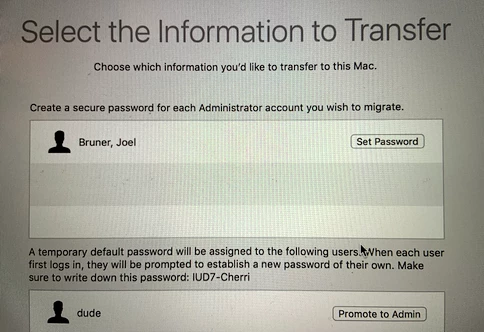
We have mobile AD accounts on our FileVault encrypted Macs running High Sierra and when using Migration Assistant during workstation refreshes we get a prompt that states "A password must be established for each Admin account that you wish to migrate." It then asks us to enter a password for each user that we are transferring. You can enter any password in this field - although I don't recommend that! If you have the relevant user type their password in everything is fine, but if you enter anything else, it sets the user's password in the FileVault reboot to whatever you typed in, but then that is out of sync with their login password so then the machine drops them at the login window to enter their current network credentials.
We are managing Secure Tokens for FileVault in High Sierra for all of our mobile accounts without any issues, but I am assuming that changes to FileVault in High Sierra are to blame for this bizarre step in the Migration Assistant workflow.
So my questions are:
Is anyone else seeing this in their environment? Have you found a way to address it aside from having users enter their own passwords (which is not great when sometimes users are not present during their workstation refresh)? Have you ditched Migration Assistant altogether and adopted a different solution for migrating user data between legacy and new Macs (strongly considering this option)?