Solved

How to deploy to /Library/Desktop Pictures

  • March 25, 2021
  • 5 replies
  • 60 views

Hello Community,

after reading a lot of posts about how to set a wallpaper for the desktop, I still have not found the solution for my problem:

I created a package wich contains a picture.jpg. This package (picture) should be installed to the directory "/Library/Desktop Pictures". After running the policy to install the picture, the result in the logfile sounds: "Installation failed. The installer reported: installer: Error trying to locate volume at /Library/Desktop Pictures".

When I open a terminal at the target client, and look for the directory, I only can find it at "/Volumes/Macintosh HD/System/Library/Desktop Pictures"

If I paste the complete path as a target to install the picture inside, I get the same response in the logfile.

Can anyone help me to solve this problem ?
Thank you very much for answering and stay health!

Best answer by Anonymous

Hi @Cyberghost , thank you for your fast response!
Meanwhile I found out, that modifying the System Directory on MacOS BigSur is no longer possible. I have to create a new directory and have to store the wallpaper picture in that directory.
We use desktoppr to set up the wallpaper, too.
greetings,
NOVELLUS

5 replies

Forum|alt.badge.img+7
  • Contributor
  • March 25, 2021

Hey,

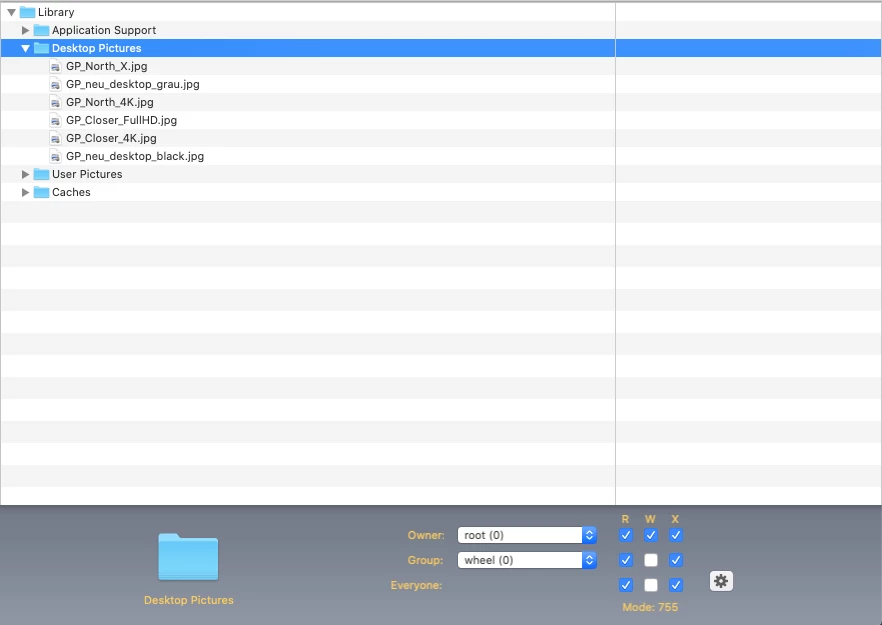
normally it should work with the setup like this one I attached. Did you used Composer and checked the permissions? I'm using this setup currently since 10.12 and it's still working on 10.15. BigSur should also work.
For changing the background via policy I'm using desktoppr


  • Answer
  • March 25, 2021

Hi @Cyberghost , thank you for your fast response!
Meanwhile I found out, that modifying the System Directory on MacOS BigSur is no longer possible. I have to create a new directory and have to store the wallpaper picture in that directory.
We use desktoppr to set up the wallpaper, too.
greetings,
NOVELLUS


Forum|alt.badge.img+7
  • Contributor
  • November 10, 2021

Hi @Cyberghost , thank you for your fast response!
Meanwhile I found out, that modifying the System Directory on MacOS BigSur is no longer possible. I have to create a new directory and have to store the wallpaper picture in that directory.
We use desktoppr to set up the wallpaper, too.
greetings,
NOVELLUS


Can you share the script you use for desktoppr please 🙂


  • November 16, 2021

Can you share the script you use for desktoppr please 🙂


@Geissbuhler 

#!/bin/bash # $3 = current User # $4 = full Path to the Wallpaper eg. /Users/Shared/Wallpaper/name-of-the-picture.png # if [ -d "/Users/Shared/Wallpaper" ] then echo "found /Users/Shared/Wallpaper" else mkdir /Users/Shared/Wallpaper fi if [ -d "/Users/Shared/Wallpaper/COMPANY" ] then echo "found /Users/Shared/Wallpaper/COMPANY" else mkdir /Users/Shared/Wallpaper/COMPANY fi chmod -R 777 /Users/Shared/Wallpaper sudo Jamf policy -event SetWallpaperPrepare sleep 15s sudo -u $3 /usr/local/bin/desktoppr $4 sudo -u $3 /usr/local/bin/desktoppr scale fill if [ -d "/Users/Shared/Wallpaper/COMPANY/Library" ] then rm -R /Users/Shared/Wallpaper/COMPANY/Library else NOP fi if [ -d "/Users/Shared/Wallpaper/COMPANY/private" ] then rm -R /Users/Shared/Wallpaper/COMPANY/private else NOP fi exit 0

hope, that helps.


Forum|alt.badge.img+7
  • Contributor
  • November 16, 2021

@Geissbuhler 

#!/bin/bash # $3 = current User # $4 = full Path to the Wallpaper eg. /Users/Shared/Wallpaper/name-of-the-picture.png # if [ -d "/Users/Shared/Wallpaper" ] then echo "found /Users/Shared/Wallpaper" else mkdir /Users/Shared/Wallpaper fi if [ -d "/Users/Shared/Wallpaper/COMPANY" ] then echo "found /Users/Shared/Wallpaper/COMPANY" else mkdir /Users/Shared/Wallpaper/COMPANY fi chmod -R 777 /Users/Shared/Wallpaper sudo Jamf policy -event SetWallpaperPrepare sleep 15s sudo -u $3 /usr/local/bin/desktoppr $4 sudo -u $3 /usr/local/bin/desktoppr scale fill if [ -d "/Users/Shared/Wallpaper/COMPANY/Library" ] then rm -R /Users/Shared/Wallpaper/COMPANY/Library else NOP fi if [ -d "/Users/Shared/Wallpaper/COMPANY/private" ] then rm -R /Users/Shared/Wallpaper/COMPANY/private else NOP fi exit 0

hope, that helps.


Thank you!