Question

How to set a self signed certificate to always trust.

  • September 3, 2020
  • 29 replies
  • 639 views

Forum|alt.badge.img+3

Hello, we where able to deploy a self signed certificate via JAMF configuration profile using the certificate manager.

Unfortunately the certificate is not set to trust. I can set it to trust via command line but I would need to find a way to deploy the certificate file to the macbook laptop then run a trust command via script. Unfortunately there seem to be no documented way to do this.

How can I achieve my goal. How can I deploy a self signed certificate and tell all our jamf computers to always trust that certificate.

29 replies

Tangentism
Forum|alt.badge.img+10
  • Honored Contributor
  • September 3, 2020

Can you not package it and have a post install script that installs it with trust settings?

Rich Trouton has a blog post here on how to add a cert to the System keychain with trust settings

The primary command is:

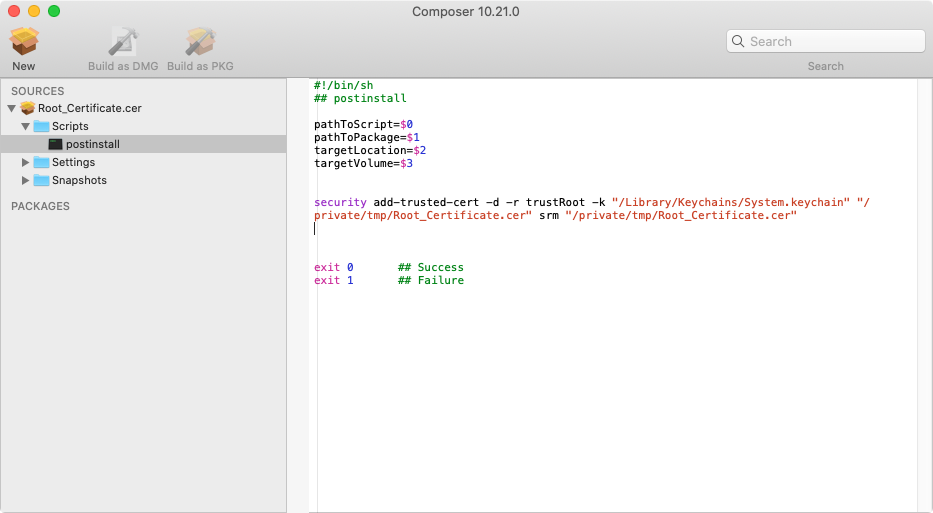
security add-trusted-cert -d -r trustRoot -k "/Library/Keychains/System.keychain" "/private/tmp/certs/certname.cer" srm "/private/tmp/certs/certname.cer"

Forum|alt.badge.img+3
  • Author
  • New Contributor
  • September 3, 2020

@Tangentism thanks.you mean I should package the cer file to a PKG or DMG file using composer? I tried with PKG but the build failed to sign with composer. I might have done something wrong. And with DMG. I set it to cache but still don't know how to extract the file from cache. If I can find a way to deploy the cer file to the mac file system the rest would be easy as I can always write a script that uses the directory path where the cer file was deployed and get the keychain to add and trust it. So far I can not find a way to have the cer file deployed to the mac.

I am very new to the mac by the way.


Tangentism
Forum|alt.badge.img+10
  • Honored Contributor
  • September 3, 2020

No worries - we all begin as novices!

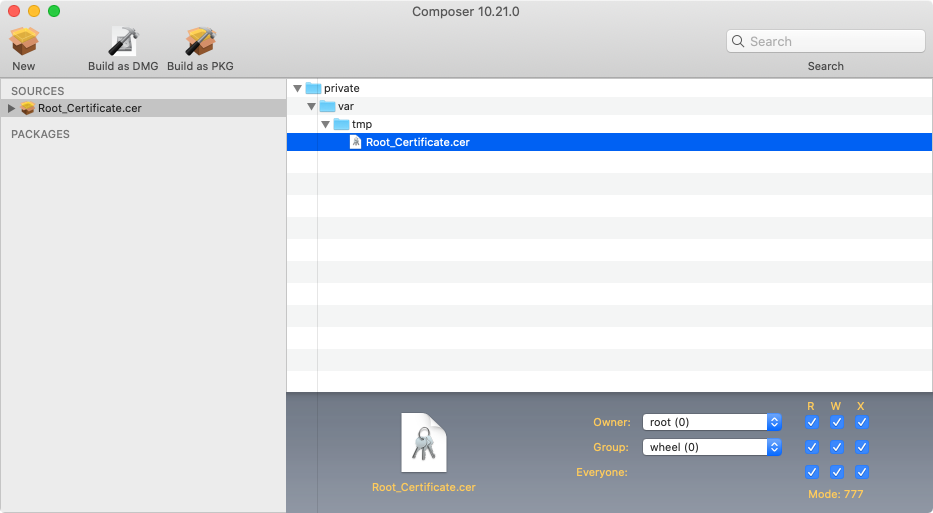
Copy the certificate to /private/var/tmp

Drop it into Composer

Check the permissions are appropriate
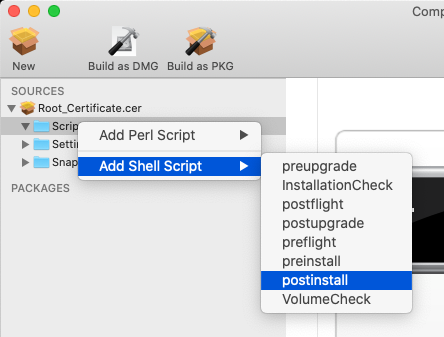
Expand the name of the package in the left hand column so the 'scripts' folder shows
Right click and 'add shell script' > postinstall

Add the previous shell command to the script, adapted to point at the certificate


Build as PKG
Add to policy so it gets delivered to all the machines scoped


Forum|alt.badge.img+3
  • Author
  • New Contributor
  • September 3, 2020

Wow Thanks @Tangentism I am going to try that out now.


Forum|alt.badge.img+18
  • Contributor
  • September 3, 2020

It's easier to just echo the cert out to a temp file, then run the command to import. Avoids all the packaging/distribution steps, and can be done in a simple shell script.


Forum|alt.badge.img+4
  • New Contributor
  • March 10, 2021

Hello
Is it still working correctly? While performing, GUI pop up appears asking for a password to change trust settings. Is it possible to bypass GUI and use only Terminal?
Its working fine before Big-sur. Only on Big-sur i am getting these pop ups. and getting error logs in jamf pro logs>>>>

SecTrustSettingsSetTrustSettings: The authorization was denied since no user interaction was possible.

Forum|alt.badge.img+18
  • Contributor
  • March 10, 2021

In Big Sur, you cannot import a certificate to the system keychain without user approval, since malware can take advantage of that. If it can, the OS will prompt the user to authorize with their credentials. If it cannot, you get the message above and it silently fails.

You pretty much have to use configuration profiles pushed by MDM on Big Sur. We switched to that and it's working well.


Forum|alt.badge.img+5

@alexjdale Do you still need the script to trust it without asking the user to trust? I am looking to install a cert for a radius AP and want to ensure the user just needs to authenticate and not give permission to the cert to approve it.


Forum|alt.badge.img+1
  • New Contributor
  • August 6, 2021

In Big Sur, you cannot import a certificate to the system keychain without user approval, since malware can take advantage of that. If it can, the OS will prompt the user to authorize with their credentials. If it cannot, you get the message above and it silently fails.

You pretty much have to use configuration profiles pushed by MDM on Big Sur. We switched to that and it's working well.


Can we get an example of the config  profile or a how to?


Forum|alt.badge.img+2
  • New Contributor
  • August 19, 2021

stall hanging here... do you have an conf profile example for a MDM deployment to trust the certs ?


kgam
Forum|alt.badge.img+8
  • Valued Contributor
  • August 20, 2021

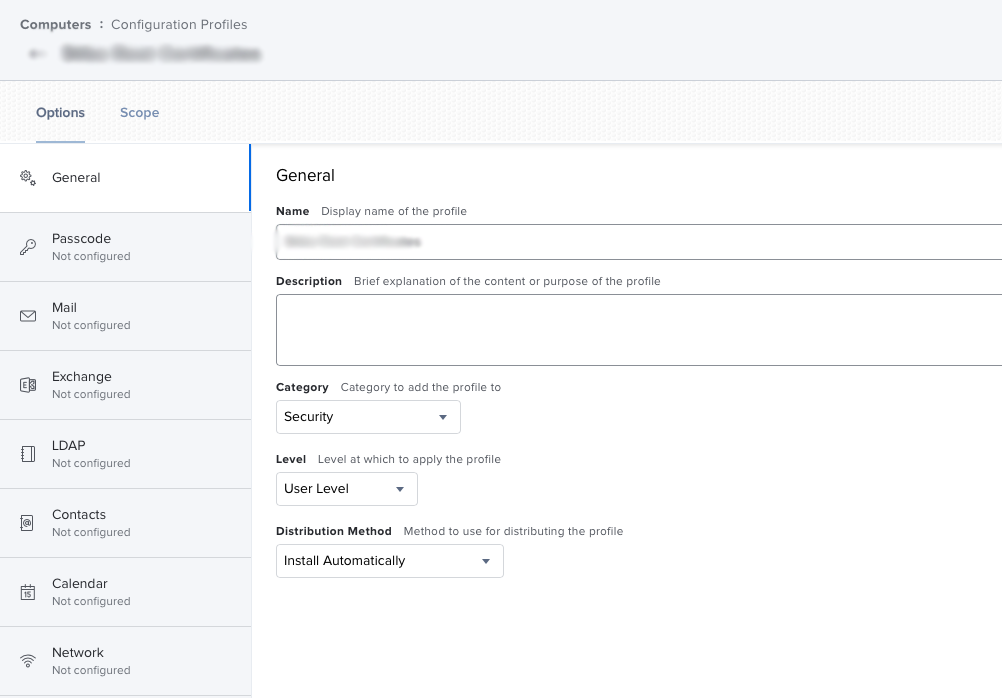
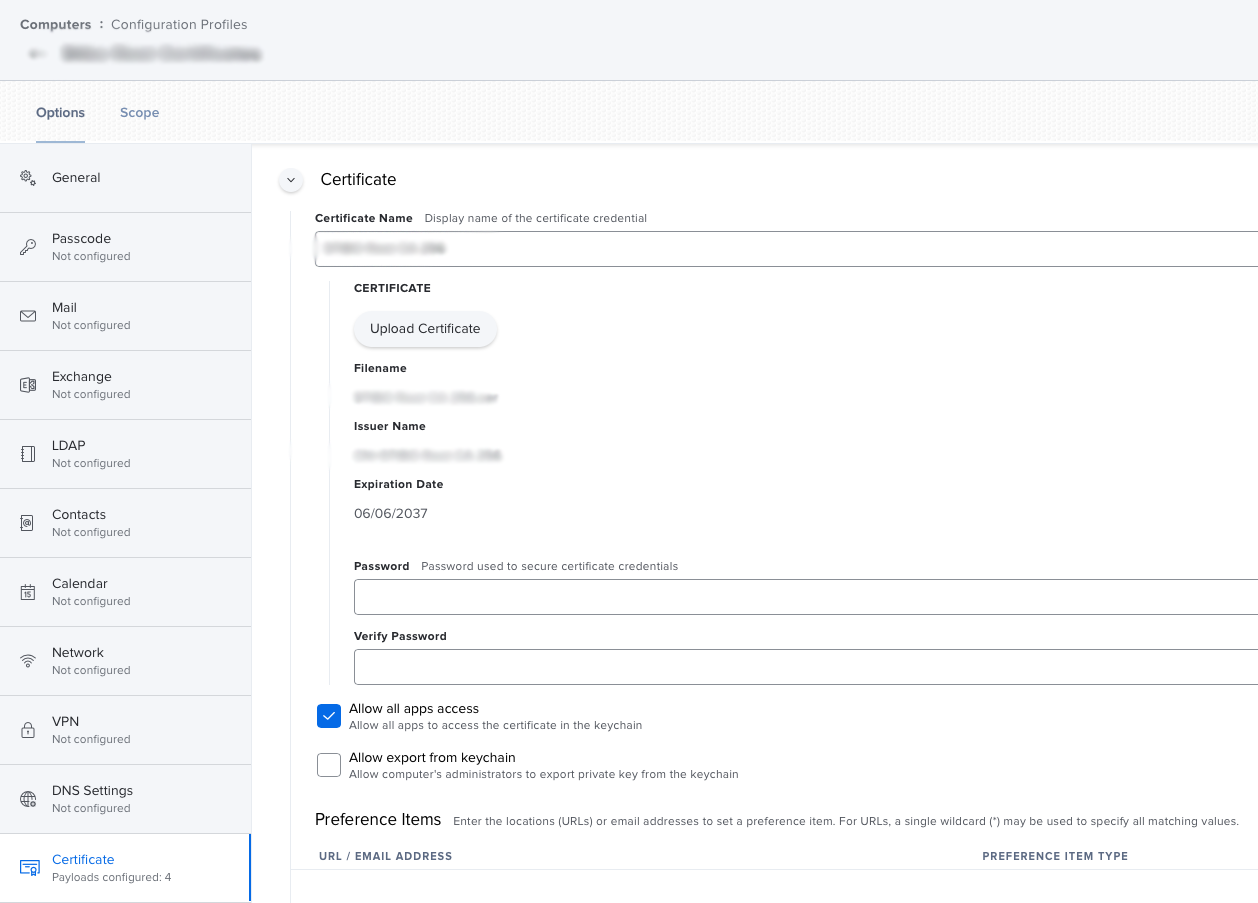
We're using the following configuration profile to install four certificates on Big Sur. The root certificate in the screenshot get's set to "Always Trust" for all purposes but two intermediate certificates issued by the root certificate plus a fourth don't. They get set to "Use System Defaults" which means that users still may get prompts to trust the certificates. Unfortunately I don't know enough about certificate chains to explain or rectify this so I'll manually trust these when configuring a new computer.


Forum|alt.badge.img+1

Hello. I also have the same issue like "kgam". Yesterday the system admin had changed a wildcard certificate. Today we have troubles to login in Skype for Business. I have no chance to enroll the certificate via

security add-trusted-cert -d -r trustRoot -k "/Library/Keychains/System.keychain" "/private/tmp/certs/....cer" srm "/private/tmp/certs/.....cer"

. With configuration profile i can enroll the certificate, but trusting is set to "Set System Defaults". 

I also don't know, why macOS don't trust the certificate. We have also checked the requirements:

https://support.apple.com/en-us/HT210176 

https://support.apple.com/en-us/HT211025 

Do somebody have an idea?

Thank you!


Forum|alt.badge.img+5
  • New Contributor
  • October 22, 2021

Hello. I also have the same issue like "kgam". Yesterday the system admin had changed a wildcard certificate. Today we have troubles to login in Skype for Business. I have no chance to enroll the certificate via

security add-trusted-cert -d -r trustRoot -k "/Library/Keychains/System.keychain" "/private/tmp/certs/....cer" srm "/private/tmp/certs/.....cer"

. With configuration profile i can enroll the certificate, but trusting is set to "Set System Defaults". 

I also don't know, why macOS don't trust the certificate. We have also checked the requirements:

https://support.apple.com/en-us/HT210176 

https://support.apple.com/en-us/HT211025 

Do somebody have an idea?

Thank you!


@ICS_Apple_Admin  -- This is the exact issues I'm seeing- any luck? 


Forum|alt.badge.img+1

@ICS_Apple_Admin  -- This is the exact issues I'm seeing- any luck? 


@Mac_User_- The whole certificate chain was not existing. We have put the Digicert Root certificate to the one certificate. Nevertheless we have to always trust the certificate - and this doesn't work.

I have written a documentation for the users to manually put in the skype4b server urls.


Forum|alt.badge.img+5
  • New Contributor
  • October 25, 2021

@Mac_User_- The whole certificate chain was not existing. We have put the Digicert Root certificate to the one certificate. Nevertheless we have to always trust the certificate - and this doesn't work.

I have written a documentation for the users to manually put in the skype4b server urls.


@ICS_Apple_Admin -- I was able to fix this issue by manually trusting the cert in Keychain Access then exporting it as trusted, adding it to config profile. Successfully pushed out as trusted! 


Forum|alt.badge.img+2
  • New Contributor
  • October 25, 2021

@ICS_Apple_Admin -- I was able to fix this issue by manually trusting the cert in Keychain Access then exporting it as trusted, adding it to config profile. Successfully pushed out as trusted! 


Hi Mac_User_ it might be trusted for you - but please try from another Mac... 


Forum|alt.badge.img+2
  • New Contributor
  • October 25, 2021

Hi Mac_User_ it might be trusted for you - but please try from another Mac... 


I mean it might be trusted for your Mac already.. and user account


Forum|alt.badge.img+5
  • New Contributor
  • October 25, 2021

Hi Mac_User_ it might be trusted for you - but please try from another Mac... 


haha I appreciate looking out. I definitely tested on several macs. A few straight out of the box, worked flawlessly. I think it helped that I exported the cert from keychain of local managed account. 


Forum|alt.badge.img+1
  • New Contributor
  • October 28, 2021

haha I appreciate looking out. I definitely tested on several macs. A few straight out of the box, worked flawlessly. I think it helped that I exported the cert from keychain of local managed account. 


This...doesn't make a lot of sense. Did something else with your deployment change? Importing a PEM or CER to the keychain and then performing an export to the same doesn't change anything about the public key of the cert. Whether or not a cert is trusted or not isn't determined within the metadata of the certificate itself. 

I'm in the same boat as the string and did try what was suggested. It made no difference.


Forum|alt.badge.img+5
  • New Contributor
  • October 28, 2021

This...doesn't make a lot of sense. Did something else with your deployment change? Importing a PEM or CER to the keychain and then performing an export to the same doesn't change anything about the public key of the cert. Whether or not a cert is trusted or not isn't determined within the metadata of the certificate itself. 

I'm in the same boat as the string and did try what was suggested. It made no difference.


hah @Scotticus26 - I was as surprised as you. I wish I remember which random rabbit hole I read to try that. I had been scanning mac admin slack, reddit, and jamf nation. I never said I could explain why it worked, didn't work for other certs - except for the specific one I needed to deploy for VPN. 


Forum|alt.badge.img+5
  • New Contributor
  • October 28, 2021

This...doesn't make a lot of sense. Did something else with your deployment change? Importing a PEM or CER to the keychain and then performing an export to the same doesn't change anything about the public key of the cert. Whether or not a cert is trusted or not isn't determined within the metadata of the certificate itself. 

I'm in the same boat as the string and did try what was suggested. It made no difference.


Not trying to mislead anyone - I don't claim to be an expert. Just tried something in desperation and somehow it's worked so I shared my experience. I apologize if it's not helpful to anyone else.


Forum|alt.badge.img+1
  • New Contributor
  • October 28, 2021

hah @Scotticus26 - I was as surprised as you. I wish I remember which random rabbit hole I read to try that. I had been scanning mac admin slack, reddit, and jamf nation. I never said I could explain why it worked, didn't work for other certs - except for the specific one I needed to deploy for VPN. 


Appreciated none the less.

Get Outlook for iOS

Forum|alt.badge.img+11
  • Valued Contributor
  • January 12, 2022

so just for a sanity check, when pushing a cert from a config profile, checking the Allow all apps access box is the same  as going into keychain and changing the trust from default to always trust??


Forum|alt.badge.img+1
  • New Contributor
  • January 12, 2022

so just for a sanity check, when pushing a cert from a config profile, checking the Allow all apps access box is the same  as going into keychain and changing the trust from default to always trust??


Not from my experience, no. 


Forum|alt.badge.img+5
  • New Contributor
  • July 21, 2022

So I was running in to the same issue. The script would import the cert but it would not trust it. After a couple days on and off working on this. I finally realized that I was using the wrong -r command. I was using trustRoot as suggested above. But the cert I was using was not issued by another cert. So I had to change the –r command to trustAsRoot. example below. Hopefully this helps some of you. 

Security add-trusted-cert -d -r trustAsRoot -k /Library/keychains/system.keychain