Solved

I give up... Where can I find the "Unique ID" for an app

  • February 25, 2022
  • 4 replies
  • 238 views

sudoBrandon
Forum|alt.badge.img+5

I'm working on home screen layout for our sales ipads.  [Devices > Configuration Profiles > Home Screen Layout]

I didn't have any issues adding the well known apps thanks to JAMF's search feature but I have a couple of lesser known ones, for example, Service Finance Dealer App.  https://apps.apple.com/us/app/service-finance-dealer-app/id962933342


Can anyone help me by telling me how to find this information?

TIA,

Brandon
Best answer by talkingmoose

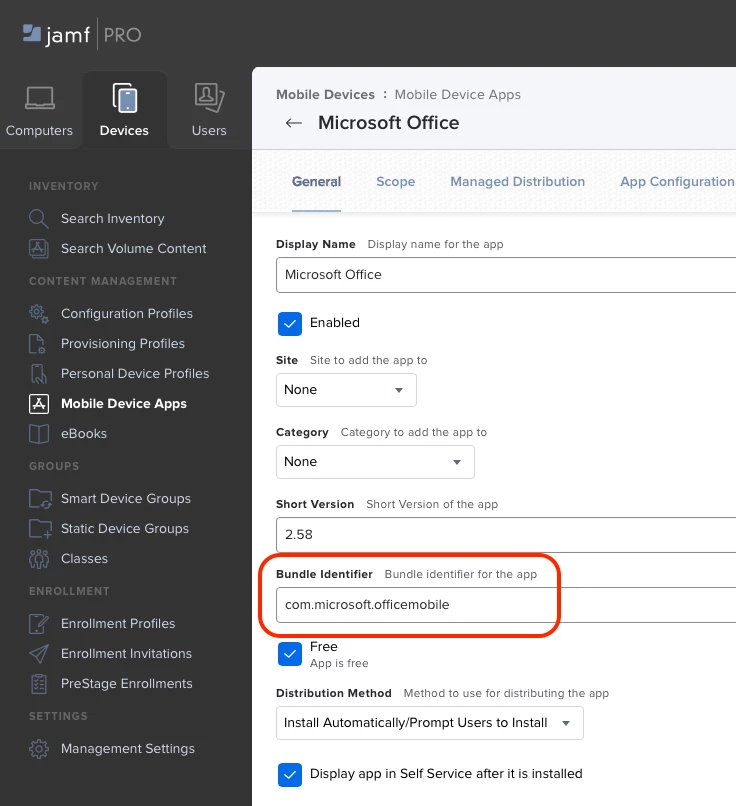
I think @ljcacioppo has provided the most elegant solution, but you can also find the identifier (aka "Bundle Identifier) in the app record itself in Jamf Pro.

4 replies

ljcacioppo
Forum|alt.badge.img+17
  • Jamf Heroes
  • February 25, 2022

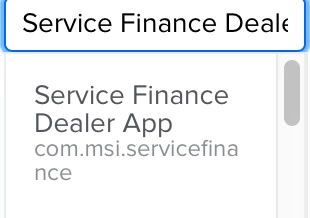
I've typically been able to just start typing the app name into the display name field to find the identifier. For this one, l looks like it might be com.msi.servicefinance


Hugonaut
Forum|alt.badge.img+15
  • Esteemed Contributor
  • February 25, 2022

@sudoBrandon  For that Application it is: com.msi.servicefinance


I found this by using this url: https://itunes.apple.com/lookup?id= as the prefix & by adding the id from your link as the suffix - after id= enter the numbers at the end of the url from apps.apple.com (https://apps.apple.com/us/app/service-finance-dealer-app/id962933342)- for example

https://itunes.apple.com/lookup?id=962933342


This downloads a .txt file. Do a find for "bundleId": & it will provide you with the Unique ID you need for the Configuration Profile.


talkingmoose
Forum|alt.badge.img+36
  • Community Manager
  • Answer
  • February 25, 2022

I think @ljcacioppo has provided the most elegant solution, but you can also find the identifier (aka "Bundle Identifier) in the app record itself in Jamf Pro.


sudoBrandon
Forum|alt.badge.img+5
  • Author
  • New Contributor
  • February 28, 2022

Thanks, everyone for your help, and all were great solutions!  I learned something new for sure.  @talkingmoose this was a great tip.  If anyone reads this in the future, hit the edit button to show this info on an app that is already listed.  

Brandon