Question

IBMs Enrollment Screen Recreated

  • October 19, 2015
  • 137 replies
  • 561 views

Show first post

137 replies

Forum|alt.badge.img+7
  • Contributor
  • October 28, 2015

@jphillips Nice!

@martel Are you not seeing the progress bar at all, or is it just not progressing? Make sure to edit the ViewController.swift file in Xcode and set your package waypoints.


Forum|alt.badge.img+9
  • Contributor
  • October 28, 2015

how would I set the waypoints if the packages change based on version numbers?


Forum|alt.badge.img+7
  • Contributor
  • October 28, 2015

Right now if you have specified a pkg as a waypoint, and the name of the pkg changes because of an update, then you would need to update the waypoint name in the app. Like @McAwesome mentioned, it would be nice if this looked at something else since package names can change frequently.

Just thinking out loud here...I wonder if having four empty packages install would work...call them something like stage1.pkg, stage2.pkg, etc....You could then have as many policies run in-between as needed and you wouldn't need to worry about changing the waypoint names.


jphillips
Forum|alt.badge.img+11
  • Valued Contributor
  • October 28, 2015

@martel I have found that the progress bar will not appear on anything except El Cap.

@mvdbent, there isn't any custom code. I just modified the location of the progress bar on the storyboard to fit my webpage.

@rdwhitt, I was thinking about this earlier too. I think what I might implement, since I'm trying to teach myself Swift anyway, is to have the app grab information off of a server for the package stages. This way I can just update the plist on a server when filenames change and will never have to keep recreating the app.


Forum|alt.badge.img+12
  • Author
  • Contributor
  • October 29, 2015

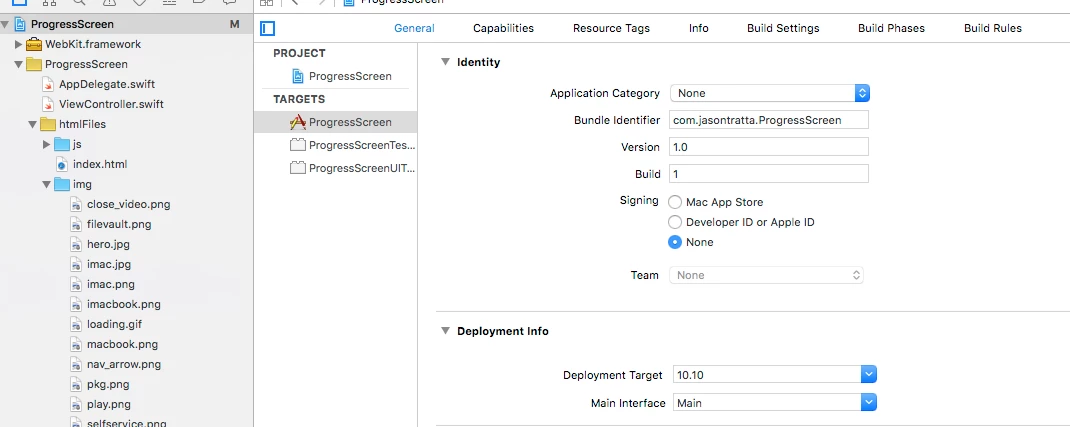
@jphillips You can change the deployment target in Xcode if you want to deploy to 10.10 as well. You can see in this image under Deployment info where you can set the Deployment Target.

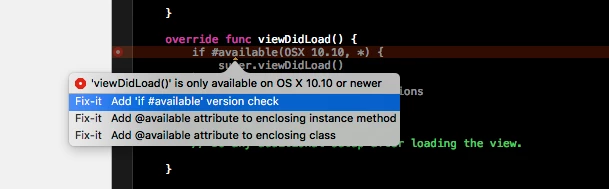
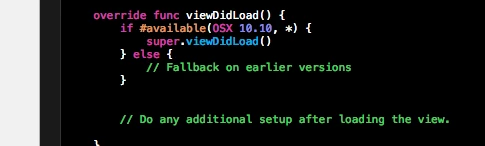
You can easily compile to at least 10.9. If you do so, Xcode will throw an error and suggest adding code to the viewDidLoad method. Click the red "!" and it will take you to the offending code seen in the images below. This should then work in 10.9. (*Disclaimer: I have not yet tested this on target machines)


jphillips
Forum|alt.badge.img+11
  • Valued Contributor
  • October 29, 2015

@jtratta I had already changed the target deployment to 10,10, but the bar still didn't show for some reason. I have not tried taking it to 10.9, though.


Forum|alt.badge.img+12
  • Author
  • Contributor
  • October 29, 2015

@jphillips I just did a test in a 10.9 VM. Sadly...it does not work at all. I'll have to work on some backwards compatibility.


Forum|alt.badge.img+9
  • Contributor
  • October 29, 2015

10.10 not showing the progress bar might be my problem too.


Forum|alt.badge.img+12
  • Contributor
  • October 30, 2015

The Mac@IBM presentation is now available to view here


Forum|alt.badge.img+23
  • Esteemed Contributor
  • October 30, 2015

This is nice.

However as suggested by others, being able to run a single custom trigger is very helpful. I'd also make the case for having it run over the login window too, as i'm sure others would want such functionality.


Forum|alt.badge.img+16
  • Honored Contributor
  • October 30, 2015

This is really really great! Works like a charm.

Does any have any advise for customizing the web page? Which app to use (preferably something graphical)? Totally out of my element on that part of it. :(


Forum|alt.badge.img+12
  • Author
  • Contributor
  • October 30, 2015

@hkabik I used Abobe Muse to throw something together. To implement your own html, just replace everything in the html folder in Xcode. There are quite a few html WYSIWYG's out there...it would just be a matter of finding the one you like best.


Forum|alt.badge.img+16
  • Honored Contributor
  • October 30, 2015

@jtratta

After you've made the page as you want it... how do you insert the progress bar where you want it?

Ah nm, these are questions for google... I'll go try to get my learn on.


Forum|alt.badge.img+2
  • New Contributor
  • December 3, 2015

Hi.

@jtratta

I was wondering what you would consider best practise for
1. deploying the progress screen app to the client machine? 2. executing it?
3. making policies affect the progress bar?
4 making the application quit in a nice way, not like exit 0?

Very greatefull for any and all ideas.

/martin


Forum|alt.badge.img+12
  • Author
  • Contributor
  • December 3, 2015

@m.gunnarsson I have deployed this two different ways. 1) Creating a package with a post flight script that launches that app. 2) Creating a login agent that launches the app at login. We start with FileVault encryption at enrollment…so the agent comes in handy after the user has to log out.

Making the progress bar follow the polices is tricky...and custom to your environment. In the example on GitHub, it uses 4 "Waypoints" and an estimated time to guess where the progress bar should be. Since I didn't want to use the API for this (which would require embedded credentials, and there’s no good way to get policy completion) it's simply looking at the jamf.log file to gauge progress. I'm our environment, the order in which polices trigger is fairly predictable. I you look at the file AppDelegate.swift you'll see where you can add the waypoints:

 // Determine which installer packages should happen in what order in your installation
//This will update the progress bar for a more accurate time estimate.
    let quarterProgress = "GLOBAL_Cyberduck4.7.2.pkg"
    let halfProgress = "packageName"
    let threeQuartersProgress = "packageName"
    let lastPackage = "packageName"

For quitting, the app will quit its self when the 4th waypoint is reached. Alternatively, I deploy a script in a policy that runs last...I just add a ZZ- to the policy name. The script quits the app, removes the files, and then opens Self-Service. Mine looks something like this.

osascript -e 'quit app "ProgressScreen"'
rm -rf /Applications/ProgressScreen.app 
rm -f /Library/LaunchAgents/com.iu.ProgressScreen.plist
rm -f /Library/LaunchDaemons/com.iu.continueEnrollment.plist

open -a /Applications/Self Service.app/Contents/MacOS/Self Service

Hope that helps.


Forum|alt.badge.img+17
  • Valued Contributor
  • December 3, 2015

Hi All,
So I've got a custom HTML page all created, but I'm having a heck of a time figuring out how to move the progress bar. Can anybody give me a couple pointers on where and how to control that?

Thanks!
mbezzo


Forum|alt.badge.img+16
  • Honored Contributor
  • December 4, 2015

I have this working beautifully with both our test DEP deployments and in a Self Service tool I made for incorporating new machines into our environment (growth through acquisition is the name of the game here).
It's really great and I am truly thankful someone took the time to make this.

@mbezzo As stated above, before you build the App edit the ViewController.swift file and put in your estimated time of completion (in seconds) and mark your waypoints.

// Determine which installer packages should happen in what order in your installation
//This will update the progress bar for a more accurate time estimate.
    let quarterProgress = "GLOBAL_Cyberduck4.7.2.pkg"
    let halfProgress = "packageName"
    let threeQuartersProgress = "packageName"
    let lastPackage = "packageName"

So if you have 10 packages installing, you would make the 3rd package to be installed the "quarterProgress", the 5th "halfProgress", the 7th "threeQuartersProgress" and the 10th "lastPackage". When that last package completes installation the app will quit on it's own.

It will look something like:

// Determine which installer packages should happen in what order in your installation
//This will update the progress bar for a more accurate time estimate.
    let quarterProgress = "things.pkg"
    let halfProgress = "stuff.pkg"
    let threeQuartersProgress = "morethings.pkg"
    let lastPackage = "abitmorestuff.pkg"

Forum|alt.badge.img+17
  • Valued Contributor
  • December 4, 2015

Sorry! After reading my post again, I definitely wasn't very clear! I meant how to physically change the location of the progress bar when on screen. Currently it's centered at the bottom, but I'd like to be able to move it around a bit.

Thank you!


Forum|alt.badge.img+16
  • Honored Contributor
  • December 4, 2015

Ah, I'm not talented with that stuff at all. Couldn't figure out how to move it so I just swapped our logo in place of the iMac image and changed the wording and called it a day.

I'm sure some folks much more clever than myself can answer that for you, then I will plunder their knowledge as well. ;)


Forum|alt.badge.img+12
  • Author
  • Contributor
  • December 4, 2015

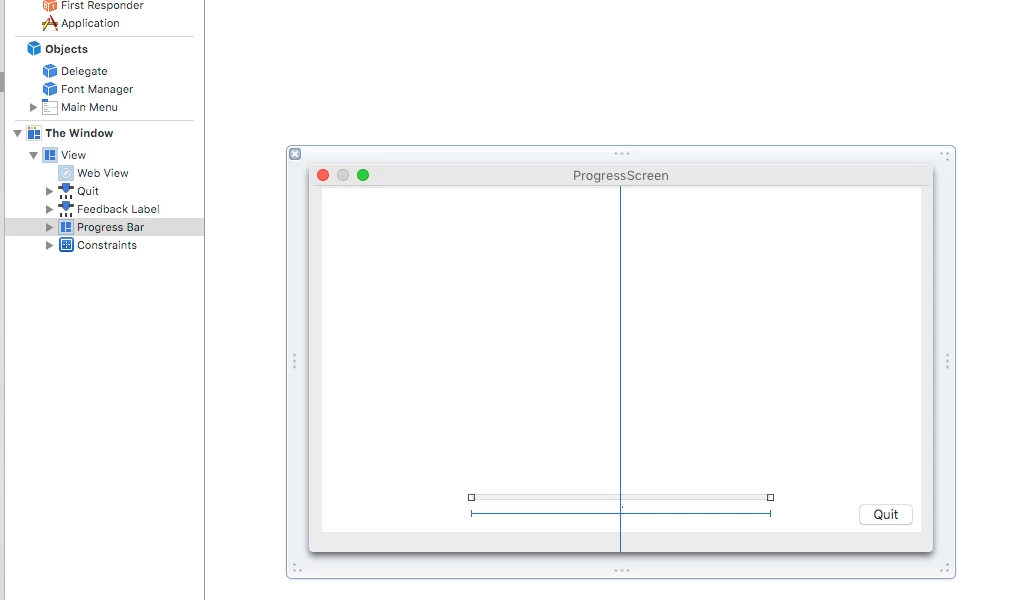
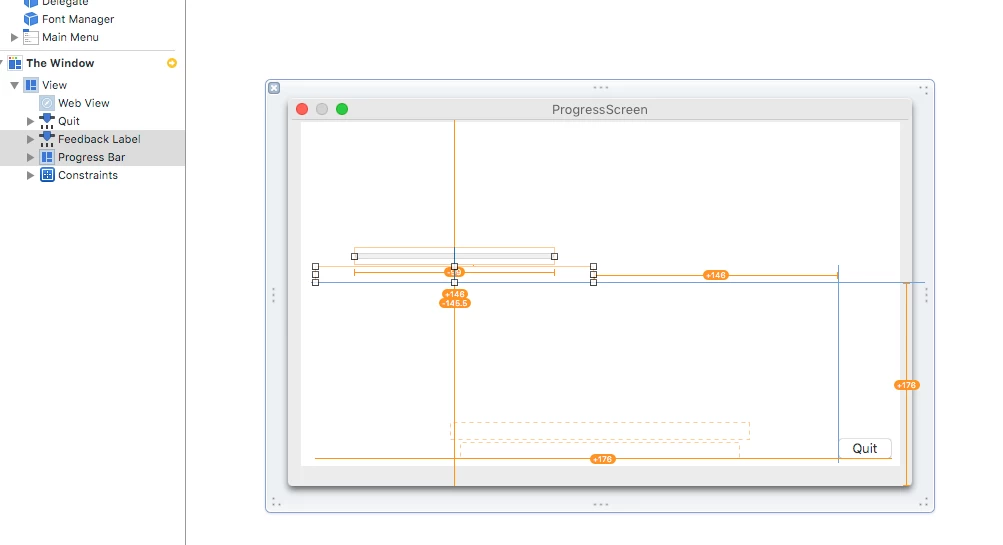
@mbezzo @hkabik I imagine you guys are probably running into problems with auto layout. If you select "MainMenu.xib" in Xcode you'll find a section called "The Window." The Window contains the web view (used to display your HTML), the progress bar, feedback text, and the quit button.

1) Click on the progress bar, it should highlight.

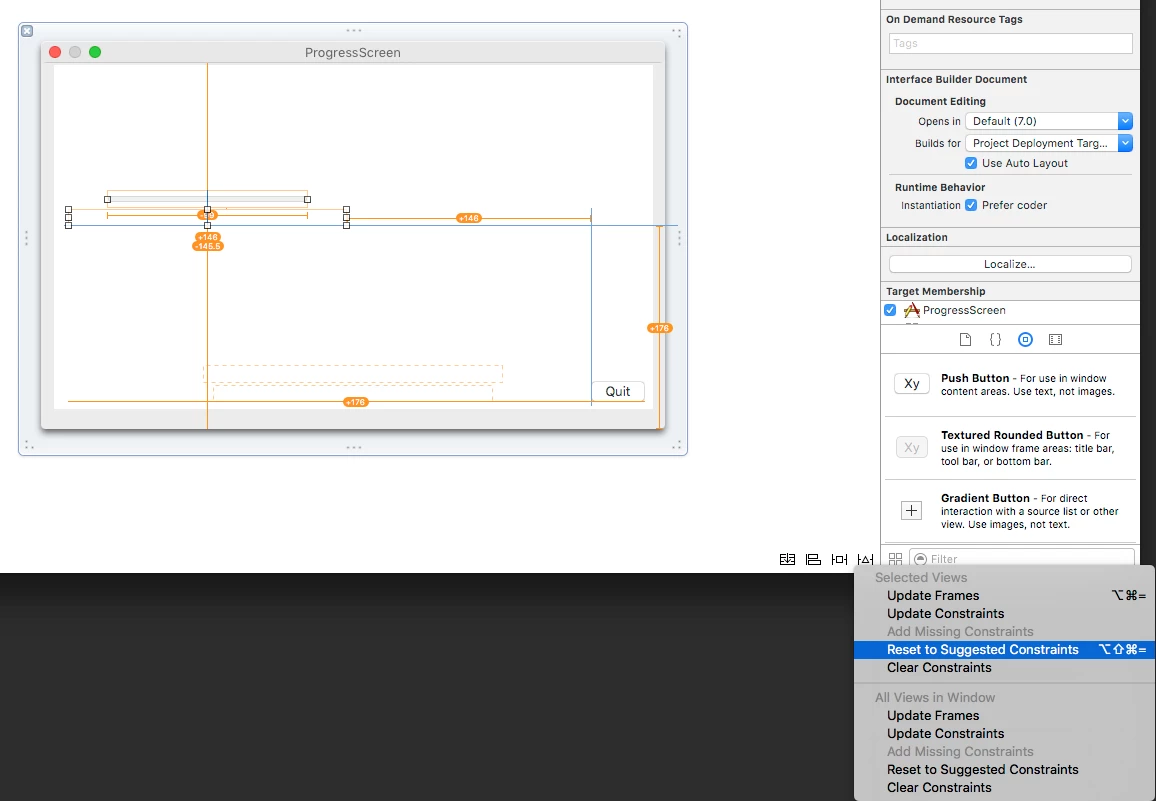
2) Move the bar to where ever you like. In this image I'm also moving the feed back text.

3) Now you need to set the constants for Auto Layout. One of the easiest ways is to select "Reset to Suggested Constraints" from the triangle-like menu at the bottom of the screen.

This isn't full proof. You might need to monkey around with the constraints to get exactly what you want. The other buttons at the bottom of the screen also deal with setting constraints. If you really want to dig into it...just Google Xcode Autolayout. I've also noticed an odd bug with the progress bar that if you make it too long, it vanishes when the app goes full screen.


Forum|alt.badge.img+17
  • Valued Contributor
  • December 4, 2015

Thank you! That's exactly what I was looking for and wow - being new to Xcode that just wasn't as obvious to me as I was thinking. :)

Thanks again!
Matt


Forum|alt.badge.img+17
  • Valued Contributor
  • December 4, 2015

alright, hopefully one final question. I've got a simple 800x600 html file customized like the above examples. How can I constrain the progress bar to a specific spot in that 800x600 rectangle and just have the blank space "float" to fill the varying screen sizes? Right now the progress bar just floats at the very bottom of the window. I realize this is an Xcode question and not necessarily related to this - feel free to point me somewhere else if you know of a good resource for this.

Thanks!
mbezzo


Forum|alt.badge.img+12
  • Author
  • Contributor
  • December 4, 2015

@mbezzo The "best" way to insure that everything is where you'd like it is probably breaking up the different components even more. Instead of having one giant HTML view, have several views and then use constraints to get the layout you want on any given screen size. The constraints keep UI elements in relative positions to each other, unfortunately there is no easy way constrain to the HTML inside the web view. Think of your final image as several components constraining against each other and then start to break them up that way. As the screen size changes, the layout adapts.

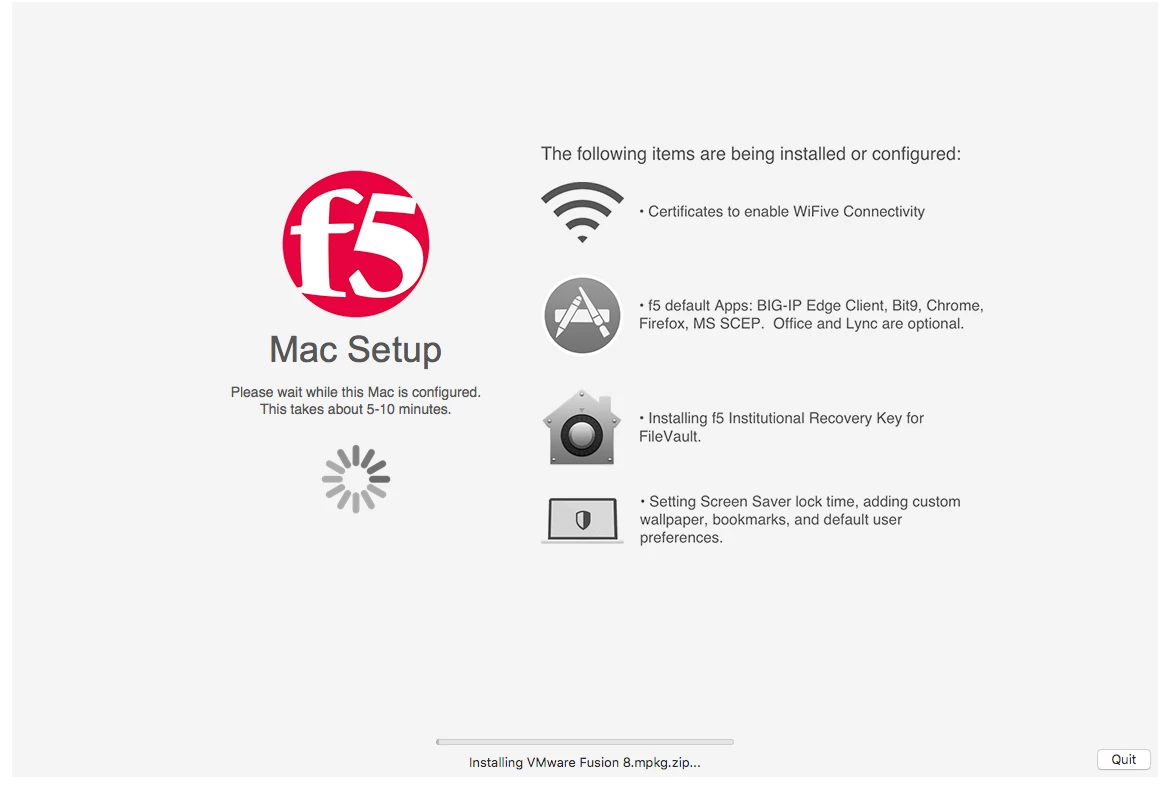
I think IBM likely did something like this, but I think they were using a static Image, web view, and a progress bar. I wanted to keep the example as simple as possible but, just about any book on Cocoa Programming for OS X or Web Tutorial ( I prefer the Big Nerd Ranch Books) should be able to get you comfortable with adding UI elements. It's mostly drag, drop, and connect with almost no code familiarity needed. You're getting into the nuts and bolts of UI design....but hey...when you're done you'll be able to layout UI's for any Apple Device!

Hope that helps.


loceee
Forum|alt.badge.img+10
  • Contributor
  • December 7, 2015

This is great. I am watching with great interest, and apologies if I am out of line as I haven't had really close look at the code.

I do have a suggestion, rather than hard coding waypoints into the swift code, I'd like to see the jamf.log monitored and the progress waypoints encoded into the policy name. Similar to how iHook and cocoaDialog do progress.

eg. log entry.

jamf: Executing Policy A1 #20 Binding to Directory ... 
jamf: Executing Policy Setting-Computername
jamf: Executing Policy B1 #75 Installing Top Secret Apps ...

Naming your provisioning policies with an excluded preceding code (to actually order the execution) and if then a # numeric code to update progress bar with percentage and a friendly text.

Very rough idea, but it makes it much easier to tweak timings and will provide visibility in the JSS, and will remove the need to hard code things into the app.


Forum|alt.badge.img+17
  • Valued Contributor
  • December 7, 2015

weird, I so posted a "thank you" reply last week, but it seems to have disappeared! So, thanks again @jtratta - that was great advice.

After playing around with it for a bit, I decided to just leave it at the bottom and centered. I borrowed heavily from IBM's app, and just put a GIF spinner in place. So I've got two versions of this now - one for our initial "machine level" settings, and then a second for when we customize the user profile. I'm pretty happy with it!