Question

IBMs Enrollment Screen Recreated

  • October 19, 2015
  • 137 replies
  • 535 views

Show first post

137 replies

Forum|alt.badge.img+16
  • Honored Contributor
  • December 8, 2015

This is monitoring the jamf log, right? Would it be possible to tell this how many policies will run through a command? So say I have whatever the first policy is end with a command saying something like "sudo jamf policy -event Enrollment_Screen_20". This would add

Checking for policies triggered by "Enrollment_Screen_20"

into the jamf.log file. We could then parse out the number 20 and then use that to determine how many policies will be run in total. So instead of having four hard coded waypoints, you have X waypoints where X is the number from that event.

This would in theory be a way to tell it how many policies will be run without requiring hardcoding the JSS information or package names into the enrollment screen itself.

I'll poke around and see if I can get it working like that, but I'm so unfamiliar with Swift and rusty with coding in general that I'm not sure I'll get it working in a timely fashion.


Forum|alt.badge.img+12
  • Author
  • Contributor
  • December 8, 2015

@mbezzo That looks great! Glad I could help.

@McAwesome That's a pretty clever idea. You could also have a second event that tells the app the approximate time so the bar moves at about the right pace. I'll see if I can come up with something...that shouldn't be too difficult. Thanks for the idea!


mm2270
Forum|alt.badge.img+24
  • Legendary Contributor
  • December 8, 2015

Seems like @loceee made a similar suggestion a few posts up, about getting progress bar indicators from the policy names in the jamf.log.
BTW, I keep coming back here to see what you all are doing in this space, and I'm impressed. This is looking very very nice. If we ever get around to moving to a DEP model here, we'll be sure to check this out. Thanks for the hard work on this.


Forum|alt.badge.img+10
  • Contributor
  • December 8, 2015

@mbezzo, @rdwhitt, and @jphillips would you be willing to share your code?

I really like the different looks / ideals and would like to try and corporate this into are workflow....


Forum|alt.badge.img+13
  • Contributor
  • December 8, 2015

@jtratta I would like to ask one 2 more thing as well.
1) Can you make this program stay on top of all other pop-ups, messages and Dock animations. Like jamfHelper?

I can see Notification Center messages and some installation windows make this window to dissapear.

2) Make this program to run on all connected screens (again like jamfHelper)?

Thanks


Forum|alt.badge.img+17
  • Valued Contributor
  • December 8, 2015

Hi @spotter,
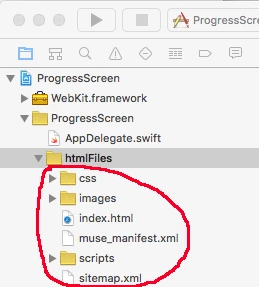
It's sorta hard to share, but I'll try to go over what I did (and I think others are doing). I used Adobe Muse (wysiwyg html app) to create the html that's placed in the app @jtratta made. It's super simple, basically just drag and drop. So I grabbed our logo, dropped it in. Then figured out what few items I wanted to call out, then did a google image search for icons that I liked. Some of them were only in color, so I brought them into Pixelmator and made them black and white. Then I just arranged them how I liked, and exported the html. Dragged the resulting files into the "htmlFiles" folder in the Xcode project, and you're all set.

Hopefully this will get ya pointed in the right direction.

As for the other progress ideas - sounds great. Hopefully someone can figure out a slick way of dealing with this so we don't have to build a new App everytime the packages change. Looking forward to future updates. :)

Thanks!
mbezzo


Forum|alt.badge.img+4
  • New Contributor
  • December 9, 2015

For those of us that are not very good at this app creation thing. Does anyone have a step by step guide on how to go about getting this done?


ImAMacGuy
Forum|alt.badge.img+23
  • Esteemed Contributor
  • December 9, 2015

@jbruno +1 :)

I downloaded it off git, but am pretty lost, can't find some of the view controller stuff they were talking about..


Forum|alt.badge.img+7
  • Contributor
  • December 9, 2015

Once you have downloaded the project and opened it in Xcode, you'll need to navigate to a couple of areas.

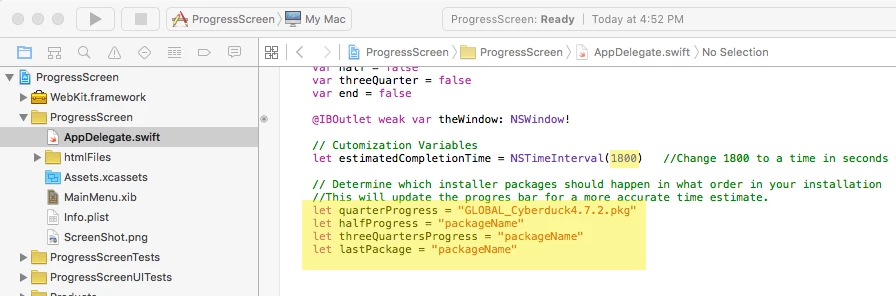
  1. The AppDelegate.swift file is what you will use to edit your estimated time and waypoint packages. This is what currently defines how the progress bar moves.

  2. You can replace all of the folders/files under the html folder with your own HTML. @jtratta used Adobe Muse, but pretty much any HTML editor can be used.

Then hit the play button at the top of the Xcode window to build the project and it will open in full screen.


DBrowning
Forum|alt.badge.img+25
  • Esteemed Contributor
  • January 14, 2016

If you wanted this to go full screen on any screen that maybe plugged in...how would you do so? I know nothing about coding in swift


Forum|alt.badge.img+9
  • Contributor
  • February 12, 2016

Hello,

First of all, this is a great app and I look forward to customizing it for our environment. One problem we are having is getting it to run in fullscreen mode by default. When I run from the command line locally with ./ProgressScreen it runs fine. When I do the same command remotely as part of a script, it comes up smaller and needs to be made full screen. I checked the code and it looks like it is set to run full screen by default. Is there some modifications I need to make to the code or the HTML to make this work? Or, am I launching this wrong and should be using an open command? Any information would be appreciated.

Thank you,

Rafe Moody


chris_kemp
Forum|alt.badge.img+20
  • Jamf Heroes
  • February 23, 2016

Got a problem, maybe someone can help...I built a page in Muse, and it looks fine in a normal browser; so I did an "export as HTML" and got the files & folders. Page still looks fine in a browser.

However, when I copy the files & folders to the Xcode project & run it, the build succeeds but the page loads no graphics at all, so all I have is a bunch of blue ? on a blank page. The image files are in the folder, though... any thoughts where I may be going wrong?


Forum|alt.badge.img+9
  • Valued Contributor
  • February 24, 2016

it's the file references... you have to alter the HTML, so that any references to 'images/image.png" would be "image.png", and the same with .css files and scripts (.js) files...


chris_kemp
Forum|alt.badge.img+20
  • Jamf Heroes
  • February 24, 2016

Ah, gotcha - thanks! :) <--- more comfortable with BASH than CSS...but I'll get there.


Forum|alt.badge.img+4
  • Contributor
  • March 17, 2016

There are many files here.

https://github.com/jason-tratta/ProgressScreen

Can't tell which file is for what.

Documentation extremely lacking.

And This is a poor readme.

" This is my recreation of the Casper Enrollment screen IBM showed at JAMFs user conference.

About: Simply, this is a full screen application that uses a Webview to display information to the user. This can either be an embedded html file or a website. The application monitors the jamf.log and in conjunction with waypoints and estimated time displays a progessbar to the user. When the last package is installed, the application quits. The user can quit the screen any time with Command-Q.

Usage: The application uses waypoints you set and monitors the jamf.log to give the user feedback. In the ViewController.swift file simply edit the esitmatedCompletionTime and the package waypoints.

You can replace the files in "htmlFiles" with your own index.html, or, edit the url path in the "loadWebPage()" method


Forum|alt.badge.img+23
  • Esteemed Contributor
  • March 17, 2016

It's an open source project, it takes contributions. If you think you can improve something, go for it like I'm attempting to do. Whining about it isn't doing you any favours.


Forum|alt.badge.img+5
  • New Contributor
  • March 17, 2016

As franton has stated above, Jason has been posted this freely as open source for the purposes of helping other admins out, its not something he had to do at all. If you read though the post you will find plenty more information about its creation and usage.

That fact there is limited information can be seen as a good thing. It gives you the opportunity to work out how this works and what each file is used for. You learn more from working things out then you do from hand holding.

you might want to read up on Swift and Xcode a little before playing with something like this:

https://developer.apple.com/library/ios/documentation/Swift/Conceptual/Swift_Programming_Language/
https://developer.apple.com/swift/
https://developer.apple.com/library/tvos/documentation/ToolsLanguages/Conceptual/Xcode_Overview/index.html


Forum|alt.badge.img+12
  • Author
  • Contributor
  • March 24, 2016

I have created a new version that allows for configuration through scripting, no more coding / compiling needed. You can download the compiled application from the release section. This is still an early version, so do please keep that in mind. Feedback is most welcome. Thanks!


Forum|alt.badge.img+17
  • Valued Contributor
  • March 24, 2016

Very nice! Really appreciate the continued work on this!

Thanks,
mbezzo


Forum|alt.badge.img+23
  • Esteemed Contributor
  • March 24, 2016

I like the idea of what you've done with your new version. Question: wouldn't it have been easier for you to implement this as a plist instead of via applescript?


Forum|alt.badge.img+12
  • Author
  • Contributor
  • March 25, 2016

@franton Scripting is relatively easy to pull off in OSX apps. It's something I wanted to try...so this seemed like a good fit. I also liked the idea of being able to change things from the JSS without much hassle. Scripting seemed like the most accessible way for anyone to configure. By defualt, you could use either Apple or JavaScript now.

There's always another way...I'm sure I'll be adding other configuration methods down the road. The original hard coding option is still there as well.


Forum|alt.badge.img+4
  • New Contributor
  • April 22, 2016

Hey guys,

I am struggling around for some days with the progress screen.

In our environment we need it to come up for the first time when the login windows appears.

I played around with the loginlog of MagerValp which works as a privileged helper. But as this project is not a Swift project I am unable to find the missing link...

Maybe one of you has the missing link for me?

Thanks in advance.
BR,

Max


Forum|alt.badge.img+7
  • Contributor
  • April 25, 2016

Hey All and @jtratta

Im working on building the DEP Progress Screen. I downloaded it from Github today and built it as is. No changes to any code at all. Installed the ProgressScreen.app on my test machine. I than used Apple Script to set the way points like this:

tell application "ProgressScreen" set useWayPointMethod of every configuration to true set wayPointOne of every configuration to "Parallels AutoDeploy 11.0.2" set wayPointTwo of every configuration to "ALL - Adobe Flash Player 21.0.0.213" set wayPointThree of every configuration to "Enterprise Connect 1.5.3" set wayPointFour of every configuration to "Firefox v44"
end tell

When I ran the AppleScript it automatically launches ProgressScreen.app for me. I than go to terminal and run my test policy with sudo jamf policy -id 535. And watch the progress screen.

The progress bar is not updating at the waypoints. PS. I also tried running the the Apple Script with the filename instead of the Display name(as shown above) as well. That didn't make a difference.

Am I doing something wrong?

Thanks

Shawn G


Forum|alt.badge.img+12
  • Author
  • Contributor
  • April 25, 2016

@sgoetz

Shawn,

If you are running the script from the JSS, you may need to target the logged in user in order for the scripting to work. Try something like this. If that does not work you may have found a bug.

#!/bin/sh


user=`stat -f%Su /dev/console`
sudo -u $user /usr/bin/osascript <<TimeComplete

tell application "ProgressScreen"
set buildTime of every configuration to 840
end tell 

TimeComplete

Forum|alt.badge.img+7
  • Contributor
  • April 25, 2016

Hey @jtratta

Thank you for the quick response. I used the Apple Script Editor app on the test machine to make the changes while I was logged in the machine. Im trying to use way points cause that makes more sense to me than trying to figure out average time. Especially since people will be all over the world and there is no way for me to judge their internet speed connection. Or am I suppose to use both the time and waypoints.

Thank you!

Shawn G