
Question

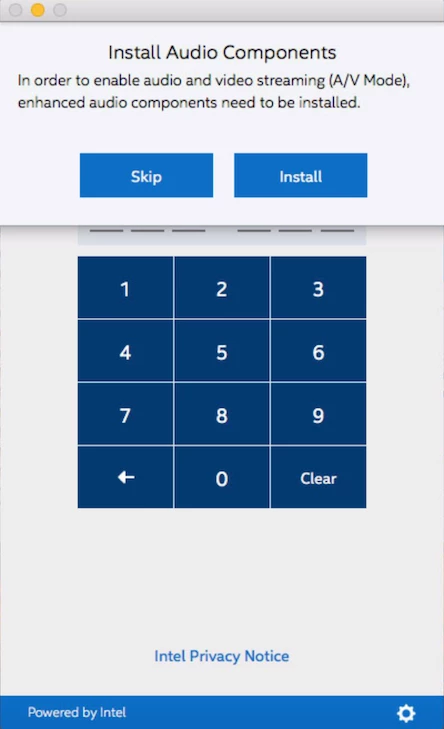
Intel Unite - How to package 'Install Audio Components' at first launch

  • May 30, 2018
  • 2 replies
  • 21 views

Forum|alt.badge.img+5

Hi, we are planning to rollout Intel Unite to share Mac screens to the display in meeting rooms. Problem is that first launch it tries to install some AV components, none of the Application packaging tools are able to capture it.
Has anyone done it before? See attached screenshot for prompt.

Thanks in advance. :)
2 replies

Forum|alt.badge.img
  • New Contributor
  • June 14, 2018

I haven't found a good way to do it yet but here's a workaround:

After installing the AV tools on a machine, package /Library/Audio/Plug-Ins/HAL/ACE.driver with the following post-install.

#!/bin/bash
/usr/sbin/chown -R root:wheel /Library/Audio/Plug-Ins/HAL/ACE.driver
/bin/ln -s ACE.driver /Library/Audio/Plug-Ins/HAL/InstantOn.driver
/Library/Audio/Plug-Ins/HAL/ACE.driver/Contents/Resources/acetool install
/usr/bin/killall -c coreaudiod -u _coreaudiod

defaults write /Library/Preferences/com.intel.Intel-Unite.plist AVMode -bool TRUE
defaults write /Library/Preferences/com.intel.Intel-Unite.plist AudioComponentsPromptedOnce -bool TRUE

Forum|alt.badge.img+16
  • Honored Contributor
  • September 26, 2019

In the meantime Intel has released a version of Unite where this can be automated in a smoother way.

#!/bin/sh

PATH="/usr/local/bin:/usr/bin:/bin:/usr/sbin:/sbin"

echo "Starting Intel Unite audio driver installation..."
"/Applications/Intel Unite.app/Contents/MacOS/Intel Unite" -installaudiodriver 2>&1

exit 0

Use this a postinstall script when creating your package with Composer.