

In Settings, I set inventory display to show all of the following:
- Operating System
- Operating System Build
- Operating System Name
- Operating System Version
Here's what I get: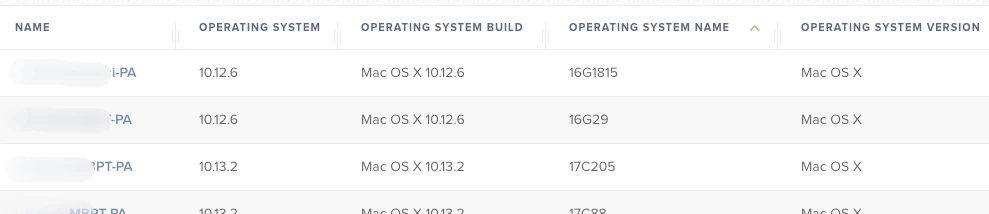
That's clearly wrong.
Under the "Operating System" heading (where it should show "Mac OS X") instead it's showing Version.
Under Build, it's showing the name.
Under Name, it's showing the build.
and under Version, it's showing the OS.
Then I tried having only 1 item checked.
If I set inventory to show only Build, I do indeed get the build: 18E226
If I set inventory to show only Version, I do indeed get the version: 10.14.5
So those two work.
But if I set inventory to show only Operating System, I get the version: 10.14.5
And if I set inventory to show only Name, I get the operating system: Mac OS X
There seems to be no way to show only the name ("Mac OS X 10.14.5"), which is what I actually want.
Is this broken everybody, or just me?
