
Question

Inventory NOT updating

  • January 3, 2020
  • 2 replies
  • 21 views

Forum|alt.badge.img+1

We're new to the Jamf environment, but have attempted to look through several articles/discussions regarding inventory updates.

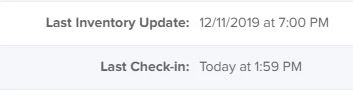
Issue: Our macs show an initial inventory update when they were enrolled, but no subsequent updates. The Last Check-in time/date is accurate and seems to be working. Additionally, we are seeing the following result: verbose: Gathering screen saver idle time. I'm not sure if that's part of the problem.

Any information/advise would be greatly appreciated.

Baseline:
1. enroll mac into jamf cloud
2. forced sudo jamf recon -verbose (see attached)
3. See attached for the console readout.

2 replies

Forum|alt.badge.img+2
  • New Contributor
  • February 14, 2020

We had the same issue on our MacBooks. The inial recon took approximately 20 minutes to run, but subsequent recon operations took less than a minutes. I'd let it run for at least 30 minutes to see if it completes.


Forum|alt.badge.img+11
  • Valued Contributor
  • February 14, 2020

May not be related, but we used to see really long inventory times which we eventually discovered was down to SMB mappings linked in the user's home directories.