Question

Issues launching JSS after upgrade

  • March 6, 2017
  • 33 replies
  • 183 views

Forum|alt.badge.img+3

Hi,

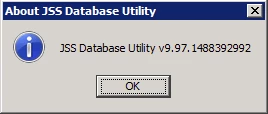
After upgrading to the latest version of JSS 9.97.1488392992 from 9.97.1482356336 I am no longer able to access the web console. I am able to get to the logon screen and can authenticate successfully however after doing so the JSS will open for 1 or 2 seconds and then go back to the logon screen. Has anyone seen this behavior before?

Thank you,
33 replies

Tangentism
Forum|alt.badge.img+10
  • Honored Contributor
  • March 6, 2017

Upgraded our dev server this morning and having the same issue: login and get kicked out immediately. went through the usual of clearing cache/cookies, etc on the client side to no avail.

Looking at JSSAccess log and have several entries like this:

2017-03-06 11:53:14,417: username=xxxx, status=Successful Login, ipAddress=10.110.168.154, entryPoint=JSS

Can confirm same version:


Forum|alt.badge.img+9
  • Contributor
  • March 6, 2017

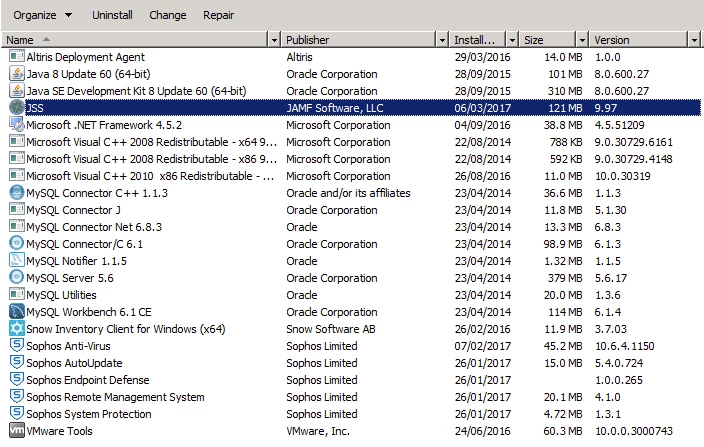
Same issue here. Running Windows 2012 R2. Found two instances of JSS installed under Programs and Features. Ended up uninstalling both JSS instances, Deleted the JSS folder and reinstalling. I replaced my Database.xml and server.xml files, and copied my ssl-prod.jks to Tomcat. Then a simple restart of the server and I am up and running again.


Forum|alt.badge.img+17
  • Honored Contributor
  • March 6, 2017

Thanks for posting. I'll try the manual installer. I'm close to giving up on the windows installer.


Forum|alt.badge.img+10
  • Valued Contributor
  • March 6, 2017

I just did the upgrade and I cannot get logged into the JSS with any account, ADS or local. Log in, kicked out. I too have two JSS's in Programs and Features (Server 2008 R2). I will try what mradams did. I knew I should not have applied this... As in - the .msi installers have become so flaky, there always seems to be problems, and I should have waited to see what the others had to say.


Forum|alt.badge.img+17
  • Honored Contributor
  • March 6, 2017

@aamjohns were you able to test in test environment first?


Forum|alt.badge.img+10
  • Valued Contributor
  • March 6, 2017

No.


Tangentism
Forum|alt.badge.img+10
  • Honored Contributor
  • March 6, 2017

@mradams I only have one instance of the JSS showing up under Programs and Features.

Thankfully this is a dev server so there is no production critical data on it but doesnt look good for updating the prod servers!


Forum|alt.badge.img+10
  • Valued Contributor
  • March 6, 2017

I just uninstalled both instances and then reinstalled the latest installer with the hotfix. I can now log into the web console. After the first install attempt and then this install my Apache Tomcat lost its SSL cert settings. Even though after the first install I was getting kicked after authenticating, when arriving at the page I was getting the warning that the cert is not trusted.

@CasperSally - you mentioned manual install. If you do the following it should work for you.
To avoid the .msi installer failing I do the following and I don't usually have any issues.
1) Run services.msc and stop the Apache Tomcat service
2) Browse to the location of the JSS Installer.msi file (after being extracted).
3) Copy the path out of the address bar at the top of the explorer window
4) Run a cmd prompt as administrator
5) cd "C:TSSTCasperJSSInstallerWindows9.97.1488392992JSSInstallerWindowsJSS Installation" and hit enter (in a cmd window type cd " then right click with the mouse and choose paste and then put a " at the end and hit enter.
6) run: msiexec.exe /I "JSS Installer.msi"
7) Follow through the prompts to completion
8) Make sure the tomcat8.exe and mysqld.exe processes are running.
9) Give it a bit before trying to access the web interface


Forum|alt.badge.img
  • New Contributor
  • March 6, 2017

Seriously, thanks for this post


Forum|alt.badge.img+11
  • Valued Contributor
  • March 6, 2017

2 threads on this issue now on JAMF Nation: https://www.jamf.com/jamf-nation/discussions/23265/database-connection-error-access-denied. However, all are using Windows servers. Anyone tried on a Linux box? Any issues there?


Forum|alt.badge.img+3
  • Author
  • New Contributor
  • March 6, 2017

It sounds like everyone with this issue in this thread is windows based. I'm running Server 2012 R2. I checked and do have 2 JSS objects in programs and features. I did not install JSS in the default location so I selected Custom when running the msi installer and ensured the JSS location it pointed to was the correct one.


Forum|alt.badge.img+12
  • Valued Contributor
  • March 6, 2017

I have tried on a Linux box, Centos7 to be precise. The installer did its usual thing of moving the old jss/tomcat tree into the backups tree and installing the new version in the standard place. I then had to restore the SSL cert and restart everything.

Hope this helps,

Matthias


Forum|alt.badge.img+11
  • Valued Contributor
  • March 6, 2017

@mschroder Ok thanks. We use Ubuntu and have never had an issue (never had the SSL issue either), however, I usually wait a week or 2 after a patch/update release before I go ahead.


Forum|alt.badge.img+2
  • New Contributor
  • March 6, 2017

the patch is bugged. If you have not installed yet don't. Im going the the uninstall/reinstall issue right now.


Forum|alt.badge.img+9
  • Contributor
  • March 6, 2017

Yup, I had to manually copy the cert back on CentOS 6 from the backup folder.


Forum|alt.badge.img+9
  • Contributor
  • March 6, 2017

The one time I didn't wait for others to report first, I do the install. I'm in the same boat with the login screen since Friday. I had to re-add my keystore settings to server.xml and redirect my database.xml file to the right server just to get that far, only to be bounced out after login.

We've been experiencing so many Tomcat issues I felt like a starving wolf jumping on that hot fix bone, only to get burned.


emily
Forum|alt.badge.img+26
  • Hall of Fame
  • March 6, 2017

For what it's worth, when our org did the hotfix update on Ubuntu the database connection had to be reconfigured (sys admin used the web gui, fwiw, when she tried to sign into the boxes after the update she was prompted to re-enter the DB information).


Forum|alt.badge.img+8
  • Contributor
  • March 6, 2017

I'm having the same issue.

After running and installing the MSI, when browsing to the web portal I get a database connection error. I tried editing the connection and filling in the right credentials, and it connects but wont let me log in since it kicks me out immediately after login in.

We're running our instance of JSS on Server 2012 R2.


Forum|alt.badge.img+9
  • Contributor
  • March 6, 2017

Do you have two installation instances like I had (previous post)?


Forum|alt.badge.img+9
  • Contributor
  • March 6, 2017

My mixed Linux server environment (CentOS and RHEL) has been working just fine after copying back the SSL cert from the backup folder.


Forum|alt.badge.img+8
  • Contributor
  • March 6, 2017

Yes.

I followed what was posted but still the same behaviour


Forum|alt.badge.img+10
  • Valued Contributor
  • March 6, 2017

I've been watching this in case I can offer any assistance but @BreakingZeus , I have nothing to go on. Do you need help or are you going to talk to JAMF Support?


Forum|alt.badge.img+8
  • Contributor
  • March 6, 2017

I created a ticket with Jamf Support. I reverted to a snapshot when updating didn't go as planned.


Forum|alt.badge.img+5
  • Contributor
  • March 6, 2017

I ran the installer on my test box with Server 2012 R2, which was already running the initial 9.97 release, not the previous patched version. It seems to have overwritten my database.xml file that was pointing to my off-server MySQL instance, and I did indeed end up with two JSS entries in the Uninstall Programs Control Panel item.

I don't have a third party cert on my test box (I guess I probably should to make it as identical to my production environment as possible), but I imagine it would have done away with that, too. It's almost like it is completely overwriting the root folder and everything in it, so if I HAD to install the patch today, I reckon I would copy that whole folder beforehand so that I could re-copy anything that was needed (like my edited database.xml file).


Forum|alt.badge.img+2
  • New Contributor
  • March 6, 2017

Has anyone had issues reimporting their cert after doing the uninstall/reinstall procedure?