Question

Jamf Pro 10.4 and Quick Add package Bug

  • May 9, 2018
  • 42 replies
  • 227 views

Forum|alt.badge.img+3
  • New Contributor

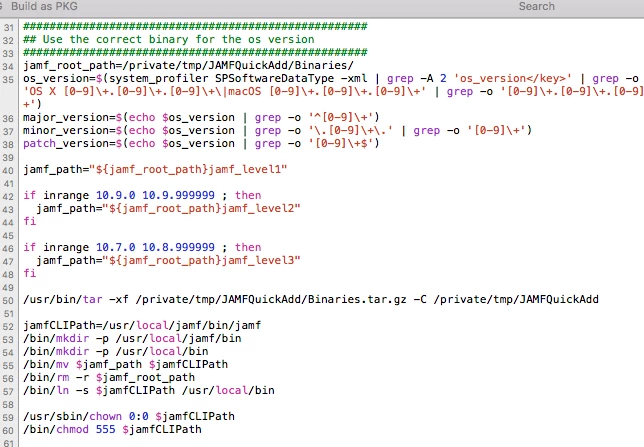
I was having problems with the new Quick Add package that I created after we updated to Jamf Pro 10.4. It seems that there is a bug in the Scripts>postinstall script.

I had to open the newly created Quickadd package in Composer

Scripts>postinstall scroll down to the "Use the correct binary for the os version," There is a command line missing - in my QuickAdd it is line 54. I have attached a screen shot /bin/mkdir -p /usr/local/bin

Once that command was entered, and the QuickAdd was saved, I was back in business.

I hope this helps others!
42 replies

Forum|alt.badge.img+3
  • Author
  • New Contributor
  • May 10, 2018

I should have indicated the symptoms of the problem

Unable to use jamf commands in terminal -- Jamf command not found

Jamf Remote indicated

Failed to symlink JAMF The file "jamf" couldn't be saved in the folder "bin".
Failed to symlink JAMFAgent The file "jamfAgent" couldn't be saved in the folder "bin".


Forum|alt.badge.img+2
  • New Contributor
  • May 15, 2018

Thanks KAD, solved my problem (one of many!)


Forum|alt.badge.img+2
  • New Contributor
  • May 16, 2018

Seems like it didn't solve my problem after all, I'm still getting 'Jamf command not found' and I've double checked the package and the script. The file and folder structure of /usr is correct.


Forum|alt.badge.img+4
  • Contributor
  • May 24, 2018

I have the same issue after enrollment, the Jamf command does not function and I need to run the binary directly. It does not matter if I use the QuickAdd package or just install the MDM profile, same issue. I did notice that this issue does not exist when using Casper Imaging.


Forum|alt.badge.img+4
  • Contributor
  • May 25, 2018

This issue was noticed in our environment following upgrade to 10.4.1 exactly as noted above by the original poster. Systems were enrolling correctly to Jamf PRO but had no access to utilize the Jamf binary afterward. All commands would fail. Upon comparing the newly generated QuickAdd package to our prior version QuickAdd package, we found that the mkdir command for /usr/local/bin was simply not present in the default postflight script included in the QuickAdd package by Recon 10.4.1. Adding that single line into the script resolved the issue for us. Had to removeFramework and delete the botched symlink on test units in order to get a clean test with the new, modified package. The resulting QuickAdd has worked for us consistently and provided a Jamf binary that is correctly accessible and functional for the end-user. Great catch @KAD! Thank you for posting your experience. You pointed us to exactly the right spot to quickly resolve this.


Forum|alt.badge.img+3
  • New Contributor
  • May 30, 2018

Same Problem here. I've added the line to the post install script, but I still get the same error and can't remove framework.


Forum|alt.badge.img+6
  • Contributor
  • May 31, 2018

We've also ran into this issue. Did a quick chat with JAMF and they are aware. Under PI-005852.


Forum|alt.badge.img+6
  • Contributor
  • June 1, 2018

Anyone else seeing:

jamf[1120:8794] CFNetwork SSLHandshake failed (-9807)

When running a jamf recon on a workstation with a modified quickadd.pkg as noted above?

I imaged three machines, one with the original quickadd, one with a modified quickadd and one enrolled via DEP. Only the modified quickadd.pkg is giving the noted error on a recon.

Just checking with JAMF supported about this.


Forum|alt.badge.img+2
  • New Contributor
  • June 1, 2018

Thanks for this thread! Updated to 10.4.1 today and was having this issue. Adding the line to the quickadd package fixed it. I also created a policy that runs on the machines that had the faulty quickadd done on them that removes the bad /usr/local/bin symlink, then installs the working quickadd, all is golden

Thanks!

MK


Forum|alt.badge.img+6
  • Contributor
  • June 8, 2018

For anyone seeing this,

You need to remove the already in place folders in /usr/local/jamf then re-run the quick-add package. If you dont then it wont be able to re-add the folders etc. You should also probably remove the /Library/Application Support/Jamf folder. Though this will re-appear immediately

I also removed the computer from the JSS just to make sure.


Forum|alt.badge.img+6
  • Contributor
  • June 8, 2018

I've just created script to fix this on enrollment instead of modifying each quickadd.pkg. This seems to be working for me.

#!/bin/bash

# check for symlink
if [ -L "/usr/local/bin" ] ; then
  rm "/usr/local/bin"
  mkdir "/usr/local/bin"
  ln -s "/usr/local/jamf/bin/jamf" "/usr/local/bin/jamf"
  ln -s "/usr/local/jamf/bin/jamfAgent" "/usr/local/bin/jamfAgent"
  chown -R root:wheel "/usr/local/bin"
fi

Forum|alt.badge.img+7
  • Contributor
  • June 26, 2018

I'm still seeing this behaviour with 10.5.0.
Is there a ticket I can follow for this bug?


Forum|alt.badge.img+6
  • Contributor
  • June 26, 2018
We've also ran into this issue. Did a quick chat with JAMF and they are aware. Under PI-005852.

This is all they gave me.


scottb
Forum|alt.badge.img+18
  • Valued Contributor
  • July 11, 2018

So, if we indeed go and "fix" this with one of the methods listed, what happens when Jamf actually fixes it? Will the fixed dir just continue to work?
Don't want to have to track down all this mess if we make a work-around...


scottb
Forum|alt.badge.img+18
  • Valued Contributor
  • July 17, 2018

BTW, thanks @ubcoit - this little script running after enrollment did the trick.


donmontalvo
Forum|alt.badge.img+36
  • Hall of Fame
  • July 24, 2018

This is one of the reasons we stopped making QuickAdd packages years ago, and we restrict the ability to do so as well.

We send techs to the https://server.domain.com:8443/enroll page instead.

We have deferred the MDM User Allowed Enrollment workflow (*) to macOS 10.14 and might defer it further (Jamf can provide the MySQL steps).

So new enrollments do not show the PI-005852 issue in our environment.

# ls -lF /usr/local | grep bin
drwxr-xr-x   6 root  wheel  192 Jul 23 11:48 bin/

and

# ls -lF /usr/local/bin/ | grep jamf
lrwxr-xr-x  1 root  wheel       24 Jul 20 10:49 jamf@ -> /usr/local/jamf/bin/jamf
lrwxr-xr-x  1 root  wheel       29 Jul 20 10:53 jamfAgent@ -> /usr/local/jamf/bin/jamfAgent

(*) Ask your Jamf rep, deferring MDM User Allowed Enrollment workflow to a later macOS version is fully supported.

Don


scottb
Forum|alt.badge.img+18
  • Valued Contributor
  • July 24, 2018

Sadly, 10.6.0 doesn't address this one...


donmontalvo
Forum|alt.badge.img+36
  • Hall of Fame
  • July 25, 2018

After today's <redacted> testing, we are definitely going to defer the MDM User Allowed Enrollment workflow to macOS 10.15.

As mentioned earlier, ask your Jamf rep, deferring MDM User Allowed Enrollment workflow to a later macOS version is fully supported.


Forum|alt.badge.img+8
  • Employee
  • July 25, 2018

Hello everyone, PI-005852 was fixed for 10.6.0. If you are finding a QuickAdd package from Recon.app still does not create the /usr/local/bin directory please reach out to support.


Forum|alt.badge.img+4
  • Contributor
  • July 25, 2018

I believe 10.6.0 has addressed it but didnt make it into release notes (as of today at least). See my post here https://www.jamf.com/jamf-nation/discussions/28764/jamf-quickadd-symlinks-usr-local-bin-causing-install-problems-for-other-apps#responseChild169545


Forum|alt.badge.img+4
  • Contributor
  • July 25, 2018

@donmontalvo when you said you just send techs to the enroll page, do you create new users for them or have them enroll with a generic user account?


scottb
Forum|alt.badge.img+18
  • Valued Contributor
  • July 26, 2018

@drhoten - I just looked again, and PI-005852 is not shown as a fixed issue. Just want to make sure before I move forward.


Forum|alt.badge.img+4
  • Contributor
  • July 26, 2018

@drhoten agreed - updated a ticket for them to revise release notes - hasnt happen, if it'll happen at all yet


r0b
Forum|alt.badge.img+1
  • New Contributor
  • July 26, 2018

I can confirm creating a new quickadd package on 10.6 resolved this issue for me.


scottb
Forum|alt.badge.img+18
  • Valued Contributor
  • July 26, 2018

Also confirmed that enrolling via URL or new QuickAdd works as expected. Thanks!