Question

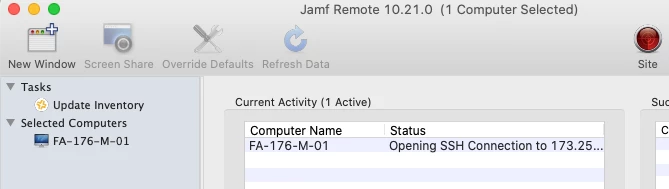
Jamf Remote stuck at Opening SSH Connection

  • April 24, 2020
  • 37 replies
  • 215 views

Show first post

37 replies

Forum|alt.badge.img+7
  • Author
  • Valued Contributor
  • May 31, 2020

Hi, @WhippsT , we are on 10.21.0 and just tested with the smart group of all 10.15.5 machines. Jamf Remote seems to be connecting and authenticating fine.


Forum|alt.badge.img+7
  • Contributor
  • June 8, 2020

I'm on 10.21.0 and can confirm that I still have this problem. Any thoughts?

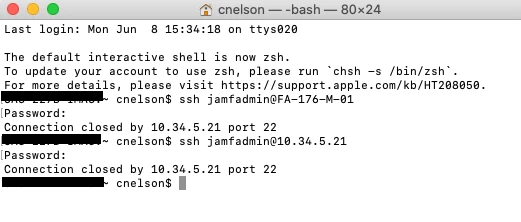
And when I try to ssh with jamf agent account, it instantly closes the connection.

Computer trying to remote to is on 10.15.3.


Forum|alt.badge.img+10
  • Contributor
  • June 9, 2020

I am on 10.20.1 and have this problem as well, just tested against a OSX10.14.6 and it failed until I accepted the fingerprint.


Forum|alt.badge.img+9
  • Contributor
  • July 2, 2020

I can confirm the problem still exists on Jamf 10.20.1 with Catalina 10.15.5.


Forum|alt.badge.img+12
  • Contributor
  • July 23, 2020

You can change the ssh config for your user account and bypass the additional security. Not recommended for security reasons but seems to work if you're in a pinch. Hopefully this issue will be resolved soon without the need for tweaks like this.

Create or edit ~/.ssh/config and add the following lines:

Host 10.*.*.*
   StrictHostKeyChecking no

Edit the "Host" IP to represent the subnets you want to bypass.


Forum|alt.badge.img+7
  • Contributor
  • November 17, 2020

So I tried something on my machines and Jamf Remote started to work again.
I already have Remote Login enabled on all machines.
I am on Jamf Pro 10.25.1 and running the command with ARD on Catalina.
I ran the following command:

dseditgroup -o edit -t user -a "jamf_mgmt_account_name" com.apple.access_ssh

I'm wondering if when the OS does it's security updates, if it's wiping the contents of com.apple.access_ssh.
Anyway, for now, Jamf Remote seems to be working. Yay!


Forum|alt.badge.img+2
  • New Contributor
  • November 17, 2020

Same issue. Just started yesterday. Thought it was my VPN. I can use Apple Remote Desktop just fine.


nielandj
Forum|alt.badge.img+9
  • Contributor
  • January 7, 2021

Running into the same issue on 10.15.6, with 10.26.0 Jamf Remote.


nielandj
Forum|alt.badge.img+9
  • Contributor
  • January 8, 2021

Follow up from my post yesterday: The only way I could get this to work was to delete the computer record and re-enroll. Joy.


Forum|alt.badge.img+5
  • Contributor
  • June 11, 2021

I'm having the same issue on 10.29.2. My computer and the remote Mac are both running os 10.15.
When I try it with a remote Mac running 10.14, it works fine.


Forum|alt.badge.img
  • New Contributor
  • July 7, 2021

Currently I am testing this, I am on 10.30.2 for cloud instance and using 10.30.3 Remote app, I cannot connect to any of the Big Sur Macs, have not test the previous OS ones


Forum|alt.badge.img+1
  • New Contributor
  • July 23, 2021

We've been experiencing this issue as well, and figured out what the solution was, at least in our setup. 

It all boiled down to our admin account password needing to be reapplied to the affected machines. 

We set our PreStage configuration create a local administrator account before the Setup Assistant, then skip account creation. This way it bypasses most of the Welcome screen prompts. Every new computer we were setting up, or if we performed a wipe/refresh of the OS would fail when trying to issue commands via JAMF Remote, SSH through terminal, or even run JAMF Recon remotely. 

What fixed it was creating a policy where under "Management Accounts", setting "Change Account Password" to reapply the password for that administrator account, then setting it to run at startup (I'm sure once this runs through all of our machines, we could change it to once after enrollment). 

Hopefully this helps others experiencing this issue. I'm going to test altering the PreStage configuration to see if not skipping account creation stops this from being an issue in the first place soon, but thought I'd share what I've found so far.