Question

Konica Minolta Bizhub Pro 951 Script options

  • August 7, 2015
  • 3 replies
  • 66 views

Forum|alt.badge.img+5

I seen another post that was kind of old that explained about adding options for a Bizhub 754 copier that was helpful looking for a script to add a Bizhub Pro 951 to a Mac computer.

Here is what I have and the options that are on the copier that I need to make available on the Mac side. The only 2 options that I can get to show up are PaperSources and Finisher, having trouble adding SaddleSticher and KOPunch. Driver is KONICAMINOLTA951.gz 10.10 for Mac.

Any help would be great.

/usr/sbin/lpadmin -p DCS_PROD_KM -L "Dublin City Schools" -E -v lpd://printservername/printquename -P /Library/Printers/PPDs/Contents/Resources/KONICAMINOLTA951.gz -o printer-is-shared="False" -o PaperSources=PF706 -o SaddleSticher=SD510 -o Finisher=FS532 -o KOPunch=PK522-3 -o KMDuplex=Single -D "NAME"

Finisher FS532/FS-532:

KOPunch PK-522-3/PK-522 (2/3 Hole Type):

SaddleStitcher SD510/SD-510:

PaperSources PF706/PF-706:

3 replies

bpavlov
Forum|alt.badge.img+18
  • Esteemed Contributor
  • August 7, 2015

Every now and then I always find myself needing to do things in a PPD and this tool and blog post has been quite invaluable:

http://www.brunerd.com/blog/2012/03/13/getting-and-setting-ppd-options-via-command-line-for-use-with-lpadmin-in-os-x/


Forum|alt.badge.img+7
  • Contributor
  • August 7, 2015


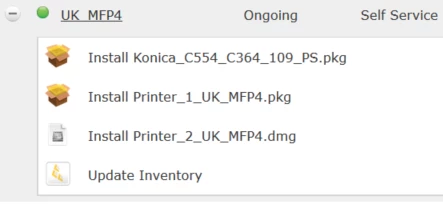
I just had to package one of these bizhub printers. What I did was create the printer with all the settings required on a cleanly built machine. Using Composer saved the .ppd in /private/etc/cups/ppd to a .dmg. I also create a .pkg to run a Preinstall script with syntax similar to yours (see below) and saved them with a naming convention so they run in the order I want them to when the user click Install in Self Service. it seems a bit redundant but it is working perfectly for me at the moment.

!/bin/sh

preinstall

pathToScript=$0
pathToPackage=$1
targetLocation=$2
targetVolume=$3

/usr/sbin/lpadmin -p UK_MFP4 -L "Country-Building-Floor" -E -v lpd://km834136.company.com/Print -P /Library/Printers/PPDs/Contents/Resources/KONICAMINOLTAC454e.gz

/usr/sbin/lpadmin -p UK_MFP4 -o printer-is-shared=false

cupsctl WebInterface=yes

exit 0 ## Success
exit 1 ## Failure


bentoms
Forum|alt.badge.img+35
  • Hall of Fame
  • August 9, 2015

@Bobst I have a similar post to what @bpavlov linked here.

Your lpadmin commands look good, maybe double check the lpoptions?