Solved

Log out after 30 min of inactivity

  • November 25, 2015
  • 18 replies
  • 263 views

Forum|alt.badge.img+1

Hi

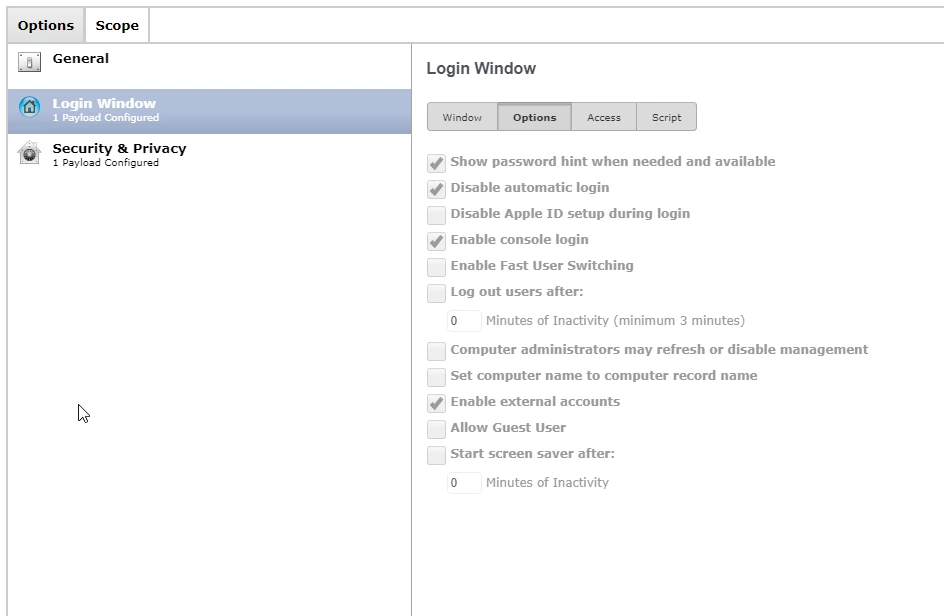
Ive noticed that some of our machines start this new behavior that they logout after 30 min of inactivity and it sets itself automatically in security and privacy setting. I did not set this up and I can not find anything in the policies or in configurations. Had anybody else has this problem?

Thank you,
-Popak
Best answer by rquigley

Hi popakr,

I had this discussion just today on the MacAdmins Slack group, answered by hkabik. They were able to answer my question which was the same as yours.

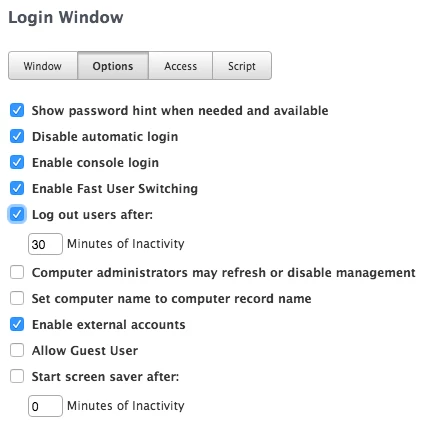
The issue is if you have a Configuration profile for Login Settings, I believe under Casper versions above 9.8, it ticks a box within it that results in machines logging out after 30 minutes as described above.

Hope this helps!

18 replies

Forum|alt.badge.img+11
  • Contributor
  • Answer
  • November 25, 2015

Hi popakr,

I had this discussion just today on the MacAdmins Slack group, answered by hkabik. They were able to answer my question which was the same as yours.

The issue is if you have a Configuration profile for Login Settings, I believe under Casper versions above 9.8, it ticks a box within it that results in machines logging out after 30 minutes as described above.

Hope this helps!


Forum|alt.badge.img+8
  • Contributor
  • November 25, 2015

Hi Popak,

I've noticed the same thing recently too. Started happening after we upgraded the JSS to 9.81, have you recently upgraded also?
We'd perviously been trying to get this behaviour in our student lab environments using the settings Rquigley highlighted above - we could never get this to work and instead did it via scripts.

Could it be that this feature wasn't correctly implemented until 9.81?


keaton
Forum|alt.badge.img+17
  • Employee
  • November 25, 2015

Hey all,

This is a product issue (D-009686) we are aware of and hope to include a fix for this in our next release 9.82, which is currently in beta.

We do offer a beta program if you are interested in testing out upcoming releases. You can join by following this link: https://my.jamfsoftware.com/betaProgram.html

We hope that helps!

Thanks,
Keaton
JAMF Support


Forum|alt.badge.img+12
  • Contributor
  • November 25, 2015

@keaton @Crawford I'm confused, I thought this issue was fixed in 9.8? From the Release Notes:

[D-008560] Fixed an issue that caused a configuration profile set to log a user out after a certain amount of time to fail to do so.


keaton
Forum|alt.badge.img+17
  • Employee
  • November 25, 2015

Hey @dferrara,

D-008560 was an issue where any amount of time set with the profile did not work, this was resolved in 9.8.

D-009686 which I mentioned above relates to how it automatically checks the box to log out the user after 30 minutes when the JSS is upgraded to 9.8 or later.

Thanks,
Keaton
JAMF Support


Forum|alt.badge.img+12
  • Contributor
  • November 25, 2015

Thanks for the clarification @keaton!


Forum|alt.badge.img+20
  • Contributor
  • November 27, 2015

So would I have to re distribute my config profile login settings now that I am upgraded from 9.51 to 9.81?

I had config profile of 20 minutes of inactivity logout users, it never worked when using 9.51, now I am on 9.81, should it just carry over? I still see the profile on computers but they are not being auto logged out.

Via config profile I have fast user switching on, but when users forget to logout it doesn't auto log them out, that is why I turned on fast user switching


Forum|alt.badge.img+5
  • Contributor
  • November 30, 2015

This never worked for me in OS versions 10.10 and below. My 10.11 machines have this working perfectly...


Forum|alt.badge.img+7

I have this box unticked and I'm getting automatically logged out - or at least the system is attempting to do so. Fortunately, one of my apps requires verification before logging me out, but it's still annoying to lock my machine (hot-corner, sleep after 0 seconds) only to come back 45 minutes later and find the system trying to log me out.


Forum|alt.badge.img+1
  • New Contributor
  • May 13, 2016

Our config profile is unchecked for the auto logout setting. This works on almost all of our 400 machines. However, we have 4 or 5 that seem to be overriding the profile and keep auto logging out. We have wiped these machines and the problem will come back as soon as they check into the JSS. We are totally stumped. I'm starting to think there is a setting at the user level that is causing this, although the users are not admins on their machines....


Forum|alt.badge.img+13
  • Valued Contributor
  • February 23, 2017

Yup, Same here!
I changed the settings on a users Mac yesterday.
I've just been informed that it's re set itself back to 30 minutes Autologout....
?????????????
Running JSS 9.93


Forum|alt.badge.img+8
  • Valued Contributor
  • April 7, 2017
I've just been informed that it's re set itself back to 30 minutes Autologout

I still see this behaviour in 9.97.


Forum|alt.badge.img
  • New Contributor
  • July 5, 2017

I now have a few users that this is impacting. I even created a policy specifically to make sure it's disabled with no luck.


Forum|alt.badge.img+7
  • Valued Contributor
  • July 5, 2017


this is what resolved our issue:
Try combining two payloads "Login Window" and "Security & Privacy" on one configuration profile...
(or do the opposite)

ps: Im on JSS 9.96


Forum|alt.badge.img+1
  • New Contributor
  • July 6, 2017

I also have a couple of Macs where users report going to lunch and come back to find their workstation completely logged out. I have Login Window configured and verify that auto logout is unchecked. I have also removed framework and re-enrolled the devices but that did not resolve the issue. Running version 9.99.0-t1494340586. I have tried osxadmin's suggestion to combine Login Window and Security & Privacy payloads, and will see if that fixes it, but it is a little frustrating that I am not seeing the config setting reflected in the workstations behavior.

*UPDATE - After combing the two payloads Login Window and Security & Privacy, as osxadmin suggested, the problem is resolved, and the logout after 30 minutes box is not be re-checked when user logs in. Thanks!


Forum|alt.badge.img+1
  • New Contributor
  • July 6, 2017

Duplicate post


Forum|alt.badge.img+3
  • New Contributor
  • April 1, 2021

I'm having this issue on 10.15.7 Macs, and the configuration profile I have tested is not working to prevent this. My CP looks just like the one osxadmin posted. Is anyone else experiencing this issue?

When the log out box after box is unchecked, it keeps getting checked again.


jclements
Forum|alt.badge.img+4
  • Contributor
  • April 6, 2021

For what it's worth, I completely re-built my General Settings configuration profile for other reasons and auto-logout magically started working again.