
Question

Mac OS Updates downloading but not installing through policy

  • February 26, 2021
  • 6 replies
  • 46 views

Forum|alt.badge.img+6

Hey Everyone,

So I have a policy setup for OS Updates. All the machines are on Big Sur. So it's a policy enabled in self service to allow users to update. The Software Updates payload points to Apples Software Update Server. Then the Restart payload is on restart if a package or update requires it for both logged in and no user logged in with the current startup disk.

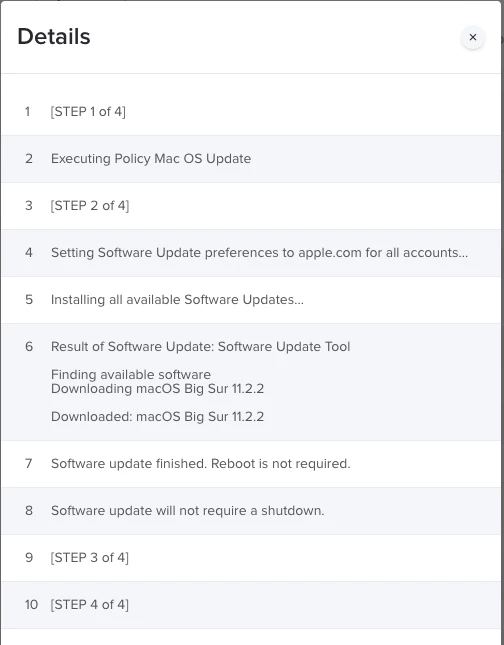
The policy logs show it downloads but nothing actually installs. I attached screenshot of running the policy the first time and then the second time.
6 replies

Forum|alt.badge.img+2

We have gone through similar suitations. softwareupdate -diaR is working as expected but not the Restart payload


Forum|alt.badge.img+4
  • Contributor
  • May 28, 2021

This is happening to us as well with Big Sur, Catalina seems to be working fine.


Forum|alt.badge.img+1
  • New Contributor
  • August 4, 2021

i'm having this issue with Big Sur as well.  Anyone from Jamf wanting to chime in?


Forum|alt.badge.img+6
  • Author
  • Contributor
  • August 9, 2021

This could probably be done way better, but here's the script I made now for our environment.

First line installs all applicable updates available, then second line interrupts the user with a button that the computer will restart. Then last line checks again to install any applicable updates with the -R flag for restart. So yes after the user clicks the restart button it will forcefully restart the machine. Though if you just want to install with no restart you can just use the -i and -a flags.


#!/bin/bash sudo softwareupdate -i -a osascript -e 'display dialog "Updates installed. Mac will now restart. Please save all your data and close all applications before clicking restart." buttons {"Restart"} default button 1' sudo softwareupdate -i -a -R


Forum|alt.badge.img+1
  • New Contributor
  • August 9, 2021

This could probably be done way better, but here's the script I made now for our environment.

First line installs all applicable updates available, then second line interrupts the user with a button that the computer will restart. Then last line checks again to install any applicable updates with the -R flag for restart. So yes after the user clicks the restart button it will forcefully restart the machine. Though if you just want to install with no restart you can just use the -i and -a flags.


#!/bin/bash sudo softwareupdate -i -a osascript -e 'display dialog "Updates installed. Mac will now restart. Please save all your data and close all applications before clicking restart." buttons {"Restart"} default button 1' sudo softwareupdate -i -a -R


I think the challenge with this script is that running softwareupdate -iaR again won't restart the computer right away, it will try to "install" the updates again, which may be 5-10 minutes before restarting.


Forum|alt.badge.img+1
  • New Contributor
  • August 9, 2021

This could probably be done way better, but here's the script I made now for our environment.

First line installs all applicable updates available, then second line interrupts the user with a button that the computer will restart. Then last line checks again to install any applicable updates with the -R flag for restart. So yes after the user clicks the restart button it will forcefully restart the machine. Though if you just want to install with no restart you can just use the -i and -a flags.


#!/bin/bash sudo softwareupdate -i -a osascript -e 'display dialog "Updates installed. Mac will now restart. Please save all your data and close all applications before clicking restart." buttons {"Restart"} default button 1' sudo softwareupdate -i -a -R


I stand corrected...this script worked beautifully!! Thank you!