
Question

Macbook prompting DEP instead of autoconfiguring

  • June 12, 2015
  • 4 replies
  • 21 views

Forum|alt.badge.img+16

We recently got our first Macbook in since they were announced. We purchased it through Apple, and DEP was supposed to kick in to enroll it and trigger the initial policies. Something odd happened though. Instead of automatically accepting DEP enrollment and having everything happen in the background, we got the following prompt:
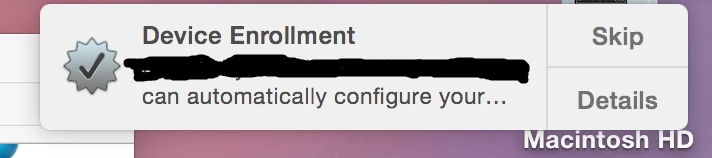
When you press "Details", it accepts everything and starts triggering profiles/policies/etc. "Skip" does exactly what it sounds like.

We can't quite figure out why this popped up though. It only pops up on Macbooks, and we were able to reproduce it multiple times in a row. Anyone have any ideas?

4 replies

bpavlov
Forum|alt.badge.img+18
  • Esteemed Contributor
  • June 12, 2015

What OS are you running on it out of curiosity?


Forum|alt.badge.img+16
  • Author
  • Honored Contributor
  • June 12, 2015

@bpavlov Brand new Macbook on 10.10.3. Plastic pulled off, hooked up to a Ethernet->USB Ethernet Cable Adapter->USB-to-USBC Adapter->Macbook. I believe we also ran into it when setting it up over WiFi, though I wasn't there when that attempted was made.


Forum|alt.badge.img+7
  • Contributor
  • June 12, 2015

I had a similar thing when trying to set up an iPad that wasn't on DEP. Maybe it could pick up that there was an MDM around?


Forum|alt.badge.img+16
  • Author
  • Honored Contributor
  • June 13, 2015

@timlings This one was actually in DEP in advance. We did the same setup approach to the Macbook as we usually do to our Macbook Pros. The message just pops up only on Macbooks. Macbook Pros just accept it and move on.