Question

macOS High Sierra Upgrade methods/options

  • September 26, 2017
  • 74 replies
  • 387 views

bpavlov
Forum|alt.badge.img+18

I updated my OS script to support High Sierra. It also adds FV authenticated restarts. I hope to potentially add another big feature in the future, but that's it for now.

https://babodee.wordpress.com/2017/09/26/update-to-macos-upgrade-script/

I know I'm not the only one who is working on this. Feel free to share your upgrade methods and/or scripts to upgrade to macOS High Sierra. Curious to see what others are coming up with.

Here are links to other methods used for Sierra:
https://github.com/kc9wwh/macOSUpgrade

https://github.com/ToplessBanana/tutorials/tree/master/HOW-TO-self-service-macOS-upgrades

And a huge discussion for Sierra where a few other methods are discussed:

https://www.jamf.com/jamf-nation/discussions/22731/in-place-macos-sierra-upgrade-script

74 replies

Forum|alt.badge.img+16
  • Honored Contributor
  • September 26, 2017

So if you don't set the --converttoapfs YES but the machine supports APFS it will convert on it's own? No user input?


bpavlov
Forum|alt.badge.img+18
  • Author
  • Esteemed Contributor
  • September 26, 2017

@hkabik That is correct. The installer app will determine on its own whether the hardware/drive supports APFS and upgrade accordingly. They must do this for good reason so its probably not a good idea to enforce it on every upgrade.

@rtrouton has a good write up on it: https://derflounder.wordpress.com/2017/09/26/using-the-macos-high-sierra-os-installers-startosinstall-tool-to-avoid-apfs-conversion/


Forum|alt.badge.img+16
  • Honored Contributor
  • September 26, 2017

Well that solves that. I thought I was going to need essentially two deployments... one for SSD with YES and one for spinners/fusion with NO. already setup my EA's and everything lol.


ImAMacGuy
Forum|alt.badge.img+23
  • Esteemed Contributor
  • September 27, 2017

never mind, package on the server didn't work. :)


Forum|alt.badge.img+1
  • New Contributor
  • November 3, 2017

If I have the installer in Applications folder and use ARD to push this command as root High Sierra installs fine. I upload the same script to Jamf and put in Self service to run and it fails. Any ideas why?

/Applications/Install macOS High Sierra.app/Contents/Resources/startosinstall --applicationpath “/Applications/Install macOS High Sierra.app” --nointeraction


ThijsX
Forum|alt.badge.img+20
  • Employee
  • November 4, 2017

@mrorrrer can you specify the error exit code's from the policy log?


Forum|alt.badge.img+7
  • Contributor
  • November 5, 2017

@mrorrer I found that Self Service would cause it startosinstall to fail. I managed to get it working by killing Self Service in the script that calls startosinstall. Below is an example that should work.

#!/bin/sh

/Applications/Install macOS High Sierra.app/Contents/Resources/startosinstall --applicationpath “/Applications/Install macOS High Sierra.app” --nointeraction

killall "Self Service"

Forum|alt.badge.img+1
  • New Contributor
  • November 6, 2017

After some research and failed attempts i got it to work with this. Thank you very much for your help!

#!/bin/bash

/Applications/Install macOS High Sierra.app/Contents/Resources/startosinstall --applicationpath "/Applications/Install macOS High Sierra.app" --volume $1 --rebootdelay 1 --nointeraction

killall "Self Service"

Forum|alt.badge.img+3
  • New Contributor
  • November 7, 2017

I've been trying to use OS_Upgrade script to install High Sierra and have run into a couple of issues:

  1. If the "Install macOS High Sierra.app" already exists in the desired location, it will try to trigger the policy to download and it will fail. If you delete the app, the policy download will trigger and it will proceed.
  2. It gets to Step 2. Says it is in progress, but then never restarts. The Policy logs never show anything since it never fails, but nothing ever happens.

bpavlov
Forum|alt.badge.img+18
  • Author
  • Esteemed Contributor
  • November 15, 2017

@phons I tried to reproduce the issue but I can't seem to. I've heard of someone else reporting the same thing as well so you're not alone. Hit me up on the MacAdmins Slack if you get a chance. I'm @bp


Forum|alt.badge.img+3
  • New Contributor
  • November 16, 2017

I found the problems and a solution to each:

  1. I was originally using /Users/Shared. When I switched to /Applications/ The download issue went away

  2. I realized I was using the stub Install macOS High Sierra instead of the full download. When I started using that, it worked fine in the upgrade.

Thanks for all the work on the script, going to make my life a lot easier as we update to High Sierra.


Forum|alt.badge.img+20
  • Contributor
  • November 17, 2017

I am using the following method https://github.com/kc9wwh/macOSUpgrade

I have a custom event that places 10.13.1 in /Applications

but since the drive is encrypted the authenticated restart does not happen, I have to do the initial encryption login and then the upgrade to High Sierra begins.

I thought authenticated restarts was working after 10.12.4. ??


Forum|alt.badge.img
  • New Contributor
  • November 22, 2017

@tcandela just comment out the 521 to 525 lines


Forum|alt.badge.img+7
  • Contributor
  • December 19, 2017

My apologies in advance for any ignorance here. I have a pretty simple need to upgrade High Sierra. I uploaded the installer straight to my distro and then created a policy to have it install the OS over the top of a Sierra machine. Everything works fine but for some reason the installer keeps getting triggered in my policy over and over. It happens every 30 min. or so with recurring check-in I believe (this is one of the triggers). Does anyone know why this is happening? As stated, High Sierra gets installed fine but the policy keeps running repeatedly.


Forum|alt.badge.img+2
  • New Contributor
  • December 19, 2017

@dilan you may have set the Execution Frequency to ongoing , set to once per computer


Forum|alt.badge.img+7
  • Contributor
  • December 19, 2017

@shibao_si thanks for the suggestion but the policy is set to once per computer. The odd thing is the machine will get to the login screen and then restart back into the installer after a while.


Forum|alt.badge.img+8
  • Contributor
  • January 2, 2018

So I have been testing this script for about a month, with some really great success. Now I am running into an exit code, that I am not sure what it could mean.

In some of my failed updates, I am seeing an exit code of 19. Others I know how to address, but this I can't seem to understand this code.

Has anyone come across this before?

Thank you,


daniel_ross
Forum|alt.badge.img+20
  • Jamf Heroes
  • January 9, 2018

Just started pushing out his method to 679 macs worldwide in our company!

Thanks @bpavlov for the amazing work on this. The JAMF Helper screens are perfect to for our team to communicate what is happening machine wise.


Forum|alt.badge.img+4
  • Contributor
  • March 5, 2018

This method https://github.com/kc9wwh/macOSUpgrade is working perfectly!

Great work kc9wwh!


Forum|alt.badge.img+20
  • Valued Contributor
  • April 23, 2018

Hello @bpavlov thank you for your work on this, it is really appreciated.

Have you or others attempted to run this again on a Mac that is already on High Sierra? Have you incorporated the new erase install command into the script? With Apple moving away from NetBoot, I was modifying the script slightly to incorporate this into our workflow. However, we are running into issues on a Mac that is already on high Sierra. I was hoping we could simply run again on an existing high Sierra Mac to essentially act as a NetBoot imaging situation.

Anyone else have a workflow for existing High Sierra Macs?


bpavlov
Forum|alt.badge.img+18
  • Author
  • Esteemed Contributor
  • April 23, 2018

@mconners I have not tested this against a re-install but it should work. I did not restrict doing re-installs. However, I did not add any ability to do an erase using the new --erase command in startosinstall. You could potentially modify the script to do that though. I'm not sure if and when I'd get to do something like that.


Forum|alt.badge.img+20
  • Valued Contributor
  • April 23, 2018

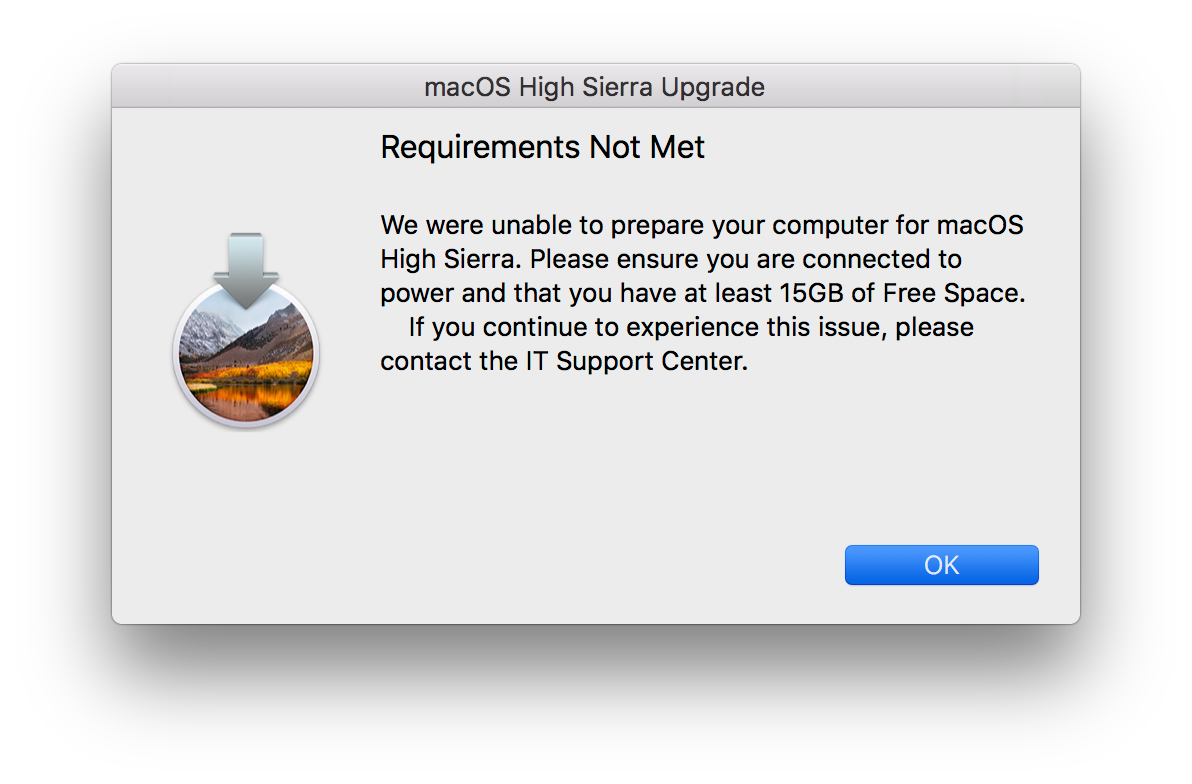
Thank you @bpavlov I think there might be an issue when running this on an existing APFS volume, especially when it comes to the disk space check. Right now, it is failing to on the free 15 GB space, but I know very well there is more than that available. Could it be the partitioning for APFS changes something to the local drive. Outside of the formatting for APFS, is there something magical happening invisibly and the script is seeing this partition and not the main partition?


bpavlov
Forum|alt.badge.img+18
  • Author
  • Esteemed Contributor
  • April 23, 2018

@mconners The formatting of the data must have changed in 10.13 APFS volumes. Thanks for making me aware of that. I'll look into that. Can't promise any fixes anytime soon though.


Forum|alt.badge.img+20
  • Valued Contributor
  • April 23, 2018

@bpavlov I am not so certain now. I believe this has more to do with the status check for the available space than the actual formatting of the APFS volumes. A couple of other techs by me have been trying to modify your script a bit for allowing us to incorporate the erase install command. So far, we aren't quite there.

The formatting as mentioned above is related to the minorOS:

Check if free space > 15GB

osMinor=$( /usr/bin/sw_vers -productVersion | awk -F. {'print $2'} )
if [[ $osMinor -ge 12 ]]; then

This mention of 12, seems to be Sierra, 10.12.X. I believe this is why it is failing the space requirement. As I am not a scripter, I could be way off.

Anyhow, the bottom line for us is to find a way to use the new erase install command without the startosinstall command for 10.13.4 and higher. So far, nothing seems to be working.


bpavlov
Forum|alt.badge.img+18
  • Author
  • Esteemed Contributor
  • April 24, 2018

@mconners Which script are you looking at? I’m starting to think you might be looking at someone else’s script.