Solved

macOS installer script not working for Apple Silicon M1 Macbook + macOS Monterey

  • October 26, 2021
  • 132 replies
  • 1117 views

Show first post

132 replies

Forum|alt.badge.img+10
  • Contributor
  • February 1, 2023

I've used this script successfully in the past with Monterey but having issues with Ventura. The MacOS Ventura installer is present on the Mac and it's starts ok but then never quits (as in reboots to install the actually update).

Anyone else come across this?


DodsonNY
Forum|alt.badge.img+4
  • New Contributor
  • February 1, 2023

I've used this script successfully in the past with Monterey but having issues with Ventura. The MacOS Ventura installer is present on the Mac and it's starts ok but then never quits (as in reboots to install the actually update).

Anyone else come across this?


I've been using it with Ventura, but I have had occasional instances that sound like what you describe (on both Monterey and Ventura).  In our environment, it seems it's tied to high uptime, so I'm just asking everyone to restart before they run the script.  Haven't had time yet, but I'm also going to play with adding kickstart to this script or maybe even running a "pre" install script that runs kickstart and clears the update plist...it's cumbersome, though.  


Forum|alt.badge.img+10
  • Contributor
  • February 1, 2023

I've been using it with Ventura, but I have had occasional instances that sound like what you describe (on both Monterey and Ventura).  In our environment, it seems it's tied to high uptime, so I'm just asking everyone to restart before they run the script.  Haven't had time yet, but I'm also going to play with adding kickstart to this script or maybe even running a "pre" install script that runs kickstart and clears the update plist...it's cumbersome, though.  


Thanks for letting me know. I will try to restart first and see how it behaves.


szultzie
Forum|alt.badge.img+11
  • Valued Contributor
  • May 25, 2023

So i know this post is about a year old, but im trying to use this scrip on an Appel Silicon laptop, and it just gets stuck on the Jamf Helper screen saying to wait.

The password prompt worked fine no issues, but then it just sits here, Jamf policy says it completed, i have it download the Ventura Installer first and put it into the Applications folder, i know that worked because the Ventura icon is showing on the helper screen. then run this script and nothing it has been over 1 hour now since the installer downloaded.

How are you guys initiating this script with a policy?


DodsonNY
Forum|alt.badge.img+4
  • New Contributor
  • May 30, 2023

So i know this post is about a year old, but im trying to use this scrip on an Appel Silicon laptop, and it just gets stuck on the Jamf Helper screen saying to wait.

The password prompt worked fine no issues, but then it just sits here, Jamf policy says it completed, i have it download the Ventura Installer first and put it into the Applications folder, i know that worked because the Ventura icon is showing on the helper screen. then run this script and nothing it has been over 1 hour now since the installer downloaded.

How are you guys initiating this script with a policy?


AtillaTheC is my hero for this base script - it was a life saver.  I've been using it for a while with great success.  Recently I made some modifications to address some of the more common issues we were seeing with it hanging on that screen.  

My updated logic checks the password against the Keychain (instead of just verifying that the same password was entered twice), checks for sufficient available storage, checks uptime (won't proceed if the machine hasn't been restarted in [choose the number] of days, make sure the installer is in place in the /Applications directory (I run a separate policy to cache the installer first so that the update takes less time for the end users), and verifies power is connected...all that really helped with consistency for us. 

There is the fact also that JamfHelper is inherently glitchy in full screen mode, so you can either set it to not run in full screen, or if it hangs, just Command + Q to quit out of JamfHelper and the installer, from my observations, usually finishes fairly soon after.  

Also been trying to find time to swap from JamfHelper calls to using swiftDialog, which I think would be more reliable. 


Forum|alt.badge.img+4
  • Contributor
  • July 10, 2023

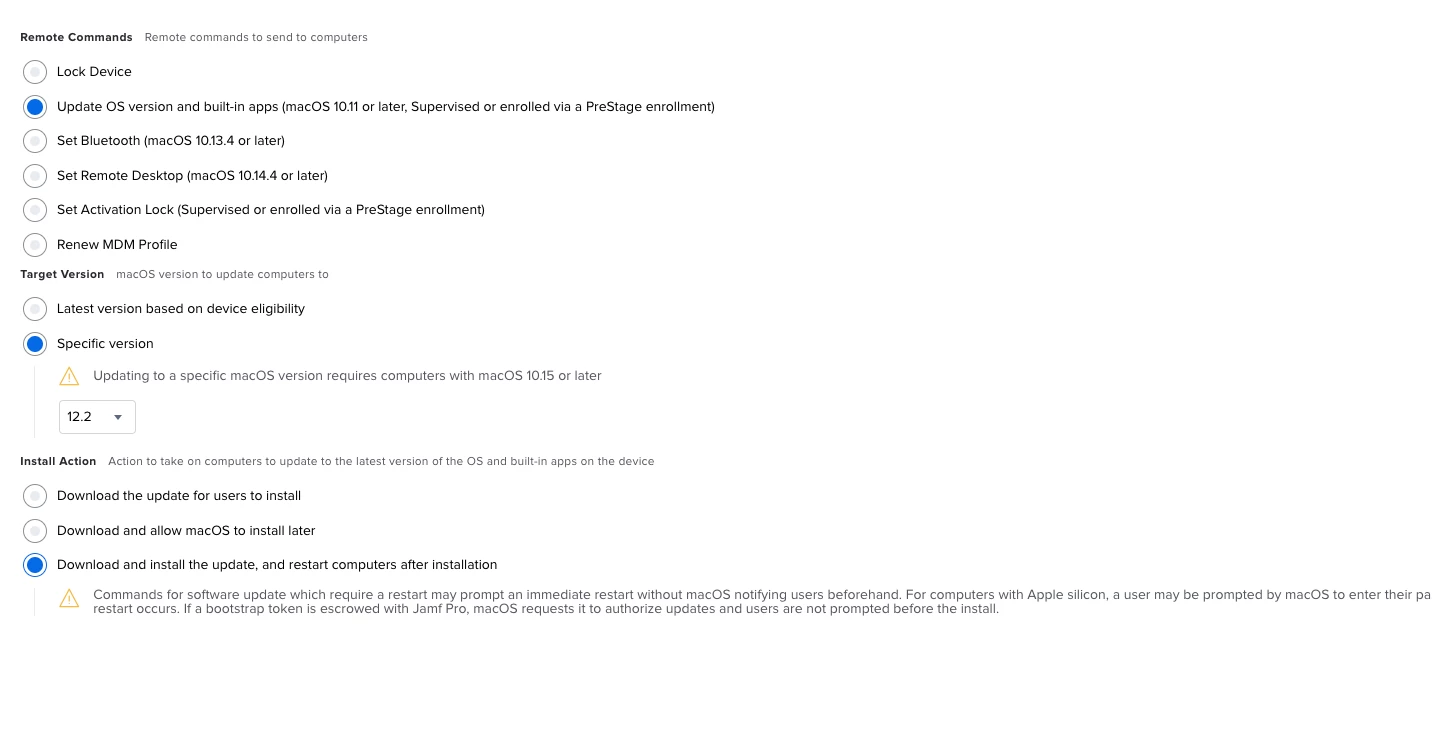
Just use the Remote command Option for those. 


Where is the Remote Commands? I cant find it in my Jamf Pro portal.


Forum|alt.badge.img+5
  • New Contributor
  • July 10, 2023

Where is the Remote Commands? I cant find it in my Jamf Pro portal.


Remote Commands = select Smart or Static Groups -> View -> Action -> Send Remote Commands.