Question

MacosLAPS by Joshua Miller

  • January 26, 2022
  • 56 replies
  • 354 views

etarasula
Forum|alt.badge.img+4

Hi there


So this "Seems" to be most recognized LAPS for MacOS - https://github.com/joshua-d-miller/macOSLAPS 


Has anyone actually got this up and running? We had spends a few days so far messing with this but were not able to get it working properly, I think we are missing something small but important. 


Thanks in advance! 

56 replies

Forum|alt.badge.img+4
  • Contributor
  • January 27, 2022

I have this running in my environment - what do you have setup so far?


etarasula
Forum|alt.badge.img+4
  • Author
  • Contributor
  • January 27, 2022

Hello Steve and thank you for replying. 

So far we had done:
1. Created edu.psu.macoslaps.plist file and placed it into /Library/Managed Preferences
File itself looks like this:

<?xml version="1.0" encoding="UTF-8"?>
<!DOCTYPE plist PUBLIC "-//Apple//DTD PLIST 1.0//EN" "http://www.apple.com/DTDs/PropertyList-1.0.dtd">
<plist version="1.0">
  <dict>
    <key>LocalAdminAccount</key>
    <string>SomeLocalAdmin</string>
    <key>DaysTillExpiration</key>
    <integer>0</integer>
    <key>PasswordLength</key>
    <integer>12</integer>
    <key>RemoveKeychain</key>
    <true/>
    <key>FirstPass</key>
    <string>FirstPassword</string>
  </dict>
</plist>

However we are not sure if there should be line for Method if its being used by MDM and if there should be one what should it say for the String. 

2. Ran the PKG to install main pieces. PKG came from here - https://github.com/joshua-d-miller/macOSLAPS/releases/download/2.1.0(721)/macOSLAPS-2.1.0.721.pkg

3. Created JAMF extension attribute to collect the info. It is powered by this script:
#!/bin/bash
# Path to macOSLAPS binary
laps=/usr/local/laps/macOSLAPS
if [ -e $laps ] ; then
# Ask macOSLAPS to write out the current password and echo it for the Jamf EA
$laps -getPassword
current_password=$( cat "/var/root/Library/Application Support/macOSLAPS-password" )
expiration_date=$( cat "/var/root/Library/Application Support/macOSLAPS-expiration" )
# Test $current_password to ensure there is a value
if [ -z "$current_password" ]; then
# The $current_password variable is empty, not writing anything
exit 0
else
# We know that $current_password has a value so writing it to Jamf
echo "<result>Password: $current_password
Expiration: $expiration_date</result>"
# Run macOSLAPS a second time to remove the password file from the system
$laps
fi
else
echo "<result>Not Installed</result>"
fi
exit 0

Ok i think this is about all we could dig up on how to get it working. Since it does not i am quite sure something is missing. 

Thanks a ton again :)


Forum|alt.badge.img+4
  • Contributor
  • January 28, 2022

Ah, I am using MacOSLAPS in conjunction with Active Directory.  I'm not familiar with the specifics of operating it otherwise.  Which part isn't working in your setup? Changing the password or retrieving and storing it in Jamf?


etarasula
Forum|alt.badge.img+4
  • Author
  • Contributor
  • January 28, 2022
Changing the password it seems ;/


[Image]

Eugene Tarasula

Sr. Mobility Support

Tel: +1 (925) 558-5796
EMail: ETarasula@RiminiStreet.com
Web: RiminiStreet.com
NASDAQ: RMNI

[Image]

This message and any attached documents may contain information that is confidential and may constitute inside information. If you are not an intended recipient, you are directed not to read, disclose, distribute or otherwise use this transmission. Delivery of this message is not intended to waive confidentiality. If you have received this email in error, please notify the sender immediately and delete this message from your system. Your privacyis important to us, and you may manage your contact preferences here. Rimini Street, Inc., Worldwide Headquarters: 3993 Howard Hughes Parkway, Las Vegas NV 89169. +1.702.839.9671 www.riministreet.com

etarasula
Forum|alt.badge.img+4
  • Author
  • Contributor
  • January 28, 2022

OK so seems like i was wrong!

It does seems to change password locally as i cant any longer use the Admin account with the password i knew. 

However what its showing me in JAMF is also not correct and does not allow me to use that either. So i am not sure where its pulling it from or why it does NOT pull right one. 


What does your extension attribute looks like? 


BGhilardi
Forum|alt.badge.img+7
  • Jamf Heroes
  • April 11, 2022

Good morning,
I’m also trying to implement macoslaps. have you found a solution?


Forum|alt.badge.img
  • New Contributor
  • June 13, 2022

I am trying to use this and so far 50% of time it works fine and rest of the time it does not return anything.

When I try to go on those computers and try to run manually it gives me following error.

cfjamfadmin@Jamftestuser-M1 laps % sudo ./macOSLAPS -resetpassword

Error|2022-06-13 10:26:17|macOSLAPS|This machine does not appear to be bound to Active Directory

cfjamfadmin@Jamftestuser-M1 laps % 

I am not connected to AD and don't want Macs to be. So why it gives me this error


etarasula
Forum|alt.badge.img+4
  • Author
  • Contributor
  • June 13, 2022

I was not able to make this work RELIABLY. When it works it works just fine but at times it just does not. This obviously is a huge issue as one cant rely on the system that is there for emergencies kind of situations but in itself not reliable. 


perryd84
Forum|alt.badge.img+11
  • Contributor
  • July 29, 2022

I've been working on a LAPS solution for macs and have created a couple of scripts to manage the cycle of the password and account creation and an app to show the password when it's needed.

Some other LAPS for mac solutions display the admin password in plain text in Jamf which is a massive security risk. My script encrypts it all and never displays the password unless you use the decryption script which you can scope to just admin users.

I've detailed the setup on my github and the scripts are there as well.
https://github.com/PezzaD84/macOSLAPS

Check it out to see if it does what you need.


JennyGarland
Forum|alt.badge.img+5
  • New Contributor
  • December 6, 2022

@perryd84How are you getting the encrypted creds?


perryd84
Forum|alt.badge.img+11
  • Contributor
  • December 7, 2022

@perryd84How are you getting the encrypted creds?


Hi @JennyGarland 

I've added a short script to my github as a few people have asked this same question.
https://github.com/PezzaD84/macOSLAPS/blob/main/Encode%20API%20Credentials
Check out that script which will encode your api credentials.


wakco11
Forum|alt.badge.img+9
  • Valued Contributor
  • January 16, 2023

I am trying to use this and so far 50% of time it works fine and rest of the time it does not return anything.

When I try to go on those computers and try to run manually it gives me following error.

cfjamfadmin@Jamftestuser-M1 laps % sudo ./macOSLAPS -resetpassword

Error|2022-06-13 10:26:17|macOSLAPS|This machine does not appear to be bound to Active Directory

cfjamfadmin@Jamftestuser-M1 laps % 

I am not connected to AD and don't want Macs to be. So why it gives me this error


As macOSLAPS defaults to AD, is the Method setting set to Local?


Forum|alt.badge.img+2
  • New Contributor
  • April 11, 2023

Hi @JennyGarland 

I've added a short script to my github as a few people have asked this same question.
https://github.com/PezzaD84/macOSLAPS/blob/main/Encode%20API%20Credentials
Check out that script which will encode your api credentials.


Hi Perry,

I followed your script

It has some variable to enter API credentials, JSS URL, LAPS Account name  so what are these to be filled up? Can you help?

And also how the decrypt self service password app works, Is it for all users will be deployed?or for specific users?

I am confused.


Forum|alt.badge.img+2
  • New Contributor
  • April 11, 2023

Hi Perry,

I followed your script

It has some variable to enter encrypted API credentials, JSS URL, LAPS Account name  so what are these to be filled up? Can you help?

And also how the decrypt self service password app works, Is it for all users will be deployed?or for specific users?

I am confused.

Can you help step by step?


perryd84
Forum|alt.badge.img+11
  • Contributor
  • April 11, 2023

Hi Perry,

I followed your script

It has some variable to enter encrypted API credentials, JSS URL, LAPS Account name  so what are these to be filled up? Can you help?

And also how the decrypt self service password app works, Is it for all users will be deployed?or for specific users?

I am confused.

Can you help step by step?


Hi @Stady 

  • So the encoded API credential is needed for all the API calls in the script and for reading and writing the extension attributes to JAMF. You can encode your API account using the script on my github 
  • The JSS URL is your JAMF URL so for example https://YOURCOMPANY.jamfcloud.com
  • The LAPS Account name is the name of the local admin account to be created by the script.

The decoding tool can be scoped to who you want. Most people scope it to their helpdesk team or their senior admins to give out the password upon request. Some users scope it to individual users upon request, so for example if a user requests to install an application they are given one time access to the decoding tool to get the password and then it is cycled.

The github page has a step by step guide but please feel free to message me if you get stuck.


Forum|alt.badge.img+2
  • New Contributor
  • April 11, 2023

Hi @Stady 

  • So the encoded API credential is needed for all the API calls in the script and for reading and writing the extension attributes to JAMF. You can encode your API account using the script on my github 
  • The JSS URL is your JAMF URL so for example https://YOURCOMPANY.jamfcloud.com
  • The LAPS Account name is the name of the local admin account to be created by the script.

The decoding tool can be scoped to who you want. Most people scope it to their helpdesk team or their senior admins to give out the password upon request. Some users scope it to individual users upon request, so for example if a user requests to install an application they are given one time access to the decoding tool to get the password and then it is cycled.

The github page has a step by step guide but please feel free to message me if you get stuck.


Thanks Perry for your prompt response. 

how I can add this encoded API credentials script to the API credential variable? In the script I see apiuser=APIUSER
apipasswd=APIPASSWORD

so what are these? Can you help me to fill the variables on each policy please step by step?
And also where can I find JAMF JSS URL? any navigation?

LAPS account name is whether any new user we can create and grant the permission?

And also for the LAPS 4 policy  do we need to scope to some specific computers? and how about smart Group called "LAPS Reset Password" do we need to scope this as well?


perryd84
Forum|alt.badge.img+11
  • Contributor
  • April 11, 2023

Thanks Perry for your prompt response. 

how I can add this encoded API credentials script to the API credential variable? In the script I see apiuser=APIUSER
apipasswd=APIPASSWORD

so what are these? Can you help me to fill the variables on each policy please step by step?
And also where can I find JAMF JSS URL? any navigation?

LAPS account name is whether any new user we can create and grant the permission?

And also for the LAPS 4 policy  do we need to scope to some specific computers? and how about smart Group called "LAPS Reset Password" do we need to scope this as well?


Hi @Stady I've sent you a private message as its easier to send longer messages there.


Forum|alt.badge.img+2
  • New Contributor
  • April 11, 2023

Hi @Stady I've sent you a private message as its easier to send longer messages there.


Thank you perry will check much appreciated.


Forum|alt.badge.img+2
  • New Contributor
  • April 11, 2023

Hi @Stady I've sent you a private message as its easier to send longer messages there.


Hi Perry,

I replied you on your private message , there is few things which I need help, Please check and let me know when you get time.


perryd84
Forum|alt.badge.img+11
  • Contributor
  • April 11, 2023

Hi Perry,

I replied you on your private message , there is few things which I need help, Please check and let me know when you get time.


Hi,

I don't see any private messages? Are you sure it sent?


Forum|alt.badge.img+2
  • New Contributor
  • April 11, 2023

Hi,

I don't see any private messages? Are you sure it sent?


Yes I Did

This is the ask


Any idea how to run the encoded API script to get the random string of
text.
Do we have to run on cmd Or any other way?
I use windows machine. Please suggest.

And also for JAMF API user it can be any user which we create on JAMF right
and giving the right permission by following this link right -
https://github.com/pezzaD84/macOSLAPS/issues/2

Forum|alt.badge.img+3
  • New Contributor
  • April 13, 2023

Hi @perryd84, first of all, nice work on putting this LAPS solution together. I have been struggling to find a more secured LAPS solution for MacOS in our company that can replace an old script from 7 years ago which now has multiple problems.

I have gone through your setup, and I have got most of it working except for the most important part; the LAPS password can't be retrieved, neither can't I see the encrypted password information in the Extension Attribute in Jamf for my test device. 

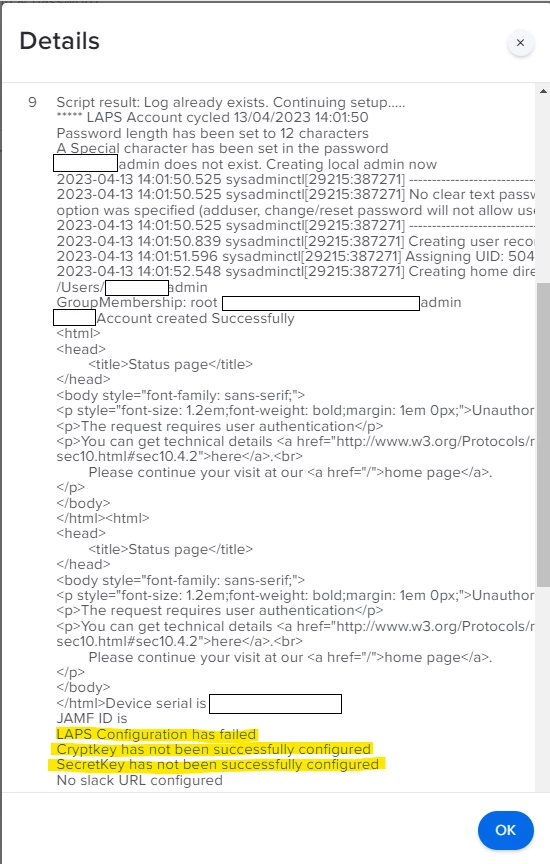
After the LAPS account is created on the device, and the LAPS package in installed successfully, I get the below error:

LAPS Configuration has failed

Cryptkey has not been successfully configured

SecretKey has not been successfully configured 

Any ideas as to what could be causing this issue? I have followed the steps to encrypt the API account password and that's the value I've used in the policy I created, which I though was all I needed to do. 

Any help would be much appreciated 😇.

Thanks!!


perryd84
Forum|alt.badge.img+11
  • Contributor
  • April 13, 2023

Hi @ClaudiaP 

So this looks like an authentication issue. I have found that sometimes if a new API account is created the password needs to be reset a couple of times before it can be used in a script. No idea why but it seems to fix this issue.

Another issue could be account permissions. Have a look at this link it details the lowest amount of permission for the API account to work.

Keep me posted how you get on.


Forum|alt.badge.img+2
  • New Contributor
  • April 13, 2023

Hi,

I don't see any private messages? Are you sure it sent?


Hi Perry, 


Thanks for all your prompt response. I appreciate your assistance. 


Quick one below

1. Do the LAPS package has to be deployed to the test machines and also if ready need to deploy to all computers right? 

2. As we have 4 policies, do we need to scope all these 4 policies to the machines? How about 'Reset APS password policy' do we need to scope this policy only to the smart group called "LAPS Reset Password"

Can you please explain each policy to whom to be scoped? 


3. The decrypt decoder script policy can be scoped to any helpdesk engineer so it can be scoped to users name or computers name? 


Your help is appreciated here! ! 


Forum|alt.badge.img+2
  • New Contributor
  • April 13, 2023

Hi Perry, 


Thanks for all your prompt response. I appreciate your assistance. 


Quick one below

1. Do the LAPS package has to be deployed to the test machines and also if ready need to deploy to all computers right? 

2. As we have 4 policies, do we need to scope all these 4 policies to the machines? How about 'Reset APS password policy' do we need to scope this policy only to the smart group called "LAPS Reset Password"

Can you please explain each policy to whom to be scoped? 


3. The decrypt decoder script policy can be scoped to any helpdesk engineer so it can be scoped to users name or computers name? 


Your help is appreciated here! ! 


Hi @perryd84 , 


Did you get chance to look on this?