Question

macOSUpgrade.sh

  • February 27, 2020
  • 7 replies
  • 36 views

sebastian_santo
Forum|alt.badge.img+4

Hello I need some help whenever I try to run the macOSUpgrade.sh via jamf policy I get the following output in the jamf log can someone help me

Executing Policy macOS Upgrade
[STEP 2 of 5]
Running script macOSUpgrade.sh...
Script exit code: 0
Script result: Killing caffeinate processes.
No matching processes were found
Killing startosinstall processes.
No matching processes were found
Killing osinstallersetupd processes.
No matching processes were found
Power Check: OK - AC Power Detected
Disk Check: OK - 479134027776 Bytes Free Space Detected
Downloading macOS Installer...
Checking for policies triggered by "Install macOS Catalina" for user "jamftest"...
No policies were found for the "Install macOS Catalina" trigger.
Downloading macOS Installer...
Checking for policies triggered by "Install macOS Catalina" for user "jamftest"...
No policies were found for the "Install macOS Catalina" trigger.
Downloading macOS Installer...
Checking for policies triggered by "Install macOS Catalina" for user "jamftest"...
No policies were found for the "Install macOS Catalina" trigger.
macOS Installer Downloaded 3 Times - Checksum is Not Valid
Prompting user for error and exiting...
0
[STEP 3 of 5]
[STEP 4 of 5]
Inventory will be updated when all queued actions in Self Service are complete.
[STEP 5 of 5]

7 replies

dan-snelson
Forum|alt.badge.img+30
  • Honored Contributor
  • February 27, 2020

@sebastian.santos Have you had a chance to review @Rosko's macOSUpgrade ?


sebastian_santo
Forum|alt.badge.img+4

Yes sir I did and I edit whatever I have to I think


sebastian_santo
Forum|alt.badge.img+4

@dan-snelson yes sir I think I did


Forum|alt.badge.img+12
  • Contributor
  • February 28, 2020

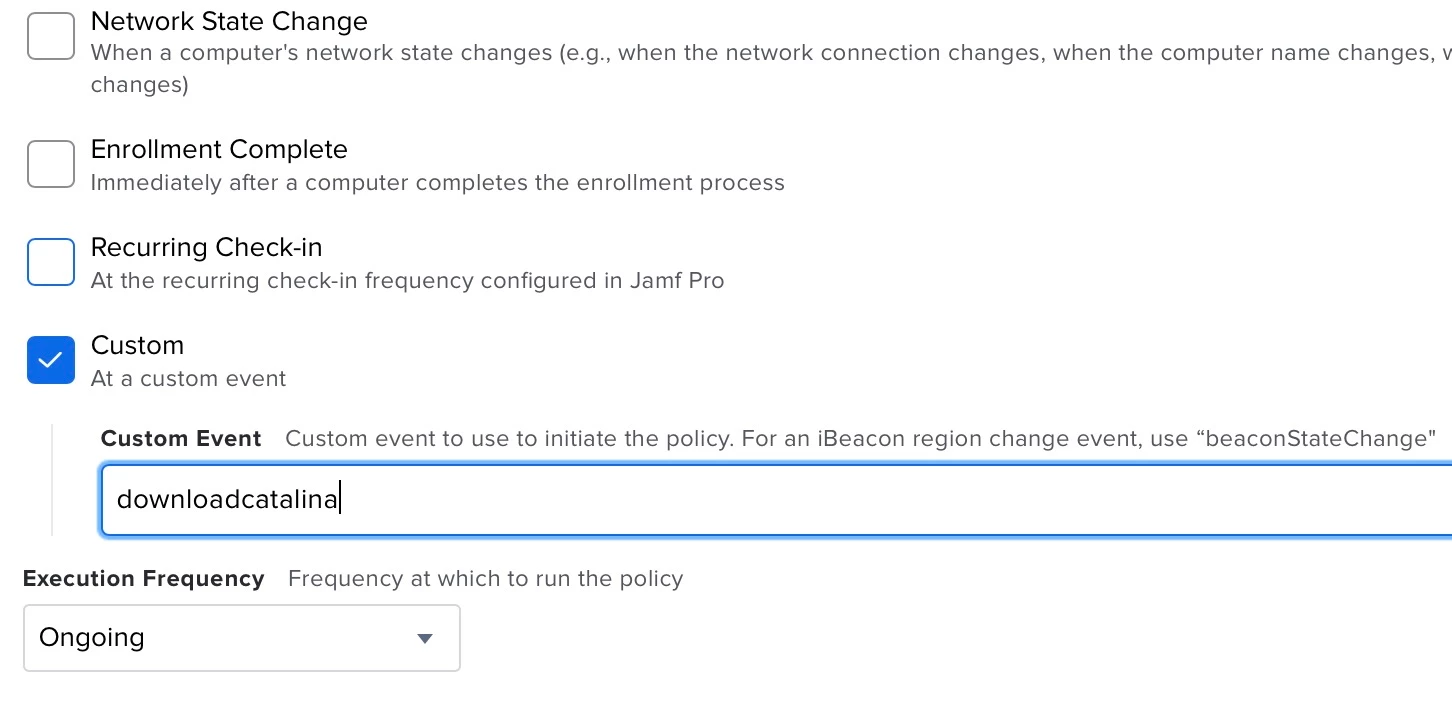
Your issue is here: No policies were found for the "Install macOS Catalina" trigger.

You need a policy enabled that the device is within the scope for with a custom trigger enabled, you should also not include spaces in a custom trigger. Update your policy with the upgrade script in it to include the new custom trigger.
Attached screenshot is an example of correct configuration for a macOSUpgrade macOS installer policy


sebastian_santo
Forum|alt.badge.img+4

@Simmo thank you I will try it and will let you know


sebastian_santo
Forum|alt.badge.img+4

@Simmo I have the issue resolved by changing the order of my policy macOSUpgrade first and then InstallmacOSCatalina its right next to the other it it worked like a charm thank you so much for your help


Forum|alt.badge.img+5
  • Contributor
  • June 16, 2020

As @Simmo mentioned in his screendump: You should set the frequency at "Ongoing". You can see that it downloads the first time and after that 'no policies were found'. I had the same issue until I saw the frequency was set to Once per computer.