

Question

McAfee Endpoint Protection and Microsoft Office 2016

  • October 20, 2015
  • 9 replies
  • 49 views

kishjayson
Forum|alt.badge.img+7

I haven't been able to locate any good documentation around recommended exclusions for McAfee Endpoint Protection and Microsoft Office 2016. Has anyone ventured down this road, or has anyone seen any glaring issues with the two products not playing nice together?

We've been getting a high number of Incidents of Microsoft Outlook 2016 crashing on OS X Yosemite 10.10.5 lately. We had a similar issue with Microsoft Office 2011 and excluding the identities folder seems to help considerably.

9 replies

Forum|alt.badge.img+16
  • Valued Contributor
  • October 20, 2015

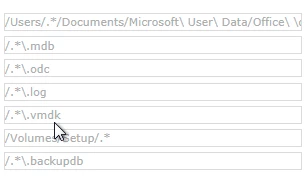
I have the following exclusions in FWIW.


mm2270
Forum|alt.badge.img+24
  • Legendary Contributor
  • October 20, 2015

@Kaltsas We have the same exceptions, except... Office 2016 no longer uses the ~/Documents/Microsoft User Data/ directory to store its information. this is now all in ~/Library/Containers/ as has been discussed in other threads, most notably on the "Outlook 2016 autoconfigure" one here.

While we haven't looked into much, I expect we'll need to update our McAfee EP exception list to exclude any "com.microsoft" directories in that path, or we may encounter the same beachballing issues we saw with Outlook 2011 before we added those exceptions in.


Forum|alt.badge.img+16
  • Valued Contributor
  • October 20, 2015

I haven't really tackled O2016 yet but that is good to know. I have maybe 20 people running it right now around HCIS. I haven't gotten any complaints yet.


kishjayson
Forum|alt.badge.img+7
  • Author
  • Contributor
  • October 20, 2015

We've already excluded the following as this appears to be where everything is stored for Microsoft Outlook, but it's possible there may be others as well, which is why I asked:

/Users/.*/Library/Group Containers/UBF8T346G9.Office/Outlook/Outlook 15 Profiles/Main Profile/

mm2270
Forum|alt.badge.img+24
  • Legendary Contributor
  • October 20, 2015

Thanks, yes, I forgot, its Group Containers, not Containers. Big difference.


Forum|alt.badge.img+13
  • Contributor
  • October 21, 2015

We have been using both with no changes to McAfee. With that said we have been having quite a few issues. Our issues range from:
- Outlook 2016 intermittently disconnecting.
- Unable to view SharePoint folders within PPT, Excel, and Word. - Recent Items displays no content. (New for 15.15.0)
- Updates are a pain to deploy. (More of a gripe than anything).

I am curious who else is having these issues...


Forum|alt.badge.img+8
  • Contributor
  • February 23, 2016

Hi everybody,
I have the same configuration here, McAfee EPP and Office 2016.
I couldn't find any KB on the McAfee website for the folder exclusions...anyone else?
Thanks


talkingmoose
Forum|alt.badge.img+36
  • Community Manager
  • February 24, 2016

You should be able to safely exclude both ~/Library/Containers and ~/Library/Group Containers from A/V scanning. These are both sandbox locations and by Apple's design only a signed application can modify its own sandbox. The OS will prohibit any app from modifying another app's sandbox.

By excluding these locations, a few of us who've done some testing with Office 2016 have found launch times go from 20-40 bounces in the dock to about 4-5 bounces.

I've not seen issues with application crashing and A/V, but maybe the above suggestion will help.


Forum|alt.badge.img+8
  • Valued Contributor
  • August 4, 2018

@talkingmoose it's easy enough to create a Sandboxed app that I'd be hesitant to exclude those paths... I could create a sandboxed app with malware in it today and make it available to people.

