Solved

Message after upgrade: PRESTAGE_IMAGING_SECURITY

  • September 20, 2017
  • 5 replies
  • 25 views

Forum|alt.badge.img+9

Just upgraded to 101 from 100.
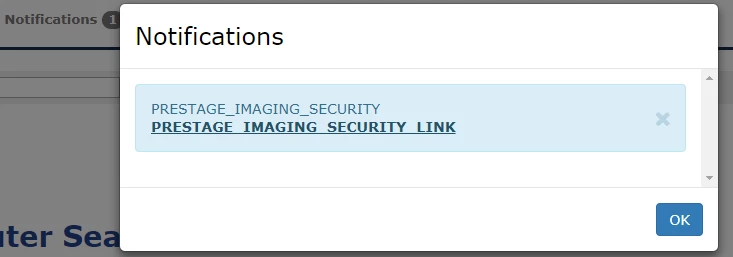
1 new notification when I log into the JSS.

Says:

PRESTAGE_IMAGING_SECURITY PRESTAGE_IMAGING_SECURITY_LINK

The link takes me here:
https://www.jamf.com/jamf-nation/admin/articles/469

404 Error The URL requested does not exist.

Very handy.
Anything I need to know about?

Best answer by talkingmoose

Looks like the link contains some erroneous stuff. Here's the article:

https://www.jamf.com/jamf-nation/articles/469

To find these in the future, you can click Knowledge Base at the top of Jamf Nation to find any article and then place a new number at the end to get the article you need.

5 replies

RobertHammen
Forum|alt.badge.img+29
  • Esteemed Contributor
  • September 20, 2017

No answer, but just had the same exact experience/results.


Forum|alt.badge.img+9
  • Author
  • Contributor
  • September 20, 2017

@RobertHammen I'm assuming it was meant to be a message about scripts no longer working "as designed for security" with Prestage Imaging (you need to put them in a PKG to deliver them now), but since that "feature" has been around for a few versions now, I'm not 100% convinced.


talkingmoose
Forum|alt.badge.img+36
  • Community Manager
  • Answer
  • September 20, 2017

Looks like the link contains some erroneous stuff. Here's the article:

https://www.jamf.com/jamf-nation/articles/469

To find these in the future, you can click Knowledge Base at the top of Jamf Nation to find any article and then place a new number at the end to get the article you need.


Forum|alt.badge.img+17
  • Contributor
  • September 20, 2017

@CCNapier

Clearing your browser cache should get rid of the "PRESTAGE_IMAGING_SECURITY PRESTAGE_IMAGING_SECURITY_LINK" and replace it with something a little more useful, though it won't fix the broken link.

I've also filed a Product Issue (PI-004466) to note that the link to the KB article is incorrect and does not work as expected.

If you would like to have a case attached to PI-004466, please get in touch with Support and they can get that done for you. You can contact Support either by calling, sending an e-mail to support@jamf.com, or by using the My Support section of Jamf Nation.

Thanks!
Were Wulff
Jamf Support


Forum|alt.badge.img+9
  • Author
  • Contributor
  • September 21, 2017

Thanks. I'll try to remember about clearing cache in future upgrades if similar messages appear.