Question

Microsoft Office 16 Auto Download & Install

  • January 4, 2018
  • 8 replies
  • 50 views

Forum|alt.badge.img+7

Hello

I know there has been a lot of chat on here about setting this up using a configuration Profile but so far this has not worked for me. The scoped machine have been added for a few weeks and have restarted but the updates have never installed automatically.
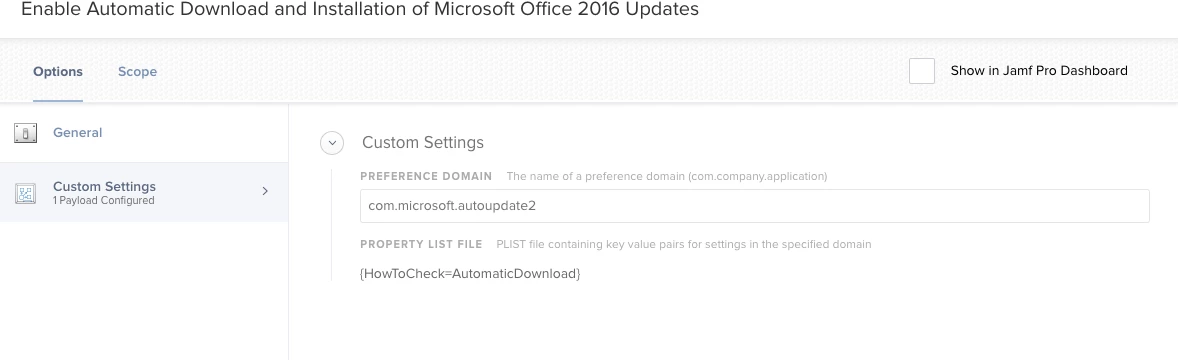
I've attached a screenshot of my config profile in the hope that someone can tell me what i'm doing wrong?

Thanks

JOe

8 replies

Forum|alt.badge.img+15
  • Contributor
  • January 4, 2018


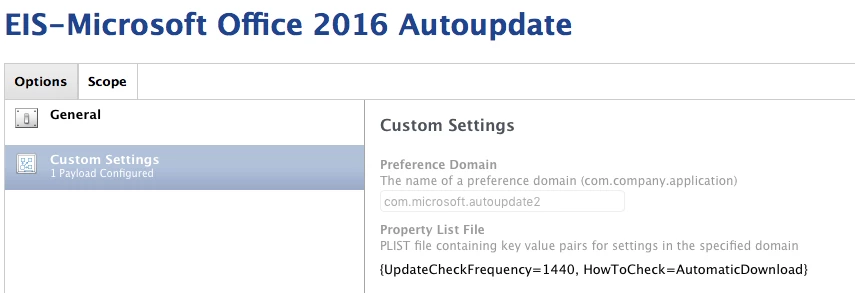
Note the UpdateCheckFrequency!
{UpdateCheckFrequency=1440, HowToCheck=AutomaticDownload}

On the General Tab, Distribution Method - Install Automatically.

The settings attached work for us...


Forum|alt.badge.img+26
  • Honored Contributor
  • January 4, 2018

If I were you, I would check out the MacAdmins Slack in the Microsoft Office forum. @pbowden is there as a Microsoft employee and actively hangs out helping Mac sysadmins. MS is working on a command line version of Microsoft AutoUpdate called MAU 4. What's great about that is that they provide you a good tool that you can use to intelligently acquire updates and deploy them at the client level. If you want to get even more fancy, on his site, he even has a tool that will help you stand up a local update caching server for MS Office 2016 and such.

Check out http://macadmins.software and check out the Slack forums.


JoshRouthier
Forum|alt.badge.img+8
  • Valued Contributor
  • January 5, 2018

I am also using a configuration profile to manage the AutoUpdate settings, though one of the things I've been looking into as a potential replacement to using a configuration profile to automatically download and install the updates is the Patch Management features that are part of Jamf Pro 10.


Forum|alt.badge.img+7
  • Author
  • Contributor
  • January 5, 2018

Thanks for all your posts. I have already looked in to MAU 4 and while it sounds fantastic it's not available yet and this client wants a solution that is working now.

@Lhsachs was this a computer or user level profile?

Thanks again


talkingmoose
Forum|alt.badge.img+36
  • Community Manager
  • January 5, 2018

MAU currently requires a user to be logged in and that the user has launched each application once to register itself. MAU 4 won't have these limitations.

Check the files in the #microsoft-office Slack channel for a mobileconfig file that pre-registers the apps for you. You can download and test to see if that's your issue.


Forum|alt.badge.img+26
  • Honored Contributor
  • January 5, 2018

I have MAU 4 in my test lab now with automatic updates off, and and Right now I’m tying the command line updater (msupdate) to a Self Service and recuuring checkin policy with optional deferral and all seems to work well and update properly. @talkingmoose is right though in that you have to still register the apps with MAU4.

Key is MAU4 is only a first beta product at the moment. Like many folks here, I’m rightfully chicken to deploy a beta product fleet wide.


talkingmoose
Forum|alt.badge.img+36
  • Community Manager
  • January 5, 2018

@blackholemac, not sure if you saw @pbowden's comment on Slack, but MAU 4 beta 2 should no longer require registering apps before using the command line feature. Really looking forward to that change.

I would imagine the apps will still need to be registered for automatic download and install, though.


Forum|alt.badge.img+12
  • Valued Contributor
  • January 5, 2018

Hey guys. Sure, a couple of comments:
@jthurwood - you need to add StartDaemonOnAppLaunch to your Config Profile for com.microsoft.autoupdate2. It's a boolean value, and it needs to be set to TRUE. This will cause the MAU daemon to be invoked when the first Office app starts - and it's the daemon that does all the work in terms of detecting and downloading updates.
@JoshRouthier stay tuned for how you can use our new msupdate command-line tool in Jamf Pro.

Thanks, Paul.