Question

Microsoft "Required Data Notice" pop up

  • July 19, 2019
  • 27 replies
  • 262 views

AlanSmith
Forum|alt.badge.img+8

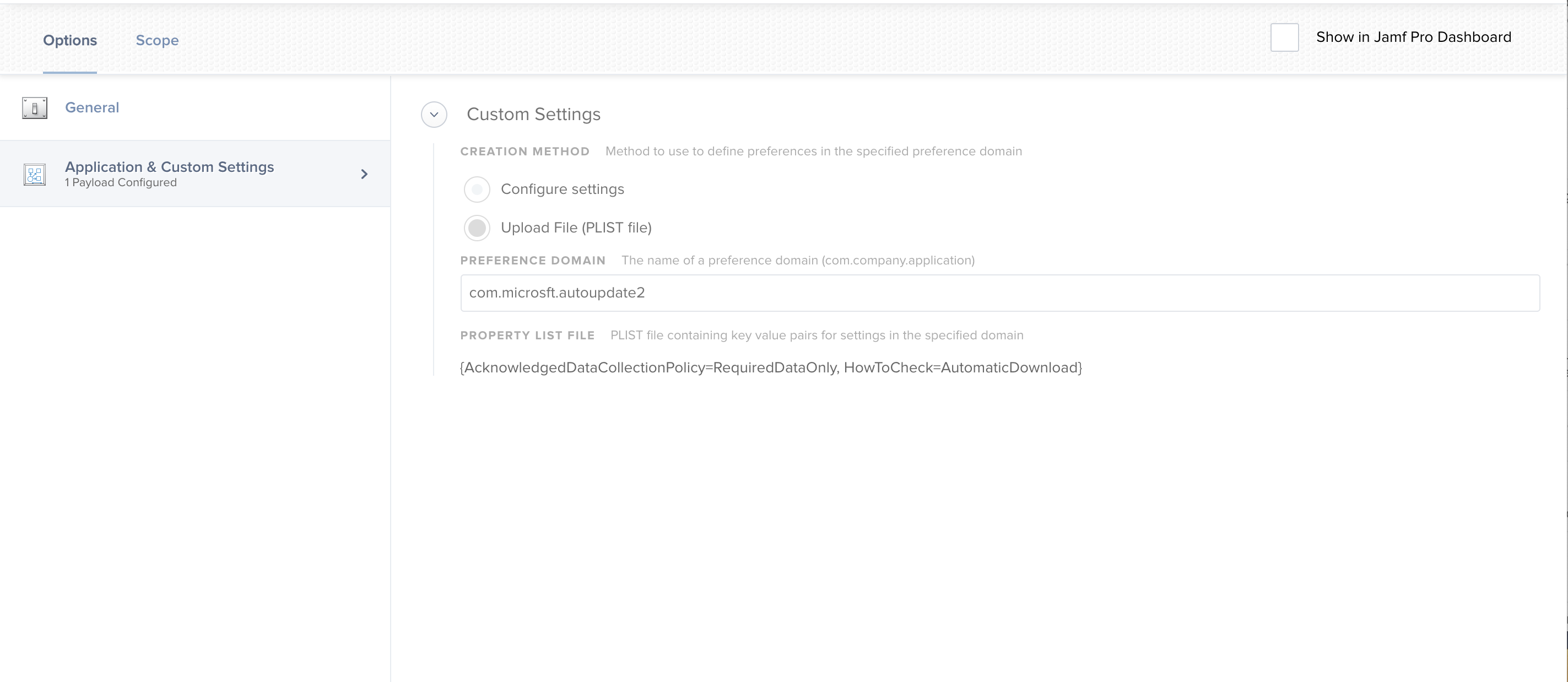
So as of today Friday 19 July, we have started seeing a rather large popup Window (See attached) appear when a user logs into one of our Macs.

We're not even starting any MS apps, it happens a few seconds after logging in.

Just wondering if anybody else has come across this and is there any way of preventing it?
27 replies

Forum|alt.badge.img
  • New Contributor
  • July 19, 2019

Also seeing this today.

Looks like it is being triggered by "/Library/Application Support/Microsoft/MAU2.0/Microsoft AutoUpdate.app/Contents/MacOS/Microsoft AutoUpdate"


Forum|alt.badge.img

Best Solution is to Make a Plist:

<?xml version="1.0" encoding="UTF-8" standalone="yes"?>
<!DOCTYPE plist PUBLIC "-//Apple//DTD PLIST 1.0//EN" "http://www.apple.com/DTDs/PropertyList-1.0.dtd">
<plist version="1.0"> <dict> <key>AcknowledgedDataCollectionPolicy</key> <string>RequiredDataOnly</string> </dict>
</plist>


remus
Forum|alt.badge.img+5
  • Contributor
  • July 19, 2019

Apparently the .plist solution is not working. Tried it on a few Macs and the damn window still pops up.


Forum|alt.badge.img+13
  • Contributor
  • July 19, 2019

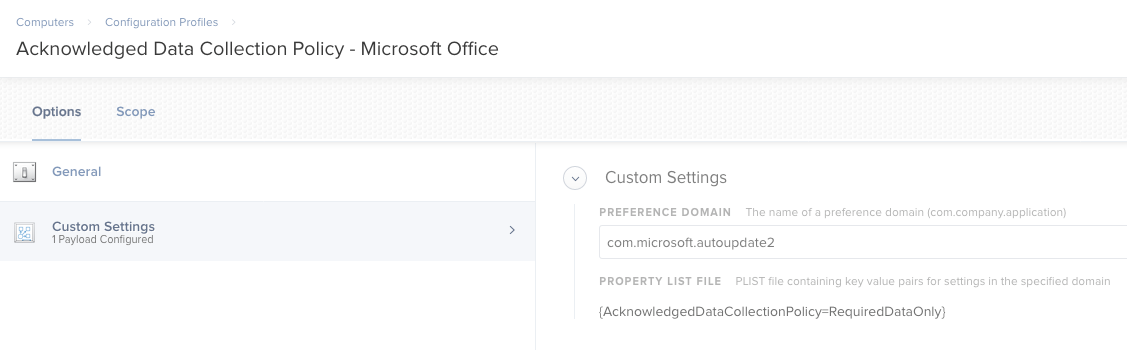
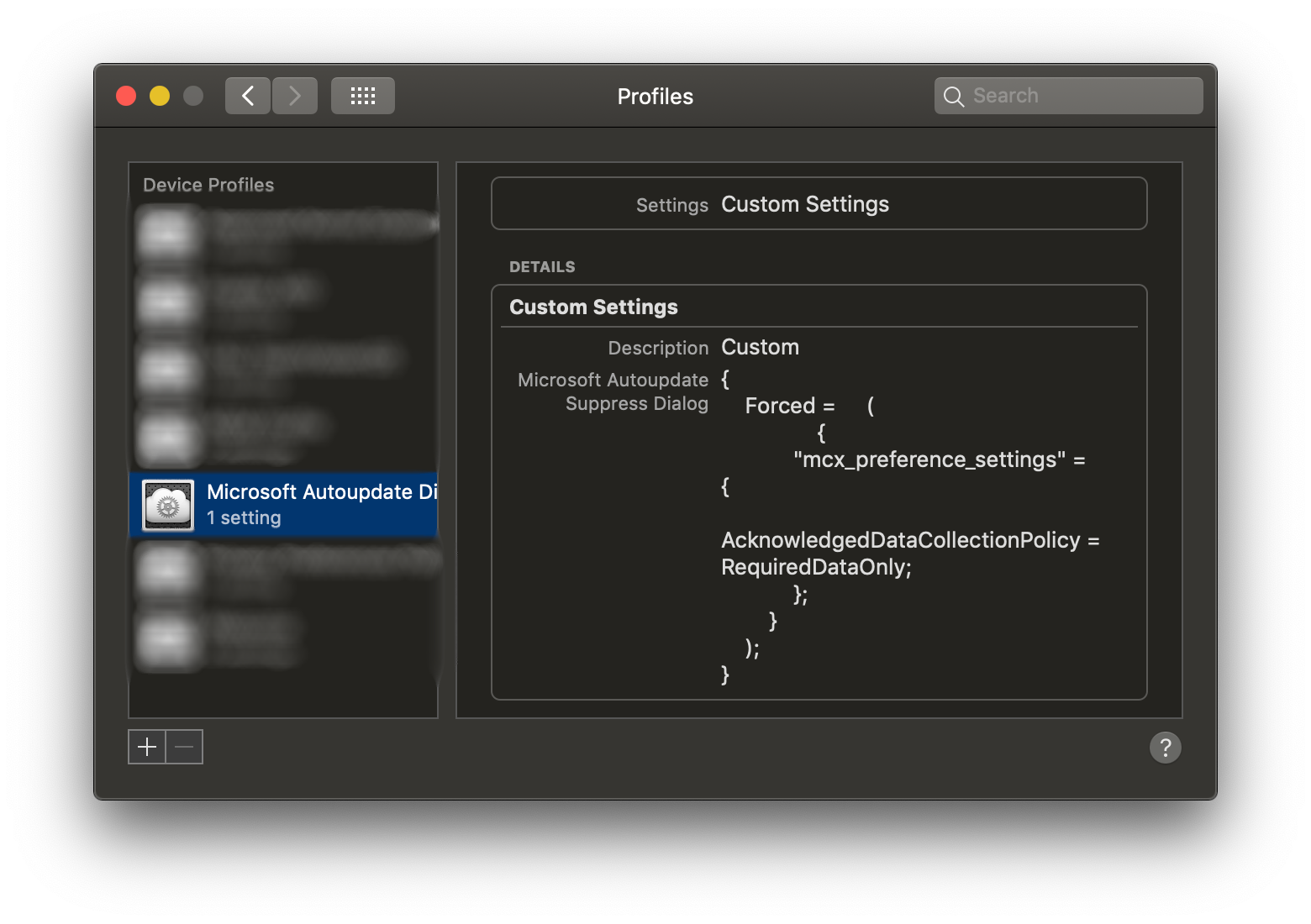
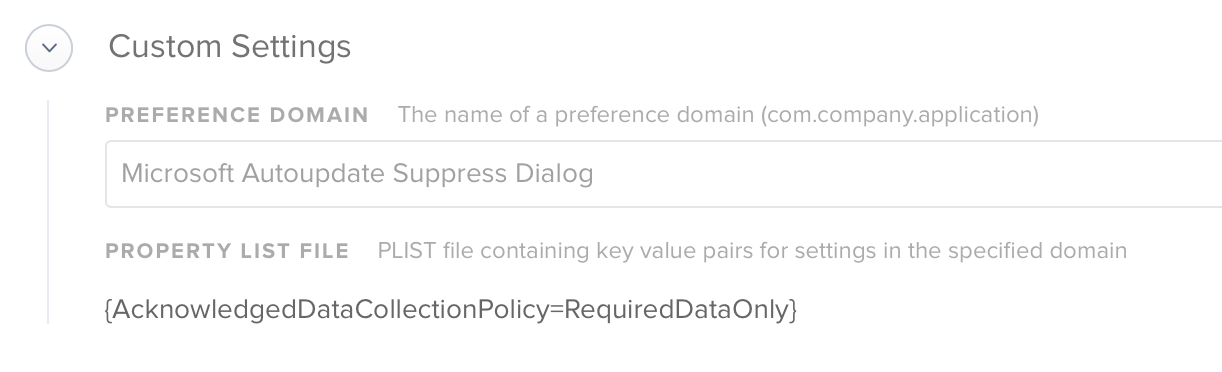
@remus Your Preference domain is incorrect. It needs to be set to com.microsoft.autoupdate2. Change that setting and redeploy.


remus
Forum|alt.badge.img+5
  • Contributor
  • July 19, 2019

@jmariani How embarrassing… I missed that. Thank you!
And thank YOU @lyubomir.hristov


remus
Forum|alt.badge.img+5
  • Contributor
  • July 19, 2019

It also works by using the defaults command.

/usr/bin/defaults write com.microsoft.autoupdate2 AcknowledgedDataCollectionPolicy RequiredDataOnly

Forum|alt.badge.img+10
  • Valued Contributor
  • July 19, 2019

@remus , I tried the defaults command and that didn't work. The way I tried to run the command was create a policy that is both triggered at check-in and login, used the "Files and Processes" payload, then use the execute command field to enter the command you posted:

/usr/bin/defaults write com.microsoft.autoupdate2 AcknowledgedDataCollectionPolicy RequiredDataOnly

Any idea why that wouldn't work? Doing the command as opposed to the Configuration Profile seems like a better solution to minimize clutter in Profiles. I'm still fairly new at managing Macs so I may be over thinking it.


talkingmoose
Forum|alt.badge.img+36
  • Community Manager
  • July 19, 2019

@joethedsa, managing plists is exactly what configuration profiles are for. I suggest trying a configuration profile instead. Much easier to manage than a policy and more immediate to apply to Macs too.


Hugonaut
Forum|alt.badge.img+15
  • Esteemed Contributor
  • July 19, 2019

started testing this out this morning, latest Installer from Microsoft.

After a fresh install, that popup appears but I applied the command

defaults write com.microsoft.autoupdate2 AcknowledgedDataCollectionPolicy RequiredDataOnly

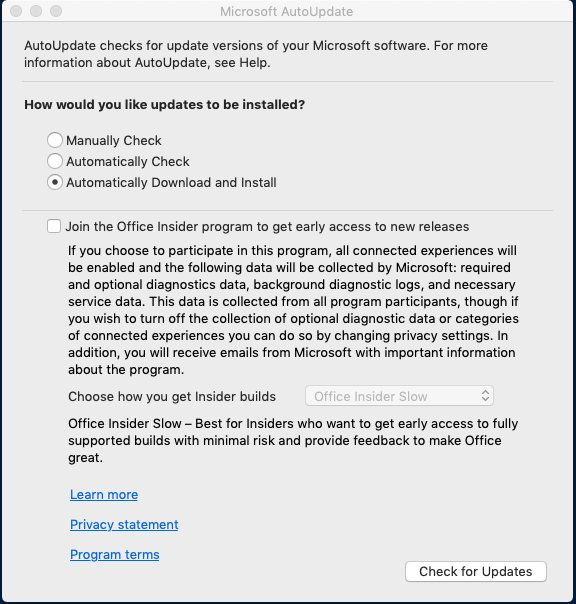
& boom it's gone so that is a go for the config profile, next I get this popup,

so, I applied

#This Enables the Check for Automatic Download & Updates button in the MAU GUI
defaults write com.microsoft.autoupdate2 HowToCheck -string 'AutomaticDownload'

#This Enables/disables the Check for Automatic Download & Updates button in the MAU GUI
defaults write com.microsoft.autoupdate2 EnableCheckForUpdatesButton -bool TRUE

but it still displays. what is the last command / string I need? how do I get rid of this popup so end users never see it? i must be missing something from software.macadmins preferences page.


Forum|alt.badge.img+4
  • Contributor
  • July 19, 2019

Thank you @lyubomir.hristov! Your solution worked perfectly!


Forum|alt.badge.img+10
  • Valued Contributor
  • July 19, 2019

@talkingmoose , thanks for the suggestion. I have deployed the configuration profile per your suggestion (Thank you @lyubomir.hristov ) and we are good.


talkingmoose
Forum|alt.badge.img+36
  • Community Manager
  • July 20, 2019

@Hugonaut, not sure how you’re running your command, but…

If you’re running it locally in Terminal, be sure to quit AutoUpdate before running the command. Don’t leave the app open.

If you’re running it from Jamf, that command will only affect root not all users.

A configuration profile for this really makes the most sense unless you have an unusual need to set this for some but not all users on the same Mac. If you’re not sure how to create the profile, @pbowden and I covered managing Office settings in our webinar in January. You can find the recording here:

https://www.jamf.com/resources/webinars/how-to-manage-microsoft-office-2019-for-mac/


Forum|alt.badge.img+7
  • Valued Contributor
  • July 22, 2019

The configuration profile can be either user level or computer level as pointed out by spalmer below. The default value for the AcknowledgedDataCollectionPolicy key is NotAcknowledged.

I've also noticed the configuration profile with this custom setting actually doesn't update the com.microsoft.autoupdate2 plist file as the AcknowledgedDataCollectionPolicy value is still NotAcknowledged when the profile is applied. But the message does stop popping up. So it appears the profile is simply overruling the plist.

Without the profile, this message should be one time only for each user. It does interrupt the logging out process. I'm not sure if the future version update of Microsoft AutoUpdate would reset this key's value in the plist.

There were also reports online on leaving this message up without clicking the OK button to dismiss it would result high CPU usage: https://answers.microsoft.com/en-us/msoffice/forum/all/microsoft-autoupdate-with-a-required-data/ab9979dd-ee6e-4f98-849d-95a15386b26c

I did experience that myself so I'm going to say some of the users will have this issue as well.


Forum|alt.badge.img+8
  • Valued Contributor
  • July 22, 2019

Here are the preferences I use for managing Office 2019

com.microsoft.autoupdate2.plist

<?xml version="1.0" encoding="UTF-8"?>
<!DOCTYPE plist PUBLIC "-//Apple//DTD PLIST 1.0//EN" "http://www.apple.com/DTDs/PropertyList-1.0.dtd">
<plist version="1.0">
<dict>
    <key>AcknowledgedDataCollectionPolicy</key>
    <string>RequiredDataOnly</string>
    <key>HowToCheck</key>
    <string>AutomaticDownload</string>
</dict>
</plist>

com.microsoft.office.plist

<?xml version="1.0" encoding="UTF-8"?>
<!DOCTYPE plist PUBLIC "-//Apple//DTD PLIST 1.0//EN" "http://www.apple.com/DTDs/PropertyList-1.0.dtd">
<plist version="1.0">
<dict>
    <key>OfficeAutoSignIn</key>
    <true/>
    <key>ShowWhatsNewOnLaunch</key>
    <false/>
    <key>kCUIThemePreferencesThemeKeyPath</key>
    <false/>
</dict>
</plist>

spalmer
Forum|alt.badge.img+23
  • Valued Contributor
  • July 22, 2019

@ccsben Based on the response from @pbowden in the #microsoft-autoupdate channel on the MacAdmins Slack team it can be either user level or computer level.

sdpalmer 11:34 AM @macbm @pbowden Does the AcknowledgedDataCollectionPolicy for com.microsoft.autoupdate2 need to be user or computer level config profile? pbowden 11:34 AM @sdpalmer either is fine

Forum|alt.badge.img+7
  • Valued Contributor
  • July 23, 2019

@mlizbeth Thanks for that. Mind to share a bit more on the rationale behind these settings?


Forum|alt.badge.img+8
  • Valued Contributor
  • July 23, 2019

@ccsben

Sure. The goal is to allow the user to simply start using the software without the need for any dialog interaction. The more dialogs the users are presented with, the more likely it is they get confused. Since we are using Perpetual/Volume Licensing, we can safely skip the Office 365 sign in dialog (when you have a Perpetual License the dialog will popup but has a "skip sign in option", for regular Office 365 it is mandatory to sign in.)
RequiredDataOnly will bypass the new MAU privacy agreement, because we have had people call help desk over it because it's something "new" popping up. AutomaticDownload is enabled because we had users running extremely outdated versions.
ShowWhatsNewOnLaunch, bypasses changelog notice on first launch
kCUIThemePreferencesThemeKeyPath will choose default system theme and take them straight to the main window where they can select the template they want to use.


Forum|alt.badge.img+1
  • New Contributor
  • July 25, 2019

Quick update: I followed the link in the post from bannonk, force-quit the update notice and deleted the file. Somehow I doubt that this will last long.... but at least I haven't got the thing flashing at me constsntly.
A


Forum|alt.badge.img+1
  • New Contributor
  • July 25, 2019

Good morning all
We have seen this on our three Macs as well today. Out of curiosity I clicked "Learn more" and opted to download the list of "things" Microsoft grabs as a PDF. It's 195 pages long. Worrying to say the least.

I have deactivated all the options possible on our one Windows 10 machine.

If there's any way to get round this on the Macs I'd be pleased to hear about it.

A


stephaniemm77
Forum|alt.badge.img+5

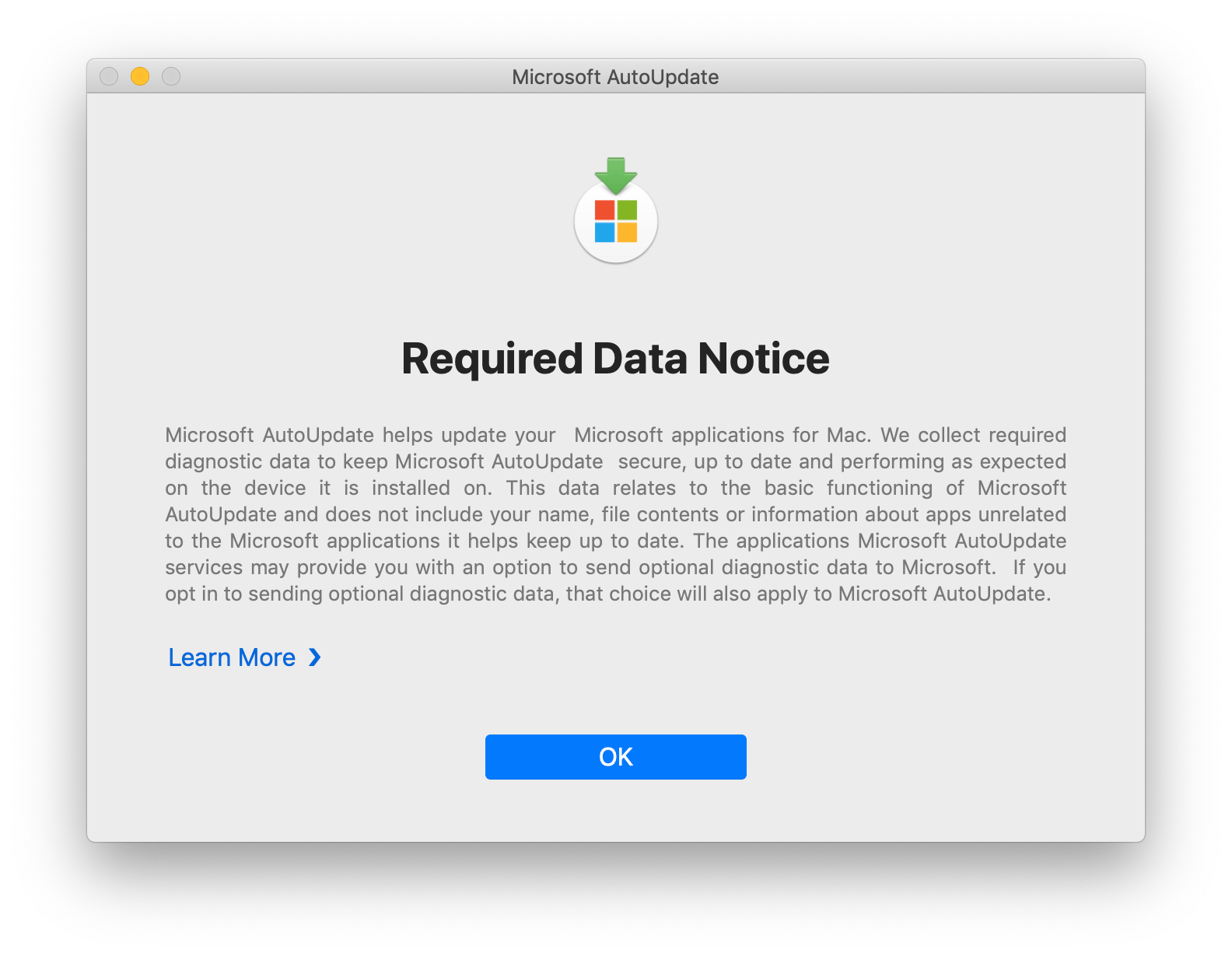
Sorry to be so dumb...but you created a new configuration profile? and add the info under custom settings? is there anything else in there i should be configuring?


mark_mahabir
Forum|alt.badge.img+15
  • Jamf Heroes
  • August 16, 2019

@stephaniemm77 Yes, we created a plist just like the one @lyubomir.hristov mentioned above.

Go to the Configuration profile you created for this, click Custom Settings, Configure and then click Upload PLIST file and select the plist you just created. Double check that it has added the preference domain as com.microsoft.autoupdate2 and click Save.

Give me a shout if you get stuck!


Forum|alt.badge.img+7
  • Contributor
  • September 30, 2019

I just wanted to thank @mlizbeth and @mark.mahabir for their posts that helped me quickly knock this out with a config profile. The automatically update config was a bonus.


kwoodard
Forum|alt.badge.img+12
  • Valued Contributor
  • October 28, 2019

Thanks all, especially @lyubomir.hristov! Very helpful. Had a faculty go to her dean saying that someone was hacking our computers...because of this pop-up. :|


Forum|alt.badge.img+4
  • Contributor
  • October 29, 2019

Thanks


Forum|alt.badge.img+5
  • Contributor
  • March 12, 2020

I'm having trouble getting this to work. I've tested on 10.14 and 10.15 and get the same results. Attached is a screenshot of my config profile. I'm testing this on my DEP machines. The machine flows out of enrollment, and then DEP Notify triggers and installs software, including Office. I have DEP Notify setup to show a restart button once it is finished. If I hit the restart button, it closes DEP Notify, but the machine wont restart because the Microsoft Required Data Notice window has popped up and requires action. Am I doing something wrong here? The auto update portion of the config profile does appear to be working.