


Question

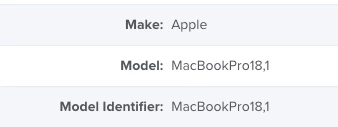
Model shows the Model Identifier in Hardware inventory for M1 Pro and M1 Max device

  • December 13, 2021
  • 8 replies
  • 62 views

karthikeyan_mac
Forum|alt.badge.img+20

Hi,

Model populates the Model Identifier value instead of Model for M1 Pro and M1 Max MacBook Pros.  The M1 and Intel devices inventory shows the Model like "MacBook Air (M1, 2020), MacBook Pro (15-inch, 2018) etc. 

We are running Jamf Pro 10.34.1.


Is this a bug or known issue ?
Thanks & Regards,

Karthikeyan


8 replies

sdagley
Forum|alt.badge.img+25
  • Jamf Heroes
  • December 13, 2021

@karthikeyan_mac This is normal until your Jamf Pro version is one updated to recognize the new models.


karthikeyan_mac
Forum|alt.badge.img+20
  • Author
  • Honored Contributor
  • December 13, 2021

@karthikeyan_mac This is normal until your Jamf Pro version is one updated to recognize the new models.


@sdagley I missed mentioning the Jamf Pro version in the post. Edited it now.

We are running the latest version (10.34.1) of Jamf Pro.


sdagley
Forum|alt.badge.img+25
  • Jamf Heroes
  • December 13, 2021

@sdagley I missed mentioning the Jamf Pro version in the post. Edited it now.

We are running the latest version (10.34.1) of Jamf Pro.


@karthikeyan_mac Updating Model IDs in Jamf Pro seems to be a low priority for updates, so it's not surprising 10.34.1 hasn't been updated (I believe the only change from 10.34.0 was the CVE-2021-44228 fix). It's likely 10.35.0 will recognize those models.


karthikeyan_mac
Forum|alt.badge.img+20
  • Author
  • Honored Contributor
  • December 22, 2021

@karthikeyan_mac Updating Model IDs in Jamf Pro seems to be a low priority for updates, so it's not surprising 10.34.1 hasn't been updated (I believe the only change from 10.34.0 was the CVE-2021-44228 fix). It's likely 10.35.0 will recognize those models.


Thank you. I added the extension attribute to fetch the information.


karthikeyan_mac
Forum|alt.badge.img+20
  • Author
  • Honored Contributor
  • December 22, 2021

Extension Attribute to fetch the Hardware Model.

#!/bin/bash cpuArch=`arch` if [[ $cpuArch == "i386" ]]; then model=$(curl -s https://support-sp.apple.com/sp/product?cc=$(system_profiler SPHardwareDataType | awk '/Serial/ {print $4}' | cut -c 9-) | sed 's|.*<configCode>\\(.*\\)</configCode>.*|\\1|') elif [[ $cpuArch == *"arm64"* ]]; then model=$(/usr/libexec/PlistBuddy -c 'Print 0:product-name' /dev/stdin <<< "$(ioreg -arc IOPlatformDevice -k product-name)" 2> /dev/null) fi echo "<result>$model</result>"


donmontalvo
Forum|alt.badge.img+36
  • Hall of Fame
  • December 23, 2021

(never mind, misunderstood the question)


Forum|alt.badge.img+6
  • Contributor
  • March 24, 2022

Jamf Inventory shows wrong year for various models.   "About this Mac" show 2017, which is correct.  Jamf Pro show it as 2015 model?  IDK


sdagley
Forum|alt.badge.img+25
  • Jamf Heroes
  • March 24, 2022

Jamf Inventory shows wrong year for various models.   "About this Mac" show 2017, which is correct.  Jamf Pro show it as 2015 model?  IDK


@jttavares I believe Jamf Pro just goes by the Model Identifier, which Apple has been known to re-use occasionally. About This Mac may use a more precise method of acquiring the model name.
